Preface#
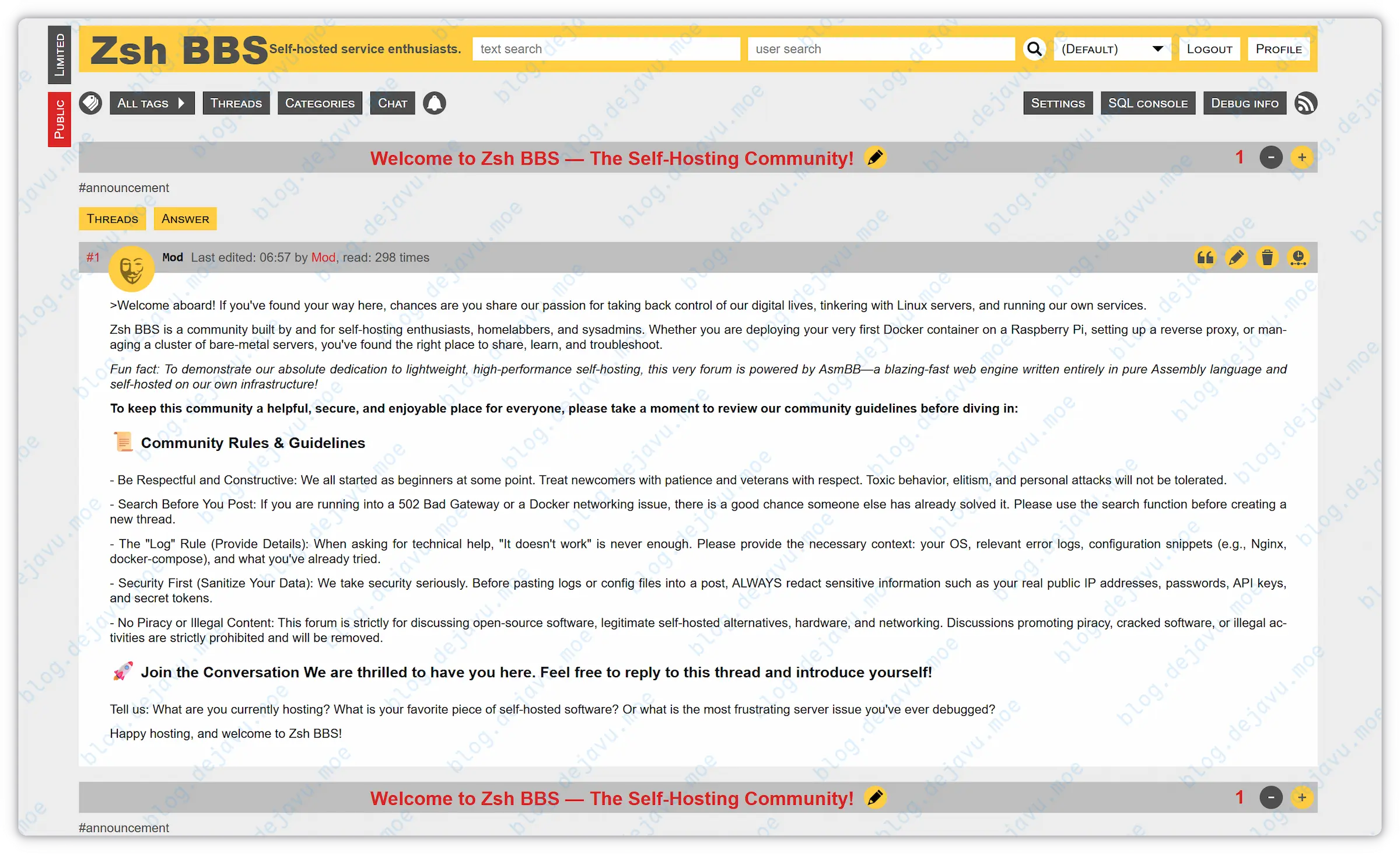
AsmBB is a lightweight forum engine written entirely in assembly language, utilizing SQLite databases and communicating with web servers via the FastCGI interface.
Official precompiled binary packages are available out of the box, making it perfect for self-hosting on personal VPS setups. This article documents deploying AsmBB on Debian 13 environment and configuring Nginx access.
Environment Setup#
Install Nginx#
Refer to this guide for installing Nginx on Debian 13; details omitted here.
Install Core Dependencies#
1
|
sudo apt update && sudo apt install wget curl tar unzip vim sqlite3 -y
|
Install AsmBB#
Fetch Precompiled Binaries#
Create site directory:
1
|
sudo mkdir -p /var/www/asmbb && cd $_
|
Download and extract official precompiled binary package:
1
2
3
|
sudo wget https://asm32.info/fossil/repo/asmbb/doc/trunk/install/asmbb.tar.gz

sudo tar -xvzf asmbb.tar.gz -C /var/www/asmbb --strip-components=1
|
Clean up redundant files:
1
|
sudo rm -f asmbb.tar.gz .htaccess lighttpd.conf install.txt License.txt manifest.uuid
|
Slim Down Theme Templates [Optional]#
Note: You must retain the Urban Sunrise and Wasp core themes.
1
2
3
|
cd /var/www/asmbb/templates

sudo rm -rf Light mobile MoLight
|
Add NoCSS Template [Optional]#
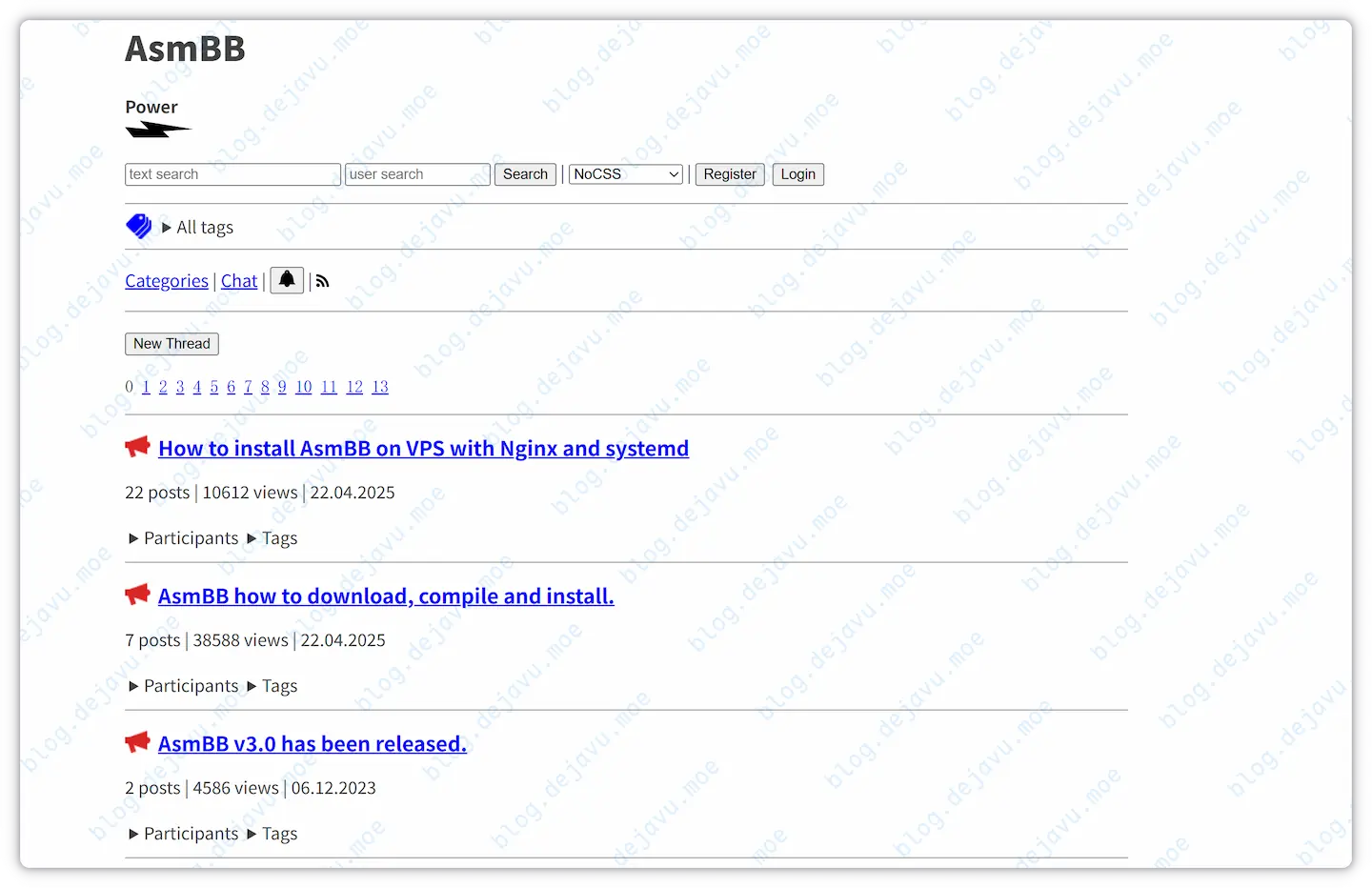
NoCSS is a new template style introduced by the author but not yet bundled inside current precompiled packages. Add manually via steps below:
 1
 2
 3
 4
 5
 6
 7
 8
 9
10
11
12
13
14
15
16
17
18
19
20
21
22
23
24
25
|
# Pull tip branch latest source

cd /tmp

sudo wget -O asmbb-src.tar.gz https://asm32.info/fossil/asmbb/tarball/tip/asmbb-src.tar.gz

sudo tar -xzf asmbb-src.tar.gz

sudo mv asmbb-src/www/templates/NoCSS /var/www/asmbb/templates/

sudo rm -rf /tmp/asmbb-src* asmbb-src.tar.gz && cd

# Install less compiler

sudo apt update && apt install node-less

# Compile CSS stylesheets

cd /var/www/asmbb/templates/NoCSS

lessc debug.less debug.css

lessc toaster.less toaster.css

lessc users_online.less users_online.css
|
NoCSS template preview below Layouts:
 1
 2
 3
 4
 5
 6
 7
 8
 9
10
11
|
sudo chown -R nginx:nginx /var/www/asmbb

sudo find /var/www/asmbb -type d -exec chmod 750 {} \;

sudo find /var/www/asmbb -type f -exec chmod 640 {} \;

sudo chmod 755 /var/www/asmbb/ld-musl-i386.so

sudo chmod 755 /var/www/asmbb/engine

sudo chmod 640 /var/www/asmbb/libsqlite3.so
|
1
|
sudo vim /etc/systemd/system/asmbb.service
|
Insert the following configuration layout:
 1
 2
 3
 4
 5
 6
 7
 8
 9
10
11
12
13
14
15
16
17
18
19
20
21
22
23
24
25
26
27
|
[Service]

Type=simple

User=nginx

Group=nginx

WorkingDirectory=/var/www/asmbb

ExecStart=/var/www/asmbb/engine

Restart=on-failure

RestartSec=5

ProtectSystem=full

PrivateDevices=yes

ProtectKernelTunables=yes

ProtectControlGroups=yes

[Install]

WantedBy=multi-user.target
|
Start AsmBB Service#
1
2
3
4
5
6
7
8
9
|
sudo systemctl daemon-reload

sudo systemctl enable --now asmbb

# Check operational status

sudo ls -l /var/www/asmbb/engine.sock

sudo systemctl status asmbb
|
Daily Maintenance Commands:
 1
 2
 3
 4
 5
 6
 7
 8
 9
10
11
12
13
14
15
|
# Stop AsmBB Service

sudo systemctl stop asmbb

# Start AsmBB Service

sudo systemctl start asmbb

# Restart AsmBB Service

sudo systemctl restart asmbb

# Inspect Logs

sudo journalctl -u asmbb -f
|
AsmBB communicates via FastCGI interfaces; standard Nginx vhost layout below:
 1
 2
 3
 4
 5
 6
 7
 8
 9
10
11
12
13
14
15
16
17
18
19
20
21
22
23
24
25
26
27
28
29
30
31
32
33
34
35
36
37
38
39
40
41
42
43
44
45
46
47
48
49
50
51
52
53
54
55
56
57
58
59
60
61
62
63
64
65
66
67
68
69
70
71
72
73
74
75
76
77
78
79
80
81
82
83
84
85
86
87
88
89
90
91
92
93
|
# Replace bbs.your.domain with actual domain

upstream asmbb {

    server unix:/var/www/asmbb/engine.sock;

    keepalive 8;

}

server {

    listen 80;

    listen [::]:80;

    server_name bbs.your.domain;

    return 301 https://$host$request_uri;

}

server {

    listen 443 ssl;

    listen [::]:443 ssl;

    http2 on;

    server_name bbs.your.domain;

    root /var/www/asmbb;

    # Specify correct SSL certificates

    ssl_certificate     /etc/nginx/cert/bbs.your.domain.pem;

    ssl_certificate_key /etc/nginx/cert/bbs.your.domain.key;

    ssl_protocols TLSv1.2 TLSv1.3;

    ssl_ecdh_curve X25519:P-256:P-384;

    ssl_ciphers 'ECDHE-ECDSA-AES128-GCM-SHA256:ECDHE-ECDSA-CHACHA20-POLY1305:ECDHE-RSA-AES128-GCM-SHA256:ECDHE-RSA-CHACHA20-POLY1305:ECDHE+AES128:RSA+AES128:ECDHE+AES256:RSA+AES256';

    ssl_prefer_server_ciphers off;

    ssl_session_timeout 1d;

    ssl_session_cache shared:MozSSL:10m;

    add_header Strict-Transport-Security "max-age=31536000; includeSubDomains" always;

    access_log /var/log/nginx/bbs.your.domain.access.log;

    error_log /var/log/nginx/bbs.your.domain.error.log;

    add_header X-Frame-Options "SAMEORIGIN" always;

    add_header X-XSS-Protection "1; mode=block" always;

    add_header X-Content-Type-Options "nosniff" always;

    add_header Referrer-Policy "no-referrer-when-downgrade" always;

    add_header Content-Security-Policy "default-src http: 'unsafe-eval' 'unsafe-inline'; object-src 'none'; img-src http: data:" always;

    location / {

        fastcgi_pass asmbb;

        fastcgi_read_timeout 3000;

        fastcgi_keep_conn on;

        include fastcgi_params;

        fastcgi_param SCRIPT_FILENAME $document_root$fastcgi_script_name;

        fastcgi_param PATH_INFO $fastcgi_path_info;

        fastcgi_buffer_size 32k;

        fastcgi_buffers 16 16k;

        fastcgi_busy_buffers_size 64k;

        fastcgi_temp_file_write_size 64k;

    }

}
|
Validate and reload Nginx configuration:
1
|
sudo nginx -t && sudo nginx -s reload
|
Finally, visit bbs.your.domain; the first registered user is designated as Administrator.
Configuring Email Verification#
To mitigate spam registrations and support password recovery, enabling email verification is highly recommended.
AsmBB natively supports unauthenticated SMTP binds only. Direct connections to external providers rarely work without local Postfix or mail-relays.
Fortunately, AsmBB allows piping emails through external binaries, resolving issuance bottlenecks via configuring msmtp interfaces.
Install msmtp#
1
2
3
|
sudo apt update

sudo apt install msmtp msmtp-mta ca-certificates
|
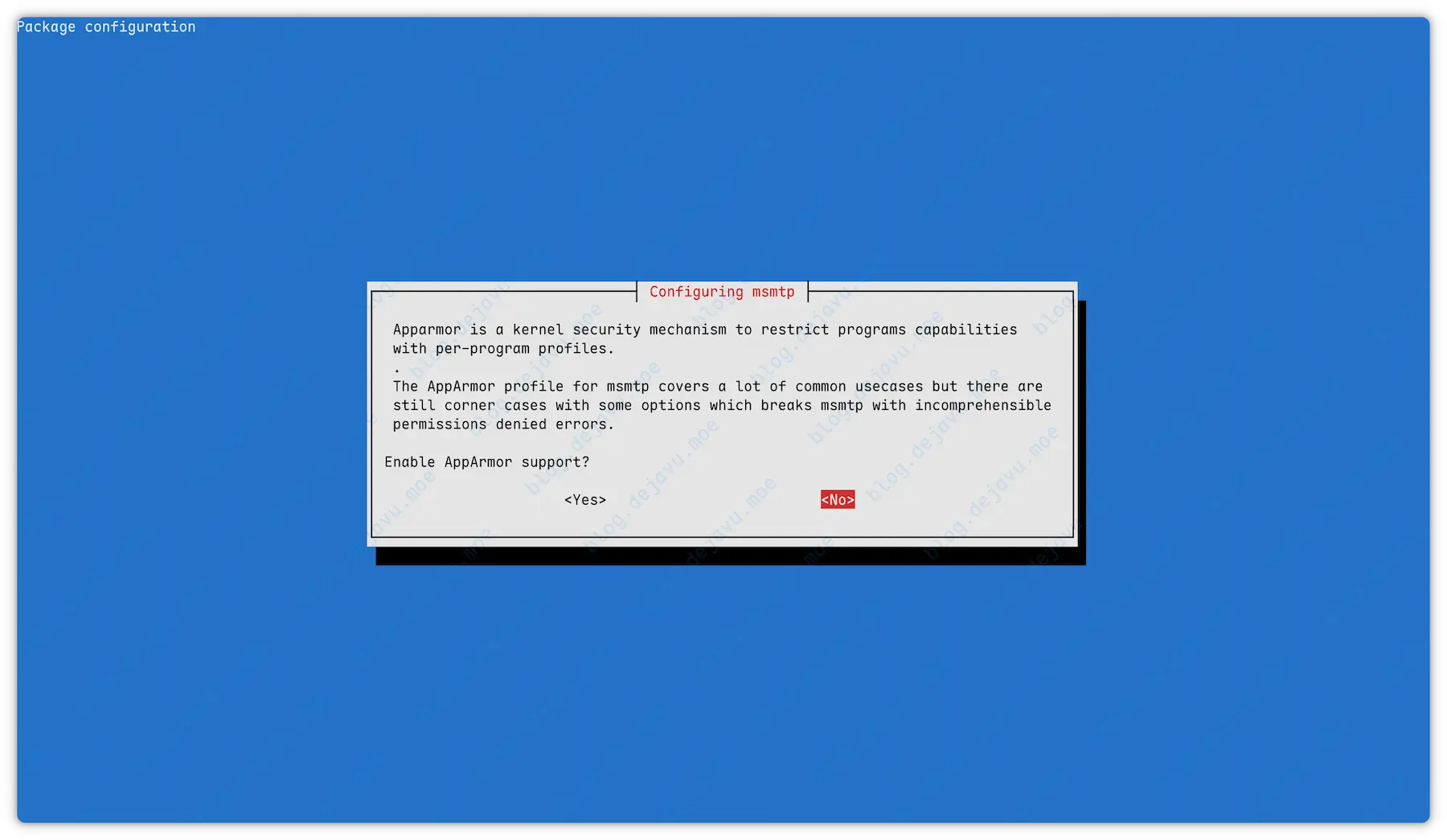
Choose No if the AppArmor prompt triggers:
Create global msmtp configuration style:
Insert SMTP server configuration nodes:
 1
 2
 3
 4
 5
 6
 7
 8
 9
10
11
12
13
14
15
16
17
18
19
20
21
22
23
24
25
26
27
28
29
30
31
32
33
34
35
36
37
38
39
40
41
42
43
44
45
|
defaults

auth           on

tls            on

tls_trust_file /etc/ssl/certs/ca-certificates.crt

# Specify log paths

logfile        /var/log/msmtp.log

# Default account

account        default

# SMTP Host

host           smtp.your.mail

# STARTTLS encrypted port is usually 587 (set tls_starttls on)

# SSL forced encryption port is usually 465 (set tls_starttls off)

# Port notes:

# STARTTLS is usually 587 (requires tls_starttls on)

# SSL forced encryption is usually 465 (requires tls_starttls off)

port           465

tls_starttls   off

# Sender email

from           noreply@your.mail

# SMTP Username

user           noreply@your.mail

# SMTP Password

password       veryStrongPassWord!
|
This configuration hosts plain-text passwords; enforce rigid privilege sets.
1
2
3
4
5
6
7
8
9
|
sudo chown root:nginx /etc/msmtprc

sudo chmod 640 /etc/msmtprc

sudo touch /var/log/msmtp.log

sudo chown nginx:nginx /var/log/msmtp.log

sudo chmod 660 /var/log/msmtp.log
|
Test Local Issuance#
Execute verification steps below, replacing tail email templates with your inbox. Verify before proceeding.
1
|
echo -e "Subject: Test from msmtp\r\n\r\nThis is a test email sent from the command line." | sudo -u nginx msmtp -t test-mail@your.mail
|
Modify Email Templates [Optional]#
The default Urban Sunrise email templates have a few issues; apply these quick fixes:
 1
 2
 3
 4
 5
 6
 7
 8
 9
10
11
12
13
14
15
16
17
18
19
20
21
22
23
24
25
26
27
28
29
30
31
32
33
34
35
36
37
38
39
40
41
42
43
44
45
46
47
48
49
50
51
52
53
|
# Backup source files

sudo cp '/var/www/asmbb/templates/Urban Sunrise/activation_email_subject.tpl' '/var/www/asmbb/templates/Urban Sunrise/activation_email_subject.tpl.bak'

sudo cp '/var/www/asmbb/templates/Urban Sunrise/activation_email_text.tpl' '/var/www/asmbb/templates/Urban Sunrise/activation_email_text.tpl.bak'

# Modify email subject templates

cat << 'EOF' > "/var/www/asmbb/templates/Urban Sunrise/activation_email_subject.tpl"

[case:[operation]|Account activation for|Email change for|Password reset for] [host]

EOF

# Modify email content templates

cat << 'EOF' > "/var/www/asmbb/templates/Urban Sunrise/activation_email_text.tpl"

Hello [nick],

[case:[operation]

|This email was sent to you because you registered an account on https://[host].

If you didn't, please ignore this email.

To activate your account, please visit the following link:

https://[host]/!activate/[secret]/

|This email was sent to confirm your new email address.

If you didn't request this change, please ignore this email.

To activate your new email, please visit the following link:

https://[host]/!activate/[secret]/

|This email was sent to confirm your password reset request.

If you didn't request a password reset, please ignore this email.

To reset your password, please copy the code below into the password reset form:

[secret]

]

Best regards,

The Zsh BBS Team

EOF
|
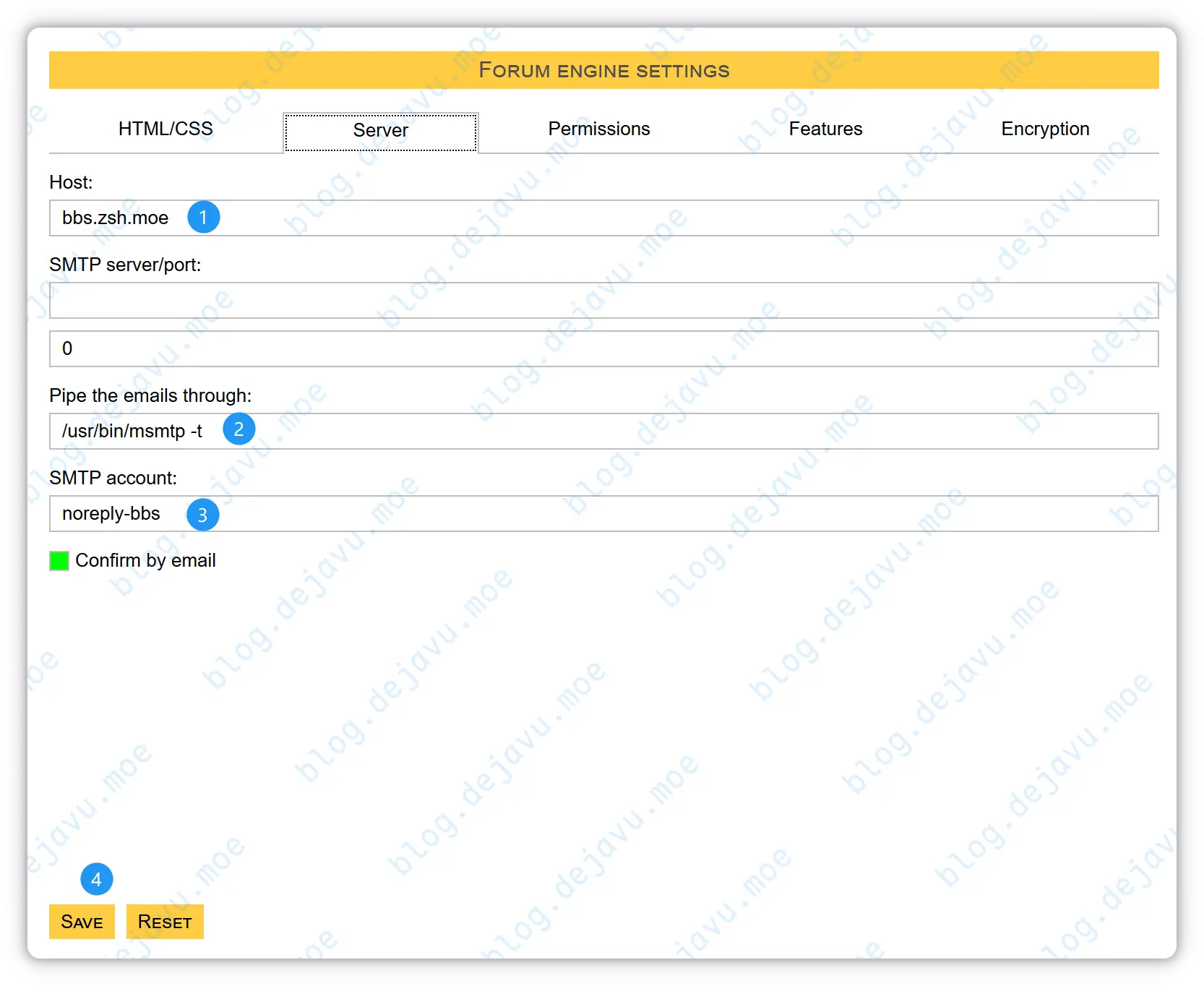
Enable Email Verification#
Configure mailing layout to msmtp pipe modes inside AsmBB panels to toggle verification triggers.
Outro#
AsmBB is an almost ideal forum engine; lightweight and robust snippets. Sparse Chinese support, but excellent regardless.