Preface
The security protections provided by Cloudflare empower all website administrators with equal and robust defense grids. In this article, we’ll explore several practical methods utilizing Cloudflare WAF (Web Application Firewall) rules to secure your sites and services. For deeper insights, consult the official Cloudflare documents—the apex source for detailed breakdowns.
Update Notice
- March 17, 2025: Cloudflare no longer supports the Threat Score
cf.threat_scorerule field. Now protected automatically via Automated Botnet Protection loops. Read the official blog post for details.
WAF Introduction
Web Application Firewall (WAF) is a defensive technology inspecting/filtering malicious requests inside HTTP traffic streams to protect web apps.
Cloudflare WAF secures sites from common triggers like SQL Injections, XSS, and uploaded malicious triggers. Free tiers support basic metrics with up to 5 custom rules per domain.
Cloudflare WAF lists 5 Basic Actions: Allow, Bypass, Managed Challenge, JS Challenge, and Block. Each has varying use-cases and triggers:
- Allow: The most permissive; allows matching items directly without inspection (whitelist layout).
- Bypass: Bypasses certain filters/restrictions for specific trusted loops.
- Managed Challenge: Prompting interactive verification page asserting the visitor is human.
- JS Challenge: Background JS execution verifying visitor integrity handles.
- Block: Forbids matching nodes entirely; use cautiously to avoid breaking legit client accesses.
Order prioritization isn’t absolute; adjust order via dragging modules across dashboards setups (5 slots max on Free).
The image below shows the example sequence of rule nodes listed here. Let’s address them fully:
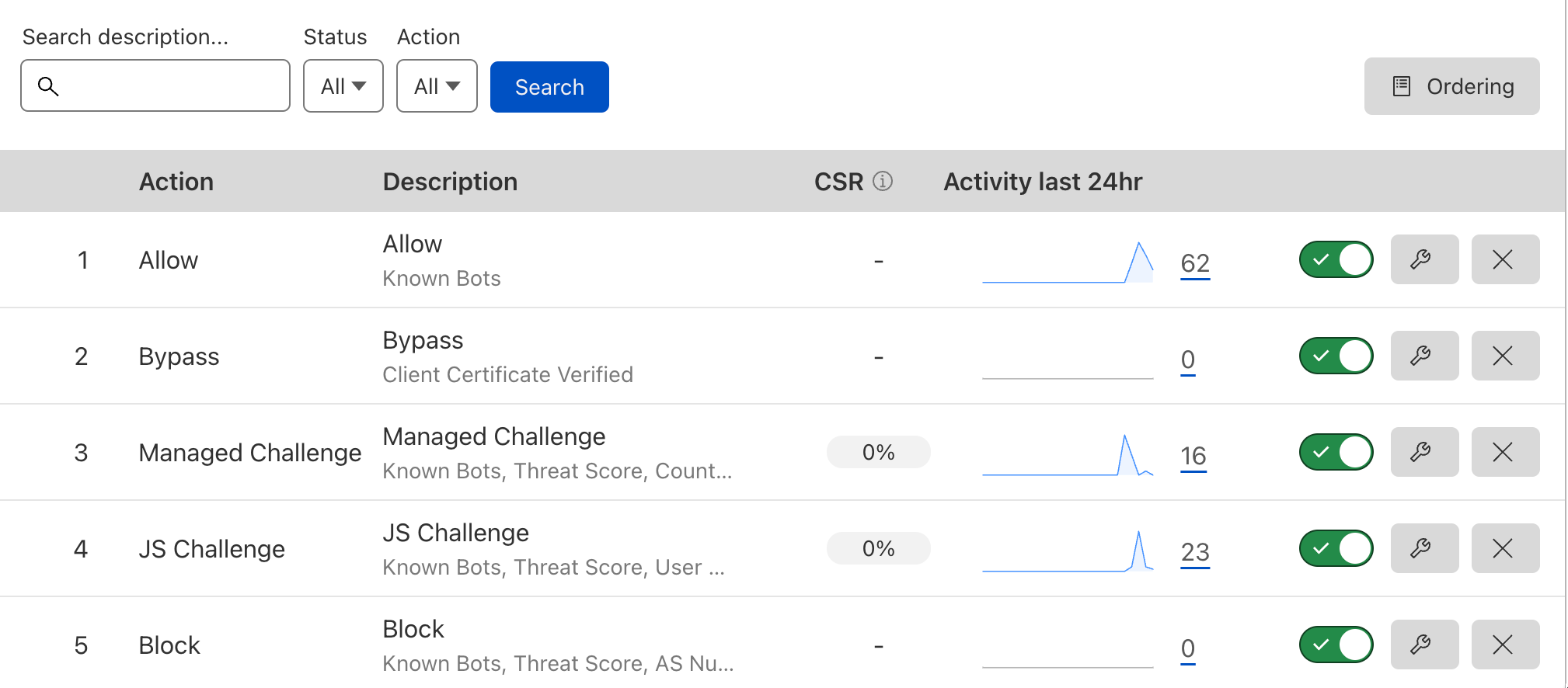
Note: You don’t necessarily need all of them; highly reliant on site properties.
Creating Rules
Follow steps on the dashboard to create WAF firewall triggers:
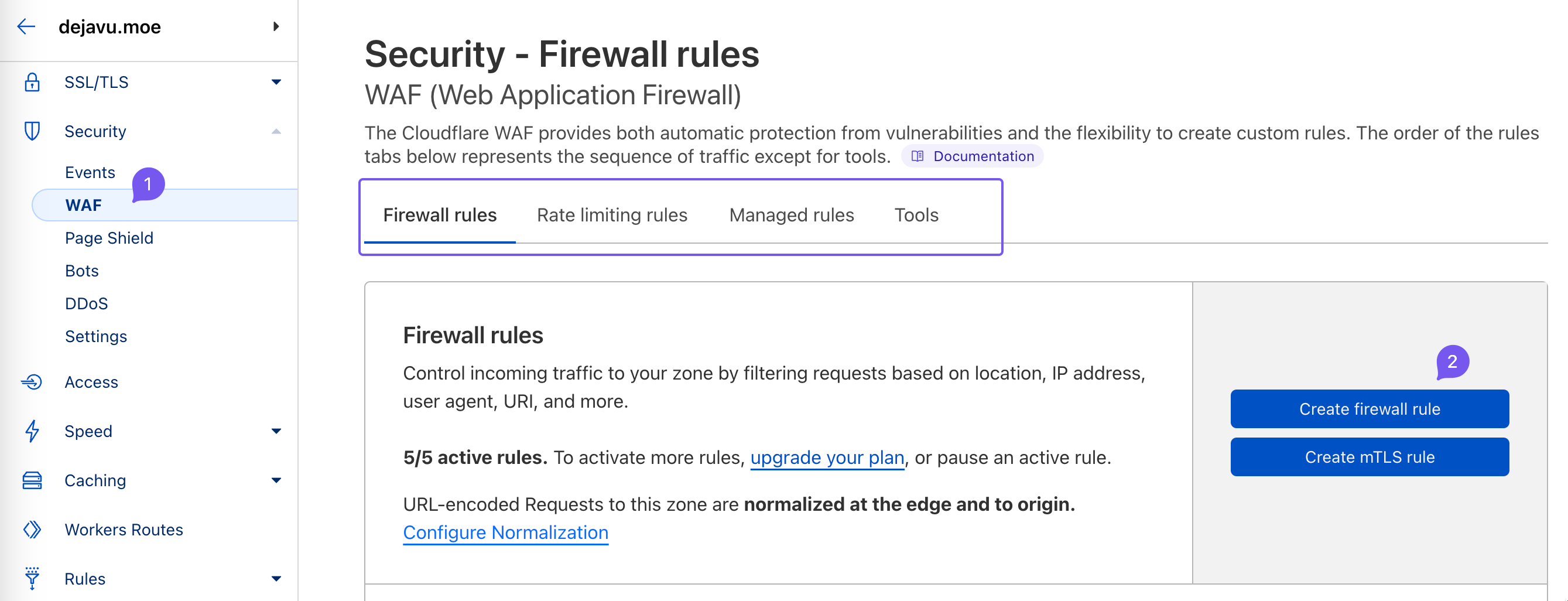
Allow
Placing Allow at peak ensures highest priority grids for fine-grained whitelisting.
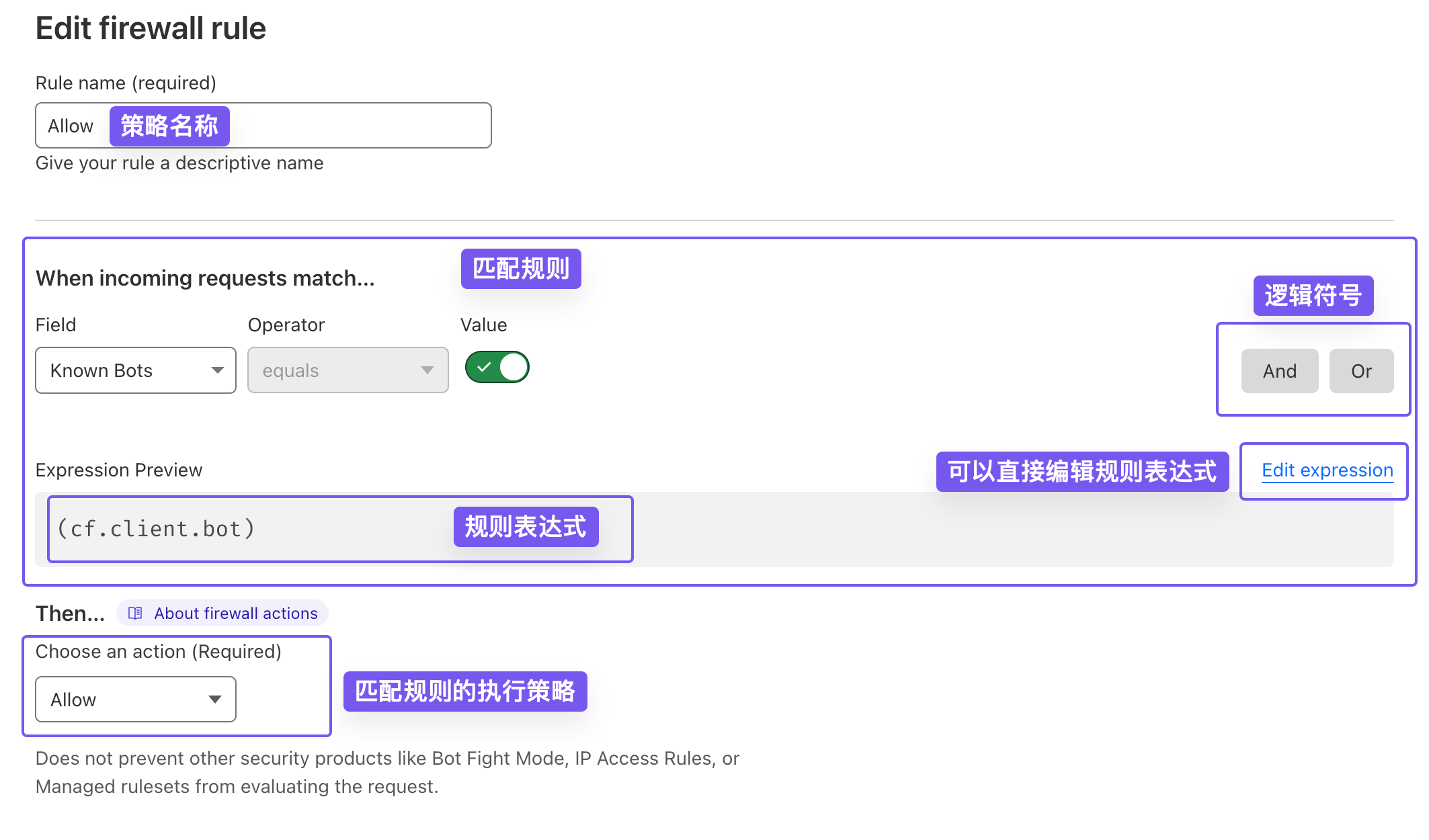
Editing visual nodes instantly previews the Rule Expression. Expressions are superior for complex logic layouts.
No worries if new; configured expressions are highly portable across domain blocks or sharing spheres.
In the setup, we evaluate Known Bots mapped to true (True).
Known Bots evaluates whether the request stems from Cloudflare-indexed indexing spiders; uses Boolean parameters.
|
|
Allows verified crawlers through without WAF interference. Highly recommended to maintain proper SEO standing Index items.
Bypass
Bypass fits optimal second priorities benchmarks well:
|
|
Examples show: when TLS client certificates pass validations (Origin certs usually), triggers skip certain WAF restrictive features on browser clamps.
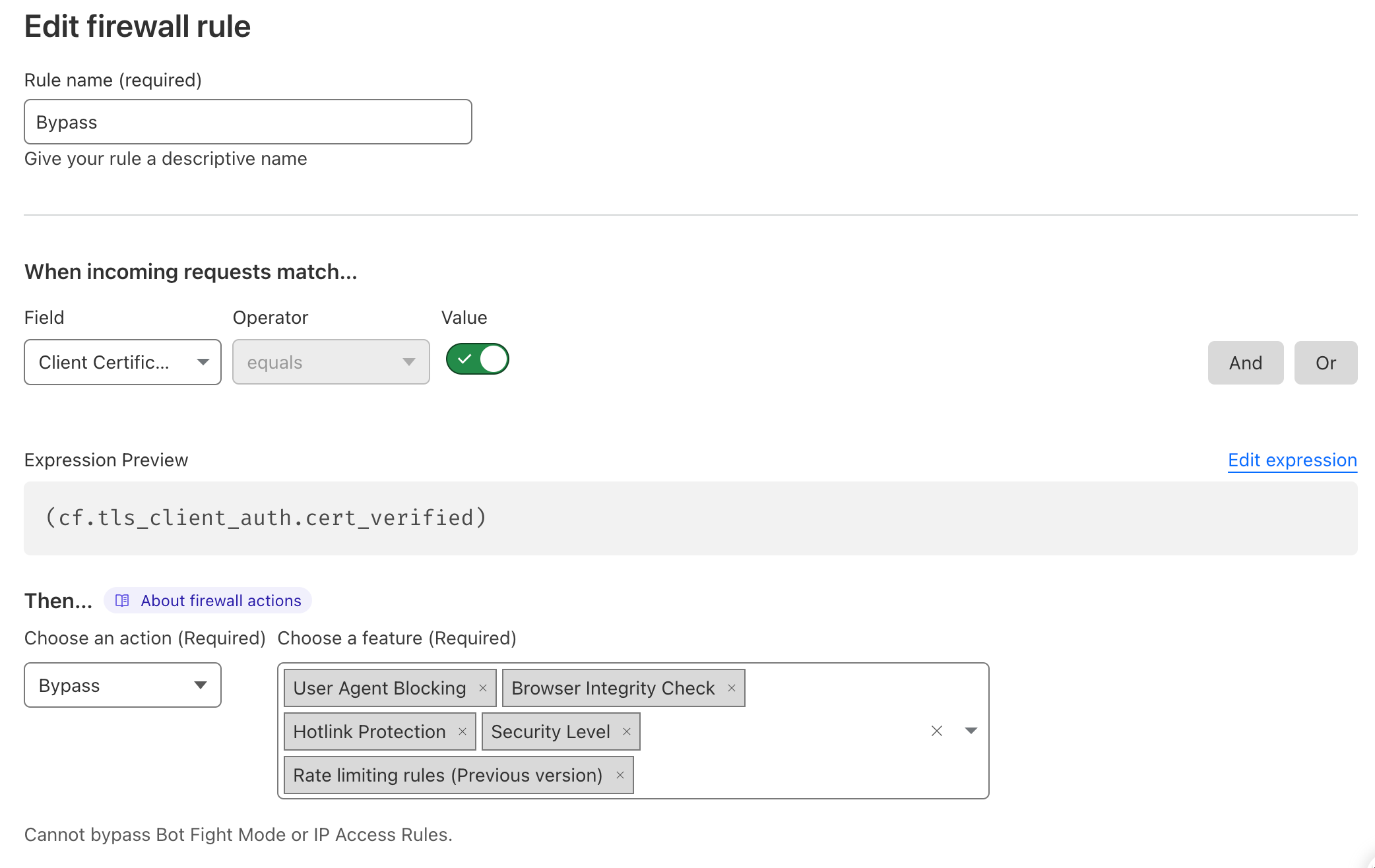
Note: Bypass grids don’t skip Bot Fight Mode or IP Access Rules.
Managed Challenge
Managed Challenge uses Cloudflare verification pages testing if visitor setups are human. Low-impact for legit users, great for stopping malicious spiders clusters.
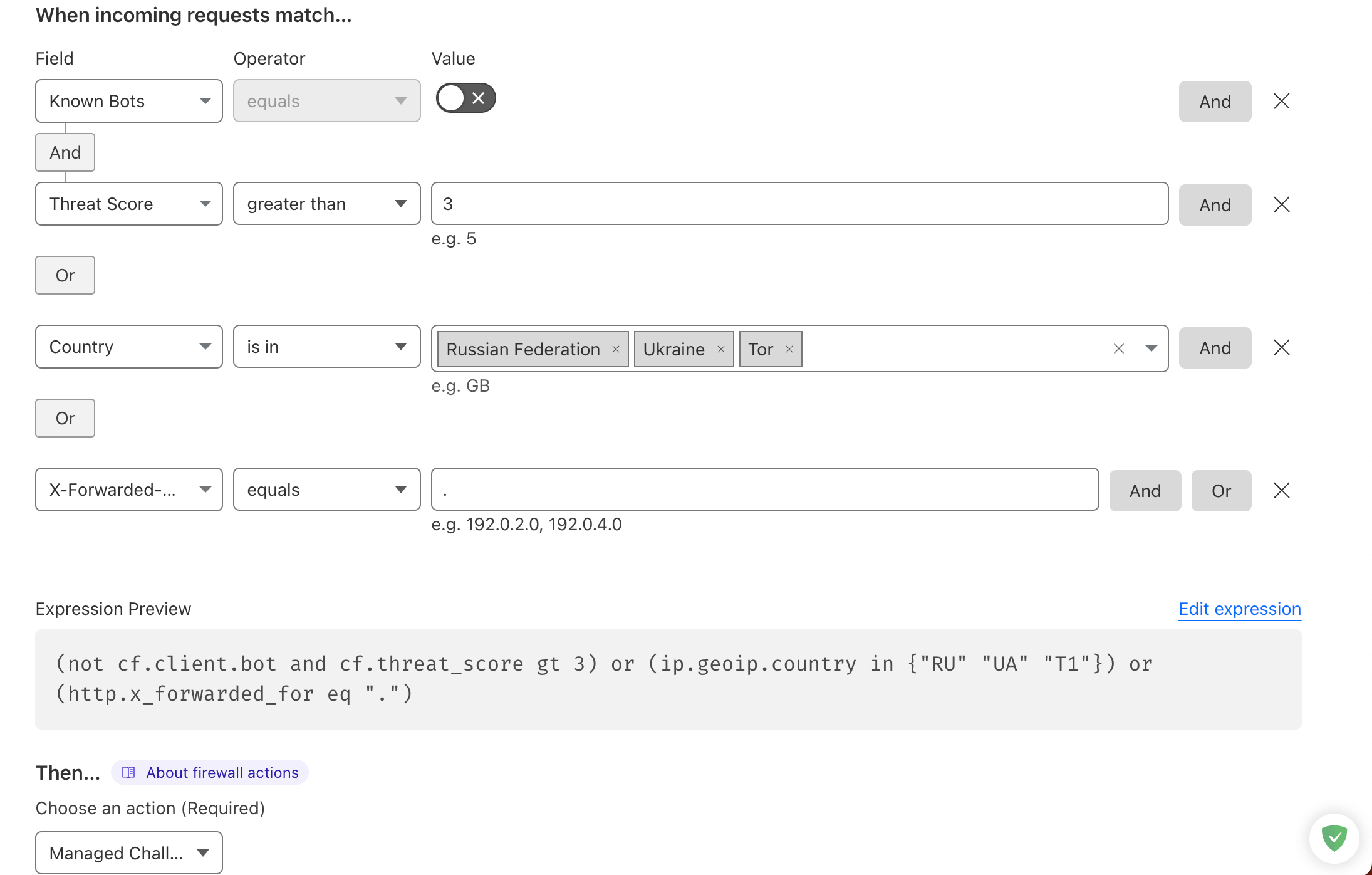
Above is a simple managed challenge trigger Layout:
|
|
A few terms definition first:
- Threat Score: A metric reflecting IP security risks; higher scores denote increased malicious potential (the higher, the worse).
- GeoIP: A method for determining IP geolocation (country/region/city, etc.).
- X-Forwarded-For: An HTTP header listing proxy hops, commonly used to obtain the real client IP. If empty, it often indicates a proxy or suspicious origin.
- And / Or: In logical expressions, And means both conditions must be true; Or means either condition can be true.
Let’s break down the matching layouts:
- NOT known bot AND threat score exceeds 3.
- Originating Country = Russia, Ukraine, or Tor anonymity networks.
- X-Forwarded-For is empty.
- Rules connected via OR, meaning any hit triggers full challenges loops.
Question: Will Yandex crawlers in Russia be blocked from accessing by managed challenges via this rule?
Answer: No. We set a top-priority Allow rule that lets Cloudflare-verified crawlers pass through WAF rules.
JS Challenge
The JavaScript Challenge policy is stricter than Managed Challenge (bots hate it). The sample rule is long, so paste it into your WAF rule editor to view.
|
|
Features UA (User-Agent) fields designating clients browser types/version parameters.
Matching disreputable IPs or UA clamps will prompt background JS evaluations triggers.
Block
Block nodes occupy bottom priority stacks rightfully. Partials listed below:
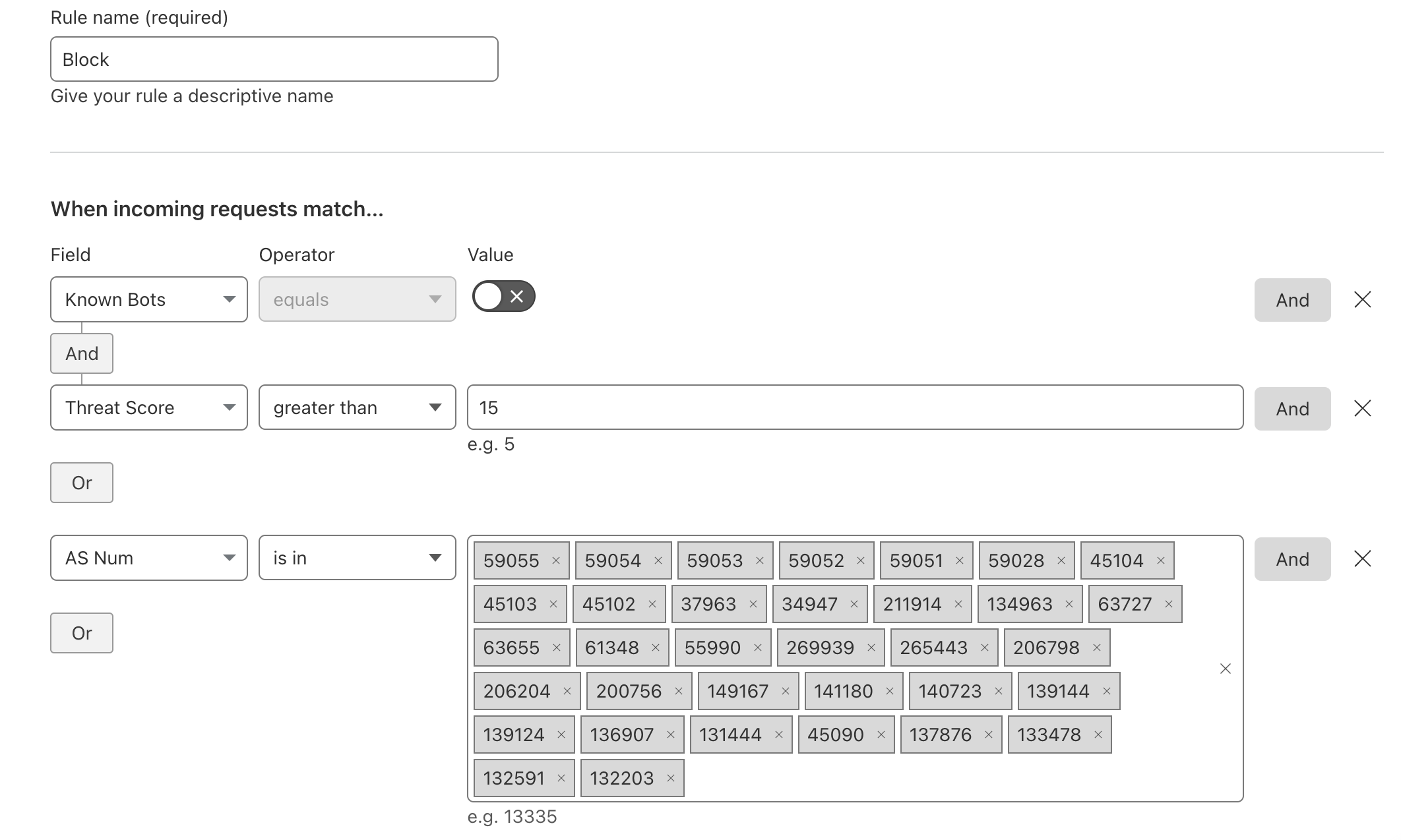
ASN: Autonomous System Number tags specific routing ranges block systems.
|
|
Pasted in expressions editors for simpler visual verification layout breakdowns:
- NOT verified bot AND threat score exceeds 15, trigger blocks.
- ASN hitting cloud farming nodes defaults restrictive blocks benchmarks.
- Matching disreputable UA Clamp bundles.
Limitations
Cloudflare WAF enforces length limits strictly based on subscription tiers setups:
- Free Plan: 2,000 chars (Us standard users 😭)
- Pro Plan: 4,000 chars
- Business Plan: 8,000 chars
- Enterprise Plan: 16,000 chars
If your rule expression exceeds the limit, shorten it or split it into multiple rules to keep it usable.
Maintaining Rules
Now familiar with basic WAF behaviors, operational maintenance revolves around inspecting Firewall Log events dials alerts:
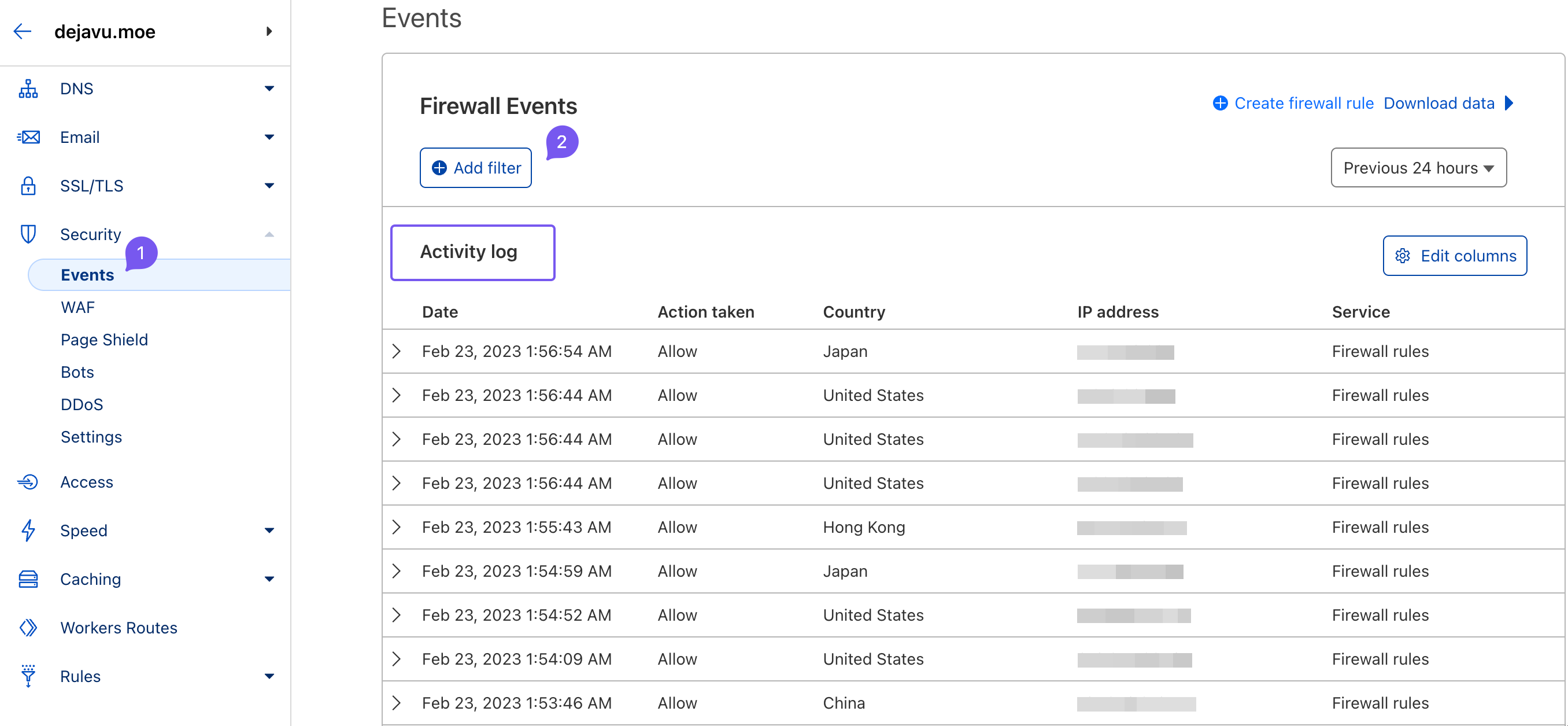
WAF filters bad setups to secure legit traffic without incurring legit client locking false positives. Example hitting false metrics below:

What happened? Inspecting the WAF events dials:
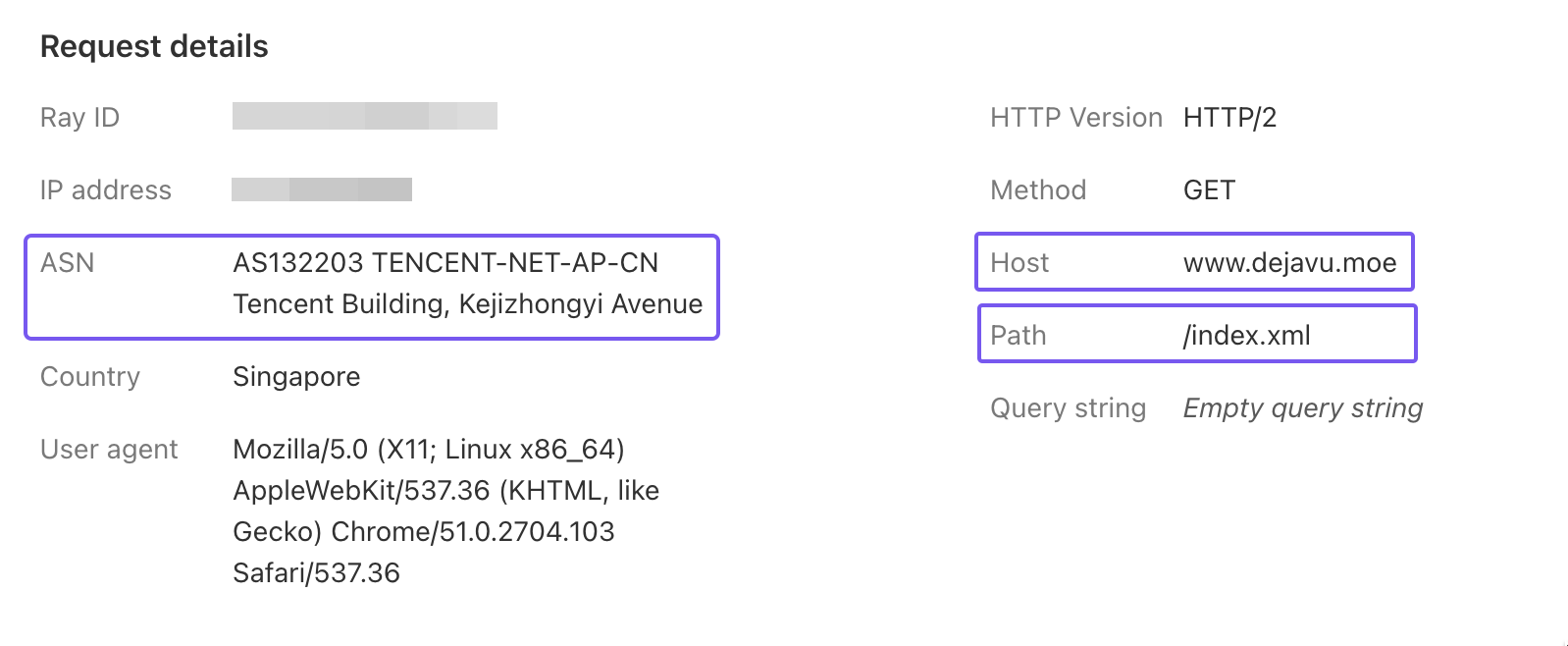
Clearly, an RSS subscription query hosted on cloud compute providers triggered ASN restrictions clamps.
I don’t intend to whitelist full cloud providers, but want RSS subscribers pulling blogs nodes smoothly without restrictions. Solution?
Solution lies inside our top-tier Allow whitelist! Term breakdowns:
- Hostname: The name of a device or service on the network, usually mapped to a domain.
- URI: Uniform Resource Identifier; a string that identifies a resource and can be part of a URL.
- URI Path: The path portion of the request URI.
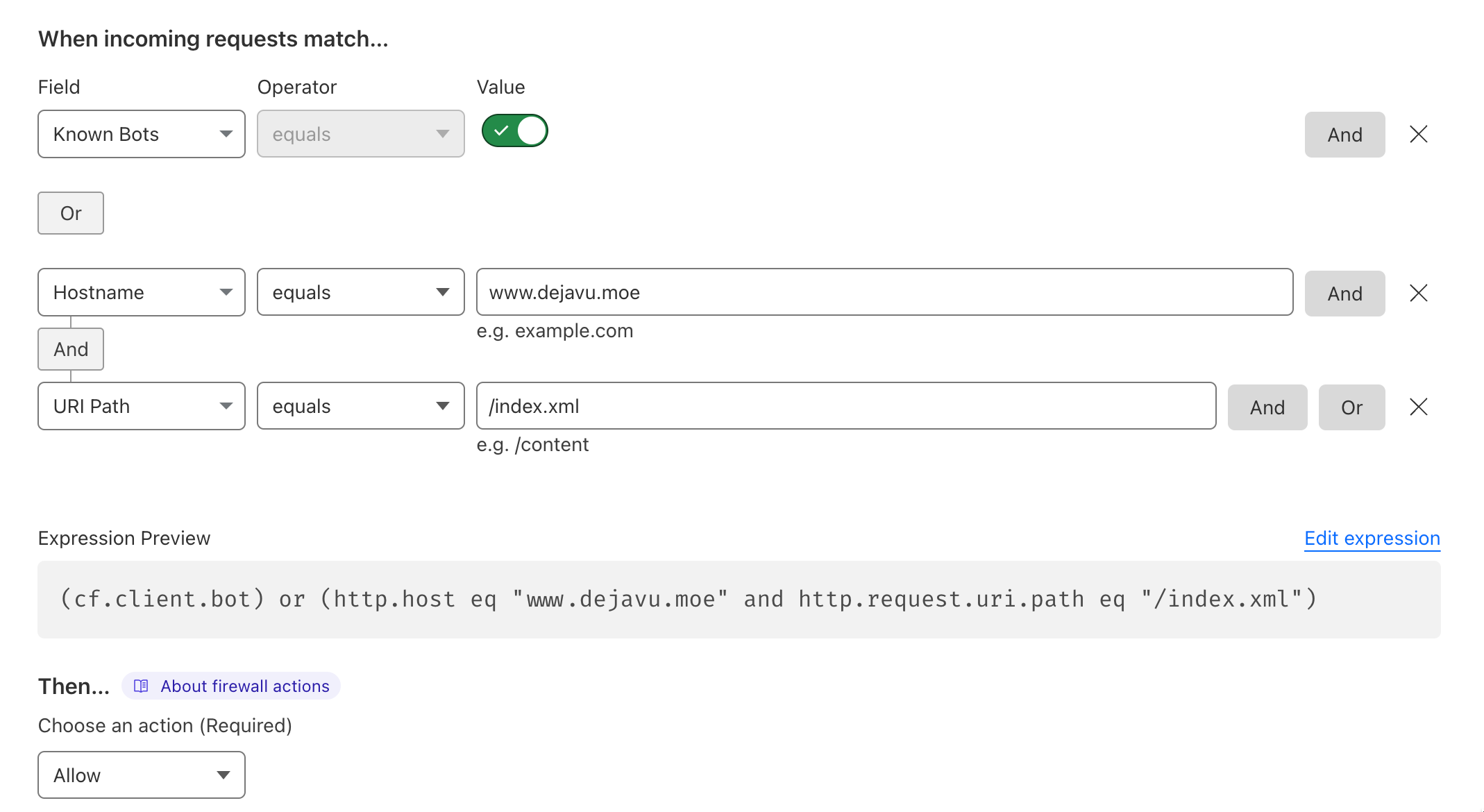
Inside previous Allow whitelists rules grids, I add customized paths:
|
|
If hitting domain resolving paths /index.xml, bypass WAF clamps cleanly via top precedence bounds overrides.
Voila! Easily establishing robust defensive dials without breaks.
CSR (Challenge Score Rate)
CSR (Challenge Score Rate) percentage models proportional triggers of challenges relative across overall restrictive hits dials.
Lower percentages preferred. 1% means 1 out of 100 hits prompted verification loops layouts. This metric helps evaluate WAF rule effectiveness and whether to adjust thresholds or operations.
Healthy dials hover between 0%-3% ranges roughly; adjustments suggested beyond grids.
Other Rules
Sparse Free parameters supported inside subsidiary triggers listed roughly below:
Rate limiting rules
Rate Limiting clamp triggers restrict client request ceilings within window frames to buffer server setups from stress overflows. For example:
|
|
You can further customize rate limit rules as needed, including response codes 1, time windows, validity periods, and more.
Note: Rate limiting rules can also restrict legitimate requests, so configure carefully.
DDoS Protection
DDoS protection policy: configure as shown below. Cloudflare’s rule is quite precise, with minimal false positives.
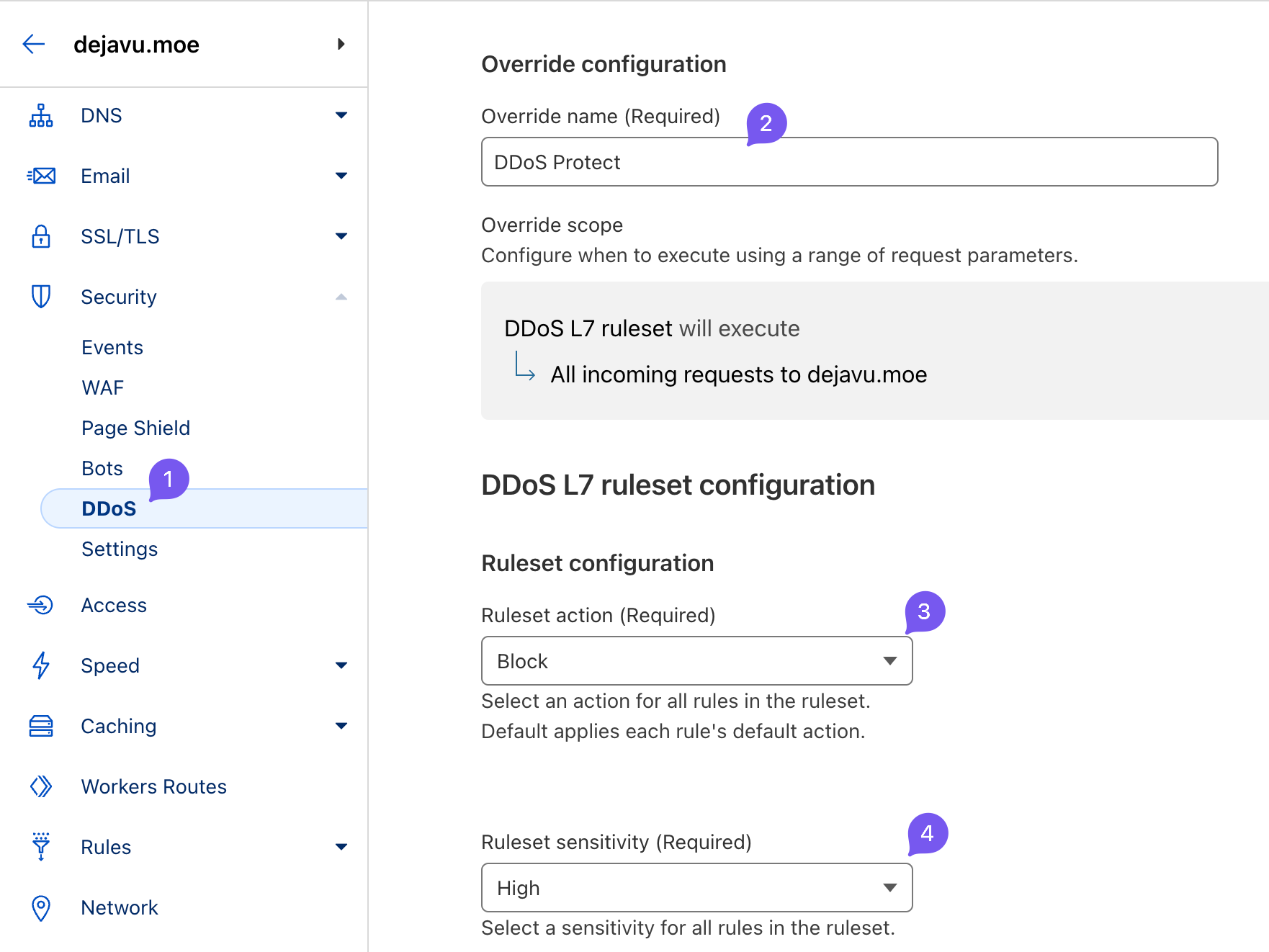
Free parameters endpoints summarized thus; fully sufficient for starting blocks properly!
-
On the Free plan, some parameters cannot be modified. ↩︎