Hello MJJs! When purchasing machines, three focal targets prevail: IP quality, hardware performance, and network routes. IP quality has been covered thoroughly; today we outline routes.
This article follows this order:
Network route definitions -> ASN -> domestic routes -> dedicated lines > international interconnect -> common tools
1. Network Routes: Definitions & Impact
What is a network route?
Simply put, a network route is the “highway” your data traverses from a local PC to remote hosts.
Your packets travel along network routes to your remote server, get processed there, and then return to you.
Roughly:
|
|
The speed at which packets move through these nodes reflects network quality.
Packets hop across multiple nodes (routers); each hop can become a bottleneck. Route quality mainly shows up in:
- Latency (Ping): Time elapsed for roundtrip data packets
- Bandwidth: Data rates yield capabilities
- Packet Loss: Percentage of dropped payloads
- Stability: Jitters and fluctuate thresholds
These metrics roughly reflect the quality of a network path.
Note: Many beginners judge network speed purely by latency, which is inaccurate. Latency affects responsiveness, bandwidth affects throughput. Some routes have low latency but low bandwidth (e.g., 10Mbps), so video stutters. Others even optimize only ICMP—ping goes via a good route while other traffic goes via a worse path.
How routes affect user experience
- Latency mainly affects page load speed (the “instant open” feeling).
- Bandwidth affects data transfer speed (uplink/downlink), e.g., Speedtest/YouTube connection speed.
- Both assume low packet loss. When loss is high, pages keep loading and speed tests look terrible; it can also cause disconnects.
- Stability usually refers to peak-hour performance. At peak hours, the network is congested and speeds drop. Some routes can do 1000Mbps off‑peak but only single digits at peak; others sustain 1000Mbps all day—this is the stability difference.
2. AS (Autonomous System) & Base Protocols
The following networking basics are simplified and omit unrelated technical details.
What is an AS, and what does it solve?
The internet is a network of networks; an Autonomous System is its giant constituent mesh layout. More specifically, an AS is a large network or group of networks with a unified routing policy. Every computer or device on the Internet connects to some AS. Each major carrier/ISP has its own ASN.
Plainly: an AS is like the Internet’s “postal system.” Each AS is a big post office managing a range of IP addresses.
Each AS gets a unique numeric identifier. For example, one is AS7018 and another is AS4837, and we refer to an AS by its ASN.
For example:
- AS4134 (e.g., China Telecom): manages A‑range IPs (e.g., 1.0.0.0 – 1.255.255.255)
- AS7018 (e.g., AT&T US): manages B‑range IPs (e.g., 8.0.0.0 – 8.255.255.255)
How data transfers work:
- Normally, A‑range users access A‑range servers and the data stays within AS4134—fast like local mail.
- When A‑range users want to access B‑range servers (e.g., from China to a US website):
- Your packet first reaches AS4134 (Telecom)
- AS4134 sees the destination is outside its scope
- AS4134 finds a path to AS7018
- Packet travels AS4134 → possibly other ASNs → finally reaches AS7018
- AS7018 delivers the packet to the B‑range target server
- Your packet first reaches AS4134 (Telecom)
It’s like international mail: you → local post office → regional hub → international transit center → destination transit hub → local post office → recipient.
Different ASes manage and announce IP address blocks and make routing decisions for them. How an AS communicates internally is up to that AS (that’s the “autonomous” part); external ASes don’t need the internal details.
BGP (Border Gateway Protocol) is the protocol ASes use to exchange routing information. Through BGP, each AS tells others: “Here are my IP ranges; if you need to reach them, send traffic to me.”
That’s why people say “check BGP to see the route”—a BGP database can show:
- Which AS an IP belongs to
- Which ASes it connects to
- Possible paths packets may take
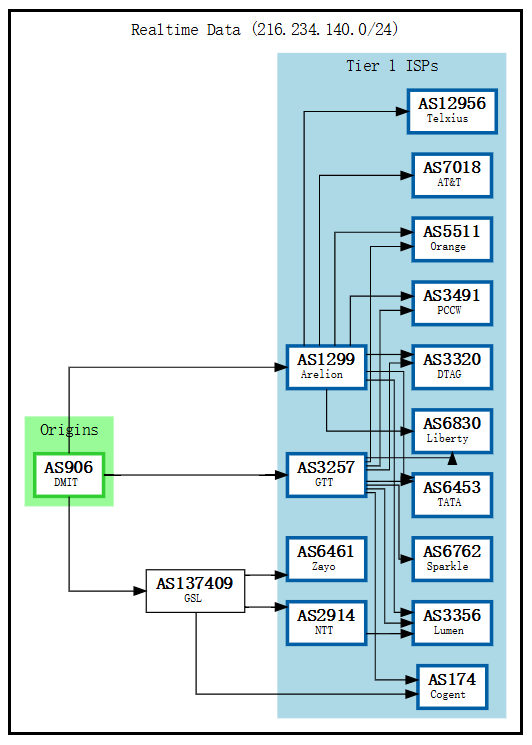
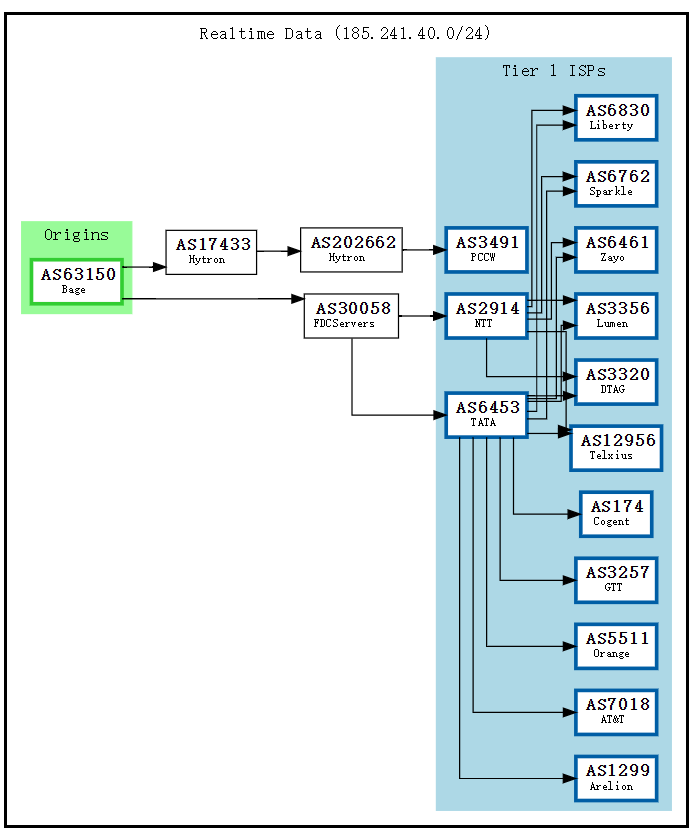
BGPtools lookup result
This BGPTOOLS result shows the AS for an IP and its connected ASNs. The graph shows DMIT’s connections; DMIT is assigned AS906 and has three direct upstreams:
- AS137409 (GSL Networks) - reaches more Tier1s like NTT/Zayo
- AS3257 (GTT) - direct Tier1 connectivity
- AS1299 (Arelion) - direct Tier1 connectivity
Through these upstreams you can reach other Tier1s such as:
- AS12956 (Telxius)
- AS7018 (AT&T)
- AS5511 (Orange), etc.
What is Tier 1?
Tier1 refers to top‑level global network operators. Key traits:
- Transit‑free: global backbone; can reach any network via settlement‑free peering, without paying transit fees.
- Global reach: must reach all destinations via peering without upstreams.
- Peering with other Tier1s: has settlement‑free peering with all other Tier1s.
Tier1 relationships are complex; historically some Tier1s didn’t peer (e.g., Cogent and Telia were disconnected for a long time).
In the graph, the blue parts are Tier1s. Simply put, Tier1s are the top‑tier backbone operators—AS giants with critical backbone roles. ASes vary in size; you can own an AS too, but if you aren’t a giant you must buy transit from Tier1s or their downstreams (DMIT and GSL do exactly that).
From a cost perspective, this is quite economical.
|
|
In this example, GSL pays Zayo/Cogent/NTT for Tier1 access, and DMIT pays GSL, indirectly reaching Zayo/Cogent/NTT. Direct Tier1 access can be better (fewer AS hops, fewer routing jumps), but it’s expensive; paying Tier2 is often more cost‑effective.
From a BGP graph you can roughly infer an IP’s network environment. IPs within the same AS usually transfer quickly and don’t detour.
Common network protocols: TCP/UDP/ICMP
Network packets are encapsulated into different transport protocols depending on the use case. ASes can also apply different traffic policies by protocol. Below are the three most common protocols (not divided by OSI layers to keep it beginner‑friendly).
TCP (Transmission Control Protocol)
TCP is like an express courier that guarantees delivery and preserves order.
Reliable transport that guarantees complete, ordered delivery. Lost packets are retransmitted, which makes it slower and higher‑latency. Common use cases: web browsing (HTTP/HTTPS), video streaming, file downloads.
Use case: when data can’t be wrong or lost, use TCP.
UDP (User Datagram Protocol)
UDP is like “throwing a package” — you send it and don’t care if it arrives.
Unreliable transport with no delivery guarantees, but low latency and high speed. Common use cases: live streaming, real‑time video chat, online games.
Use case: real‑time matters more than reliability, or the data volume is small enough to tolerate resend.
ICMP (Internet Control Message Protocol)
ICMP is like a postal notice — it doesn’t carry the package, only status information.
Used mainly for network diagnostics and error reporting; it doesn’t carry user data. Common use cases include ping and traceroute, both based on ICMP.
Understanding these three protocols helps a lot. For example, a failed ping may just mean ICMP is blocked; it doesn’t mean TCP/UDP are unreachable. TCP being fast doesn’t imply UDP is fast—some providers rate‑limit UDP (large UDP flows can look like attacks).
Wow—if I run an IDC that optimizes only ICMP so ping is 30ms while TCP detours at 200ms, could I sell a lot?
Test results:
- Beginner user: “Wow! Ping is 30ms, so fast!”
- (After purchase): “Why is it so laggy? Maybe it’s my network…” (self‑doubt)
- Vendor:
 Cough, cough…
3. China’s Three Major Carrier Lines
This article targets beginners, so I omit CIXF, Tier1 transit, POP interconnect, and other advanced topics.
In China, the three largest carriers—China Telecom, China Unicom, and China Mobile—each have their own internal networks and ASNs. Your traffic traverses these ASNs to communicate with the server. The typical path is home -> provincial network -> cross‑border -> international exit, and the experience depends on the speed of each segment.
Next is an important concept: QoS (Quality of Service)
QoS stands for “Quality of Service” and includes positive measures like priority boosts and bandwidth guarantees. Throttling and downgrades are just one QoS scenario (usually for low‑priority traffic). For example, I normally have a 1 Gbps port, but during peak hours the carrier may apply QoS to some users so everyone slows down—my 1 Gbps becomes 100 Mbps. It’s laggy, but at least nobody is completely offline.
Being QoS‑throttled is why line selection matters: regardless of carrier, peak hours prioritize the optimized network and throttle regular users, so some routes look fine off‑peak but collapse at night.
Often when we say “being Q’ed,” we don’t mean QoS in the strict sense—we mean throttled. It’s become shorthand for speed limiting.
China Telecom (163 / CN2 GT / CN2 GIA)
- AS4134: Domestic backbone, commonly called 4134 or the 163 backbone. IPs often start with 202.97. It carries standard‑quality Internet traffic; the infrastructure is old but has large, cheap bandwidth. After multiple expansions congestion improved somewhat, and it remains the default outbound path for most residential users.
- AS4809: Domestic premium network, commonly called CN2. IPs often start with 59.43. Compared with the 163 network, CN2 has less bandwidth but is more stable and faster.
- AS23764: Overseas network, commonly called CTGNet, used to provide customized international private‑line access for enterprise clients.
CN2 actually comes in two types: CN2 GT and CN2 GIA. CN2 GT (aka half‑path CN2, Global Transit) uses the 163 backbone domestically and shares the same congested cross‑border segment as 163 (so what’s the point), while overseas it’s the same as CN2. CN2 GIA is full‑path CN2—the cross‑border segment doesn’t share 163, has its own bandwidth, and both domestic and overseas segments run on CN2.
In APAC there is also a popular 163pp, nicknamed high‑QoS 163. It’s essentially 163 with guaranteed QoS on the cross‑border segment—like purchasing dedicated 163 backbone bandwidth. Most 163 cross‑border traffic is shared, so peak hours turn into a bandwidth fight and it crawls; high‑QoS 163 is ridiculously expensive…
|
|
China Unicom (4837 / 9929)
- AS4837: Domestic backbone, commonly called 4837 or the Unicom 169 network. IPs start with 219.158, equivalent to Telecom’s 163 backbone, and it’s the route for most Unicom residential users.
- AS9929: Legacy domestic backbone, also called A‑network, 9929, or CUII. It’s positioned like Telecom’s CN2, but it’s nowhere near CN2’s level—usage is low, capacity and quality are much weaker, and ports are usually small.
- AS10099: Overseas network, commonly called Unicom International CUG, providing differentiated access toward mainland China.
Common route combinations:
- Mainland AS4837 + Overseas AS4837: the most common Unicom 169 route
- Mainland AS4837 + Overseas AS10099: higher‑end route
- Mainland AS9929 + Overseas AS4837: rare route
- Mainland AS9929 + Overseas AS10099: Unicom’s high‑end route
|
|
China Mobile (CMI / CMIN2)
- AS9808: Domestic network, commonly called CMNET, equivalent to Telecom’s regular network.
- AS58453: Overseas network, commonly called CMI. It’s the most common range but load balancing is terrible; bandwidth gets saturated, almost everything exits via Hong Kong, and the backbone drops packets heavily.
- AS58807: Overseas network, commonly called CMI N2, the premium China Mobile network.
- AS3356: Tier‑1, commonly called Lumen. Lumen isn’t operated by China Mobile, but the Lumen‑CMI handoff feels great for Mobile users. Lumen has become the de‑facto “happy” route for Mobile—when people see Lumen they assume Mobile is mostly happy, so it gets lumped into Mobile routes.
This classification is just for fun; one day Mobile might nuke this path
You’ll notice China Mobile’s domestic network is the same across the board; only the cross‑border and overseas segments differ between CMI and CMIN2. So even if a Mobile user has CMIN2, the domestic segment still squeezes together with CMI users—making peak‑hour QoS especially severe.
|
|
Comparison across Carriers
Overall, it’s roughly CN2GIA≈CN2CTG>9929≈CMIN2>CN2GT>4837≈163≈CMI
Top‑tier optimizations across the three carriers
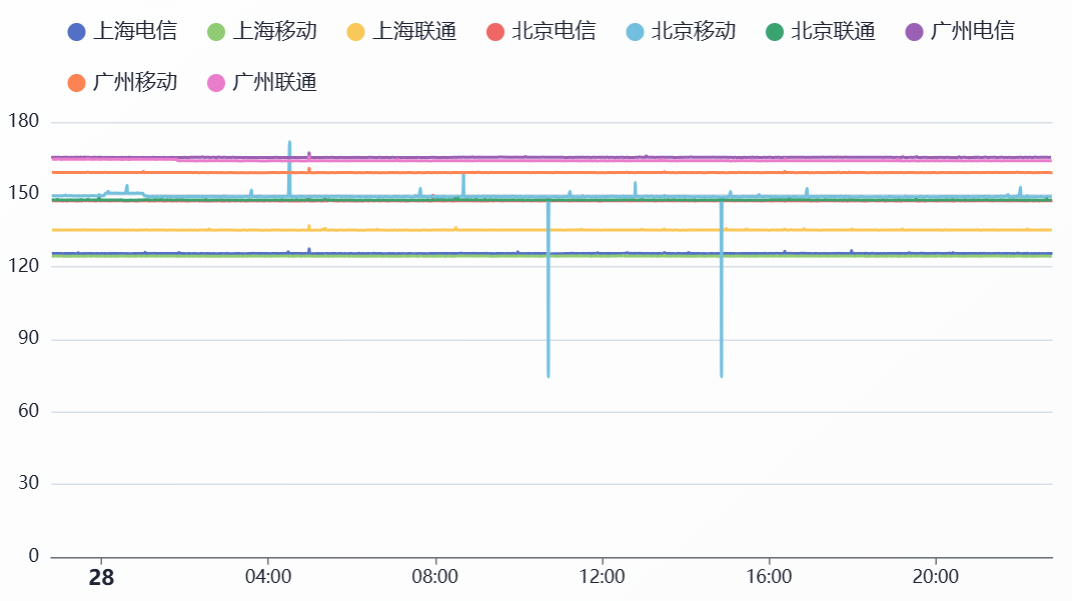
Three‑carrier backbone

China Telecom users: CN2GIA≈CN2CTG>CN2GT>163
China Unicom users: 9929>4837
China Mobile users: CMIN2>CMI
This is a broad‑brush ranking. Individual providers can vary wildly. Extreme examples: a 10 Gbps 4837 port vs a 20 Mbps CN2 GIA—of course the CMI/4837 machine feels smoother. Or 1000 people sharing a 100 Mbps CN2 GIA versus your own 50 Mbps 4837—no doubt 4837 wins. So don’t assume any “CN2” listing automatically crushes all 163 providers…
A fun question: for Unicom users, CN2 GIA or 9929?
Generally, if Unicom traffic goes through Telecom networks it gets cross‑network QoS (carriers throttle traffic from other carriers), so 9929 is usually better. A classic example: Telecom to Mobile CMI often gets throttled to under 10 Mbps, while Mobile users can hit hundreds of Mbps.
Hot Take (pure personal opinion)
After days of use, I feel the best route for Mobile is still CN2 GIA. CMIN2’s domestic segment is too crowded at peak hours; even though Telecom QoS throttles Mobile, CN2 is still CN2 and feels much better than CMIN2. As for Unicom 9929, its overall port capacity is too small—nowhere near CN2 GIA, especially in APAC where 9929 ports are tiny. It’s honestly better to go CN2 GIA. That said, for Unicom users, 4837 can still perform well and you don’t have to chase premium networks; for Mobile users, Lumen can be quite “happy.” Telecom users basically have to grit their teeth and stick with CN2 GIA—otherwise 163 can be brutally congested.
It’s just one person’s experience—results vary. Take it rationally.
4. What are Dedicated Circuits?
You can think of a dedicated line as a machine whose ingress is in China and egress is abroad; because traffic doesn’t traverse the public Internet, it avoids congestion and censorship.
IPLC vs IEPL
IPLC (International Private Leased Circuit) is a point‑to‑point physical dedicated circuit based on traditional TDM (time‑division multiplexing). It provides fixed, exclusive bandwidth between two locations and does not traverse the public Internet.
It’s a true physical private circuit: a dedicated point‑to‑point link with fixed, very low latency, theoretically zero packet loss, and 100% bandwidth guarantees, unaffected by public‑network congestion. Those benefits come at a high price and require qualifications, which makes it nearly impossible for individuals to buy IPLC directly—most can only purchase via downstream resellers.
IEPL (International Ethernet Private Line) is an international Ethernet private‑line service based on packet switching. It creates virtual private channels in the carrier network using MPLS/VPLS, providing end‑to‑end Layer‑2 or Layer‑3 private connectivity.
Unlike IPLC, IEPL is not physically isolated; it is logically isolated on shared physical infrastructure. Latency is low but slightly higher than IPLC, with near‑zero loss (QoS‑guaranteed), guaranteed bandwidth, and no public‑network congestion. It’s cheaper than IPLC but still expensive and also requires qualifications; individuals cannot buy directly from upstream providers and must use resellers.
For individual users and MJJ, the biggest advantage of IPLC/IEPL isn’t stability or bandwidth guarantees—it’s that they bypass the Great Firewall. These services target government/enterprise users with the highest network requirements; traffic never traverses the public Internet, so it avoids GFW inspection and achieves lower latency and higher speeds.
Dedicated line traffic flow
|
|
IEPL/IPLC routes are named by ingress and egress. For example, an IPLC that enters in Shenzhen and exits in Hong Kong is called Shenzhen–Hong Kong IPLC. Ingress also varies by carrier (Telecom/Mobile/Unicom). With cross‑network QoS warnings, a Telecom user using a Mobile ingress may perform worse than the public Internet, so you’ll see names like Shenzhen–Hong Kong Telecom IPLC. Some ingresses are multi‑line (Telecom+Unicom) and are called BGP ingress, hence Shenzhen–Hong Kong BGP private line. Similarly there are Guangzhou–Hong Kong BGP lines, Xiamen–Hong Kong BGP, Shanghai–Japan IPLC, Shanghai–US private lines, and so on. In general, IPLC costs more than IEPL and offers lower latency and higher speeds.
IX & Reverse Tunnel Setup
In the traditional sense, an IX (Internet Exchange) is a neutral interconnection platform where different ISPs, CDNs, and cloud providers interconnect and exchange traffic at Layer‑2, avoiding upstream transit and reducing costs.
Famous IXP examples:
- HKIX (Hong Kong Internet Exchange)
- JPIX/JPNAP (Japan)
- SGIX (Singapore)
What MJJ often refers to is an IX‑access cloud private line or “cloud on‑ramp” line. In practice, it’s a private line without a public IP. The Shenzhen–Hong Kong Telecom private line mentioned earlier uses a Telecom public‑IP ingress, while IX private‑line IPs are internal IX addresses. Only specific providers’ servers can connect—e.g., Tencent Cloud, Alibaba Cloud, Volcano Engine. When you use those servers, they can directly reach IX routes, making that server a front‑end; your front‑end + IX becomes similar to an IEPL, achieving quasi‑dedicated‑line connectivity.
Core characteristics:
|
|
The pros and cons of IX are obvious:
- No public IP, so you don’t worry about reports or noisy neighbors (many private lines use NAT shared‑IP ingress, so a bad neighbor can affect you). This is a provider decision: risk is shifted to users.
- Highly competitive pricing: same traffic costs several times less than traditional IEPL/IPLC
- Can solve cross‑carrier QoS issues: you can customize the front‑end and choose Telecom/Unicom/BGP ingress; even ingress can be customized. If the IX is in Shenzhen, your front‑end can be in Shenzhen/Guangzhou/Shanghai—anywhere that can reach the IX (generally closer is better).
- Higher latency than traditional private lines: the route to the front‑end plus the egress route can double latency. If the front‑end is poor, it can even be worse than the public Internet. The biggest benefit is still bypassing the GFW.
- Front‑end instability: this is the biggest issue. Tencent Light 200 Mbps often gets QoS‑throttled to 10 Mbps; high‑quality front‑ends in Guangzhou BGP/Volcano Engine are extremely expensive, sometimes more than IEPL/IPLC.
Front‑end traffic flow
|
|
I currently recommend primarily using IX lines, because IEPL/IPLC get reported too often. For stability, IX still wins. Even if you have a dedicated line with a unique IP, it can still get scanned; I know people whose whole range got knocked out. Your own front‑end won’t be attacked because nobody knows its IP.
Remember: you get what you pay for with dedicated lines.
Premium‑network machines
These machines are special: they establish direct BGP interconnects with premium carrier networks (e.g., 9929, CN2 GIA). That relationship lets traffic take premium routes—basically CN2 GIA/9929 on the return path. For example, a Shanghai 9929‑egress machine peering with Softbank in Japan can achieve symmetric 9929, nearly a private‑line effect, instantly turning a garbage‑route machine into a premium‑route one. Pulling Korea KT via 9929 can even resemble a Shanghai–Korea private line. Unfortunately, such providers are rare, and this approach requires deep network expertise, so it hasn’t scaled widely.
These machines usually use Beijing or Shanghai ingress—for example, the Shanghai Liqun 9929 box I’m using. It feels good; I’ll post a review when I have time.
Don’t fetishize private lines—many people assume they crush the public Internet. Whether IEPL, IPLC, or front‑end+IX, the only part you save is the cross‑border segment, which is often just a few milliseconds. If your packets already get QoS‑throttled or dropped before reaching the front‑end or private‑line ingress, the private‑line experience won’t be great either.
And who is using private lines to relay HTTP/TLS and wreak havoc on the world…
5. What is International Interconnection (Peering)?
International Interconnection refers to the network relationships established between carriers in different countries/regions so cross‑border traffic can be transmitted and exchanged globally.
Interconnect agreements
- Peering: equal‑status operators exchange traffic for free
- Transit: smaller operators pay larger operators for international egress
Interconnection quality directly determines:
- Cross‑border throughputs: exit bandwidth saturation
- Latency weights: physical distance and routing optimization offsets
- Stability: jitter during peak‑hour congestion
In plain language, it’s the data‑transfer capability between different AS networks. MJJ generally call this “international interconnect.” If interconnect is good, the machine reaches other networks smoothly with low latency, high speed, and low loss—e.g., how HK routes to the US or Europe. It’s not only China that cares about optimized routes; overseas networks matter too.
Generally, if two networks connect to the same upstream or IX, interconnect performance is usually good. For example:
Hawaii residential interconnect case
You can’t directly reach Hawaii residential networks, so you have to use a relay. The relay origin is usually US/JP/HK. First, check the destination IP’s BGP route:
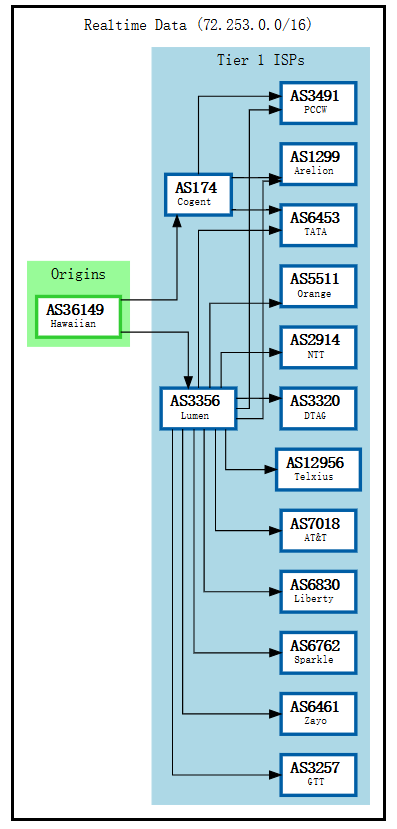
You can see Hawaiian’s direct upstreams are the Tier‑1s Cogent and Lumen. So if you find a US/HK/JP machine connected to Lumen/Cogent, you can usually get good interconnect performance.
Find an HK machine connected to Lumen:
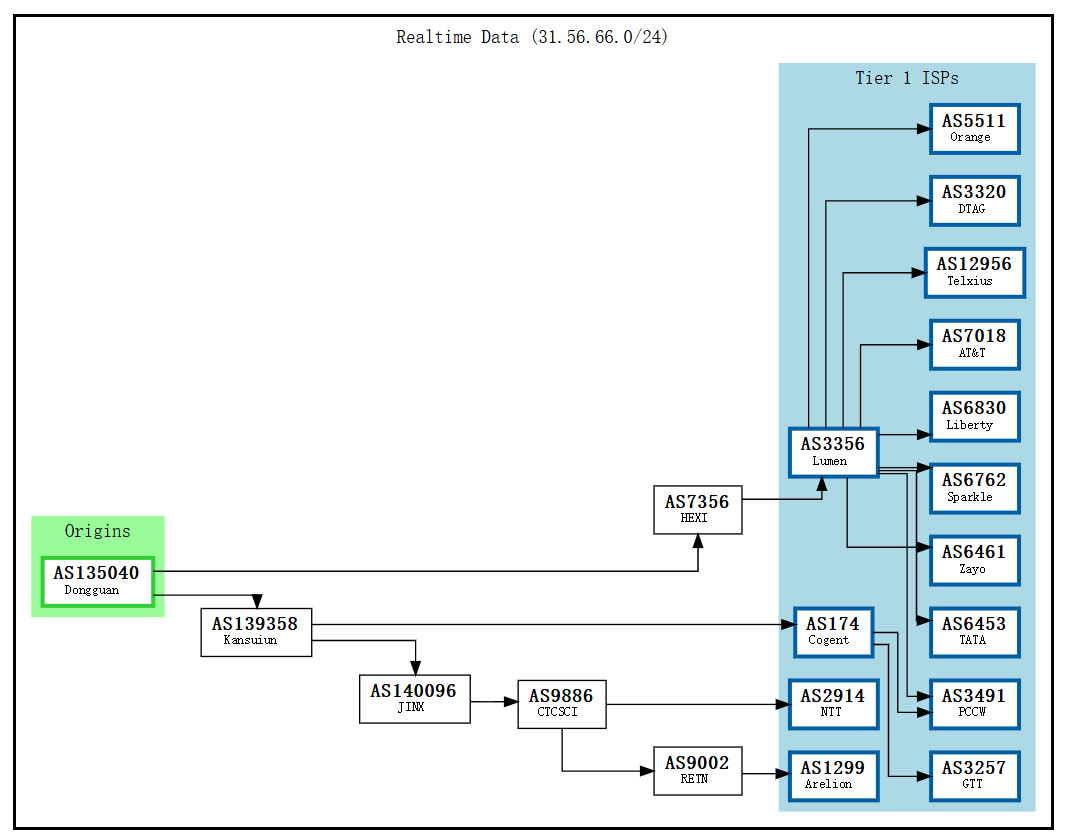
|
|
You can see by hop 8 it has entered AS3356 (Lumen) from the internal network—around 121 ms you’re already in Hawaii.
Now find one that doesn’t connect to Lumen—this one detours via Cogent:
|
|
At this point the HK→Hawaii path detours via Los Angeles and latency jumps to ~185 ms. You might wonder: Hawaii also connects to Cogent, so why isn’t it direct? Because this machine doesn’t connect to Cogent directly; it transits multiple hops, and HK→Hawaii via Cogent doesn’t necessarily have a direct route. So it ends up detouring through Los Angeles. This shows that BGP‑based judgments aren’t always accurate—often they are, but you still need real‑world testing.
In most cases, the more Tier‑1s you connect to directly, the stronger the interconnect and the straighter the routes—but direct connections are expensive. Most providers use downstream relays like CTC/GSL.
Common Tier overviews:
- Lumen (AS3356): often called Level3. Broad interconnect; direct links from APAC to the US/Europe. A “happy route” for Mobile users. Many small/mid IDCs choose Lumen as upstream due to good cost‑performance.
- RETN (AS9002): strong Europe/Russia interconnect with Eurasian land cables. Machines on RETN reach Europe quickly; HK→Europe via RETN land routes are 50–100 ms faster than detouring via the US.
- NTT (AS2914): Japanese telecom giant and top Tier‑1. Outstanding quality in APAC and dominant in Japan. Best choice for Japan‑bound traffic; APAC interconnect (HK‑SG‑JP) is very fast. Downside: expensive, high cost to connect directly.
- Softbank (AS17676): one of Japan’s big three carriers. Not Tier‑1, but excellent in Japan and APAC. Many Japan machines use Softbank; it interconnects well with 9929/CN2. Common in premium‑network setups (e.g., Shanghai 9929 egress + JP Softbank = symmetric 9929). Often residential IPs with decent quality.
- Cogent (AS174): the cheapest Tier‑1 globally, known for aggressive routing and low prices. Pros: cheap, wide coverage; good US internal network.
- GTT (AS3257): Europe‑born Tier‑1 with strong European quality and solid global coverage. A common choice for European datacenters. Cheaper than NTT, pricier than Cogent—mid‑tier positioning. Good for Europe‑heavy workloads.
- Telia/Arelion (AS1299): Nordic‑origin Tier‑1 (Telia Carrier renamed to Arelion in 2022). Global operations, stable network; strong in Europe and North America with growing APAC coverage. A reliable choice overall.
- Hurricane Electric / HE (AS6939): large Tier‑2 (self‑claimed IPv6 Tier‑1), famous for free peering with almost anyone. Many small IDCs choose HE because it’s cheap, IPv6‑friendly, and easy to connect. Downsides: too open—some regions restrict HE (e.g., Netflix blocks HE in some areas).
- PCCW (AS3491): Hong Kong’s PCCW; strong in APAC. Hong Kong datacenters with PCCW generally get good speeds to mainland China, Southeast Asia, Japan, and Korea. Great interconnect with China’s big three carriers. Downside: may need transit to reach Europe/US.
- GSL Networks (AS137409/AS7578): Global Secure Layer, a high‑quality Tier‑2. Many high‑end IDCs choose GSL (e.g., DMIT). GSL connects to multiple Tier‑1s (Zayo/Cogent/NTT, etc.), has optimized routing, and is cheaper than direct Tier‑1. POPs in Los Angeles, Hong Kong, Singapore, etc.
- IIJ/KDDI/CTC/etc… not listed one by one.
Additional notes:
Internet Exchanges (IX):
- HKIX (Hong Kong Internet Exchange): one of the most important IXs in APAC. Many carriers interconnect here. Machines on HKIX usually have excellent APAC interconnect to mainland China, Southeast Asia, Japan, and Korea. Many IX private lines (cloud on‑ramps) leverage HKIX for quasi‑private connectivity.
- JPIX/JPNAP (Japan): Japan’s main IXs with multiple Tokyo nodes. Machines connected to Japan IXs perform very well within Japan and APAC; many Japan VPS connect to JPIX.
- SGIX (Singapore): Singapore Internet Exchange, a Southeast Asia hub. Connecting to SGIX usually yields good speeds across Southeast Asia.
- EQUINIX: the world’s largest IX operator with exchanges in major cities (Hong Kong, Singapore, Tokyo, Los Angeles, Frankfurt, etc.). Many Tier‑1s and big carriers interconnect at Equinix; connecting to Equinix IX generally means high‑quality interconnect.
For example, Taiwan interconnect often relies on HKIX. Machines connected to HKIX get extremely low HK‑TW latency; those not connected often detour. Education networks are also especially “happy” on HKIX.
6. Common Debug Tools
Route tracing tools: traceroute / mtr
The most basic and important tracing tools let you see each hop a packet traverses.
|
|
Simplest delay tests: Ping
|
|
One-click scripts
|
|
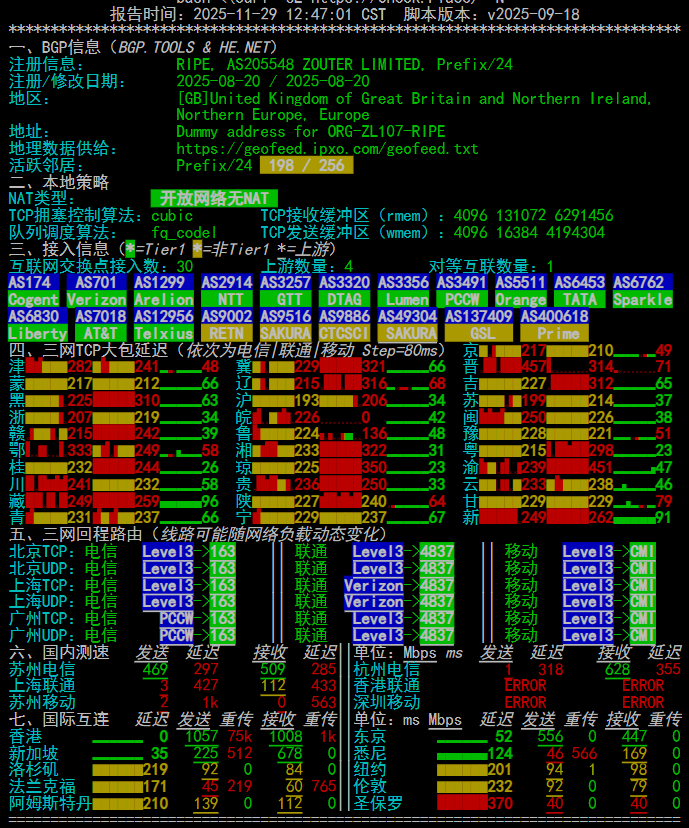
Quick test for network/BGP/international interconnect.
Connected to Lumen, so it’s a China Mobile “happy route.”
Lookup nodes & sites:
ITDOG: quickly test ICMP/TCP latency from an IP to most regions in China
BGPtool: quickly query an IP’s BGP and routing info (the charts above come from this site)
IPIPNET: view detailed routes and AS info for an IP
This article may contain omissions or mistakes—please point them out and I’ll keep updating.
Remember three truths:
- The absolute shortest route connects your wallet directly to IDC pockets.
- Buying a VPS is like opening a blind box. If you get a trash route, don’t cry—at least you have a refund… oh wait, you bought an annual plan with no refunds.
- When a provider says “optimized high bandwidth,” it might just be their cat’s name.