Preface#
The Virtualizor panel developed by a company in Mumbai, India, has caused tripping hazards for many VPS providers. From last year’s ColorCrossing to recent CloudCone incidents, hackers exploited vulnerabilities to breach servers and extort ransom, wiping out massive amounts of user data.
Facing such “black swan events,” no everyone survives alone; it’s time to perfect my automated data backup setups now.
Years ago, I consistently relied on Duplicacy CLI. But its license isn’t fully open-sourced, and updates halted. I searched for better alternatives:
The final winner is Kopia, supporting incremental snapshots, end-to-end encryption, and is insanely simple to use.
Choosing Storage Services#
Kopia supports almost all mainstream storage backends and protocols:
- S3 and S3‑compatible storage
- Local or network‑attached storage
- Azure Blob Storage
- Backblaze B2 Storage
- Google Cloud Storage
- Google Drive
- WebDAV/SFTP/Rclone
- …
I chose Backblaze B2 for Object Storage; pay-as-you-go Plan is immensely cheap ($6/TB approx). Class A operations are free with daily quotas for Class B/C, making incremental backup costs practically negligible.
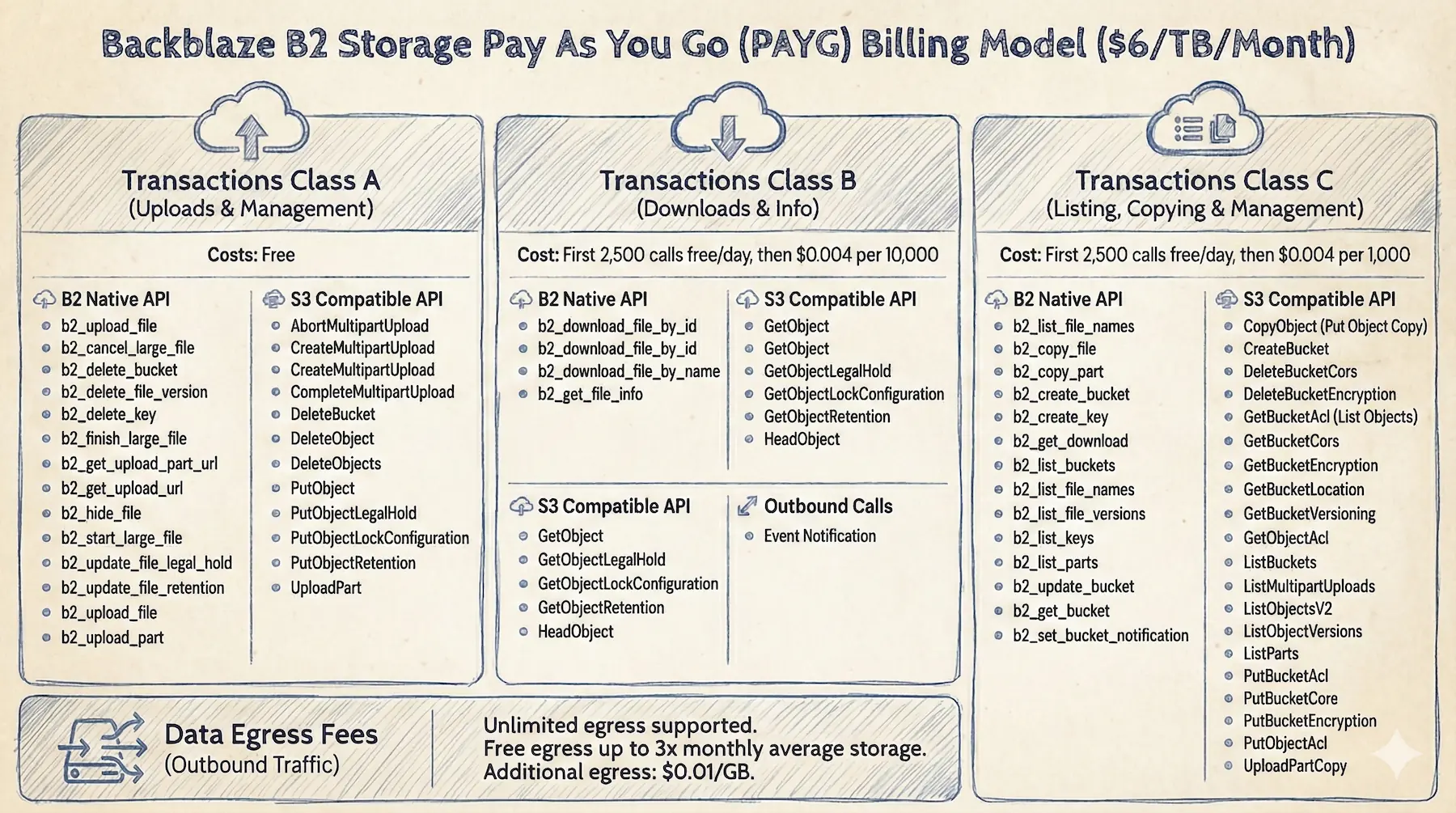
Storing 100GB costs around $0.6/month; practically negligible.
Creating Access Keys
Create a bucket in B2, generate secrets in Application Keys, and note keyID + applicationKey to begin.
Installing Kopia#
On Debian, adding the official APT repository is the most frictionless path.
 1
 2
 3
 4
 5
 6
 7
 8
 9
10
11
12
13
14
15
|
# Import GPG key

curl -s https://kopia.io/signing-key | sudo gpg --dearmor -o /etc/apt/keyrings/kopia-keyring.gpg

# Add software source

echo "deb [signed-by=/etc/apt/keyrings/kopia-keyring.gpg] http://packages.kopia.io/apt/ stable main" | sudo tee /etc/apt/sources.list.d/kopia.list

# Install

sudo apt update && sudo apt install kopia

# Verify Installation

kopia --version
|
Configuring Kopia#
Initializing Repository#
Execute repository create to initialize the repository:
1
2
3
4
5
6
7
8
9
|
sudo kopia repository create b2 \

  --bucket=<bucket-name> \

  --key-id=<keyID> \

  --key=<applicationKey> \

  --prefix=<prefix>/
|
Remember your password securely. If forgotten, backup data locks permanently with no recovery possible.
 1
 2
 3
 4
 5
 6
 7
 8
 9
10
11
12
13
14
15
16
17
18
19
20
21
22
23
24
25
26
27
28
29
30
31
32
33
34
35
36
37
38
39
40
41
42
43
44
45
46
47
48
49
50
51
52
53
|
Enter password to create new repository:

Re-enter password for verification:

Initializing repository with:

  block hash:          BLAKE2B-256-128

  encryption:          AES256-GCM-HMAC-SHA256

  key derivation:      scrypt-65536-8-1

  splitter:            DYNAMIC-4M-BUZHASH

Connected to repository.

NOTICE: Kopia will check for updates on GitHub every 7 days, starting 24 hours after first use.

To disable this behavior, set environment variable KOPIA_CHECK_FOR_UPDATES=false

Alternatively you can remove the file "/root/.config/kopia/repository.config.update-info.json".

Retention:

  Annual snapshots:                 3   (defined for this target)

  Monthly snapshots:               24   (defined for this target)

  Weekly snapshots:                 4   (defined for this target)

  Daily snapshots:                  7   (defined for this target)

  Hourly snapshots:                48   (defined for this target)

  Latest snapshots:                10   (defined for this target)

  Ignore identical snapshots:   false   (defined for this target)

Compression disabled.

To find more information about default policy run 'kopia policy get'.

To change the policy use 'kopia policy set' command.

NOTE: Kopia will perform quick maintenance of the repository automatically every 1h0m0s

and full maintenance every 24h0m0s when running as root@vps-micro.

See https://kopia.io/docs/advanced/maintenance/ for more information.

NOTE: To validate that your provider is compatible with Kopia, please run:

$ kopia repository validate-provider
|
Check connection status
1
|
sudo kopia repository status
|
Setting Global Policies#
Set global compression to zstd, balancing compression rates and speed bottlenecks:
1
|
sudo kopia policy set --global --compression=zstd
|
Set global retention policies as fallback parameters:
1
2
3
|
# Retain latest 8 snapshots

sudo kopia policy set --global --keep-latest 8
|
Check global policy lists:
Automated Backup#
Use the Docker container under /home/dejavu/warp as an example; it uses bind mounts.
 1
 2
 3
 4
 5
 6
 7
 8
 9
10
11
12
13
14
15
16
17
|
# Fine‑tune retention for a single backup target

# For containers with rarely‑changing configs, keeping 3 snapshots is enough

sudo kopia policy set /home/dejavu/warp \

  --keep-latest 3 \

  --keep-hourly 0 \

  --keep-daily 0 \

  --keep-weekly 0 \

  --keep-monthly 0 \

  --keep-annual 0
|
Excluding Irrelevant Files#
Use .kopiaignore files ignoring logs and caches setups:
 1
 2
 3
 4
 5
 6
 7
 8
 9
10
11
12
13
14
15
|
# Ignore log files

*.log

logs/

# Ignore temp directories

tmp/

temp/

# Exclude cache

.cache/
|
Check policy for a specific backup target
1
|
sudo kopia policy get /home/dejavu/warp
|
Automation Scripts#
Actions are Kopia’s native Hooks. They can trigger commands before/after snapshots, but this “black box” is not intuitive to debug, so I won’t use it here.
I leverage a Shell script with Crontab instead here.
1
2
3
4
5
6
7
|
# Create log directory

sudo mkdir -p /root/kopia/logs

# Create backup script

sudo vim /root/kopia/backup-warp.sh
|
Example script:
 1
 2
 3
 4
 5
 6
 7
 8
 9
10
11
12
13
14
15
16
17
18
19
20
21
22
23
24
25
26
27
28
29
30
31
32
33
34
35
36
37
38
39
40
41
42
43
44
45
46
47
48
49
50
51
52
53
54
55
56
57
58
59
60
61
62
63
64
65
66
67
68
69
70
71
72
73
74
75
76
77
78
79
80
81
82
83
84
85
86
87
88
89
90
91
|
#!/bin/bash

SRC_DIR="/home/dejavu/warp"

LOG_DIR="/root/kopia/logs"

CURRENT_DATE=$(date +%Y%m%d)

LOG_FILE="$LOG_DIR/${CURRENT_DATE}-warp.log"

# Must set the Kopia repository password (wrap in single quotes)

export KOPIA_PASSWORD=''

# [Optional] Disable Kopia update checks (useful for CN servers)

# export KOPIA_CHECK_FOR_UPDATES=false

log() {

    echo "[$(date '+%H:%M:%S')] $1" >> "$LOG_FILE"

}

# Fallback

fallback_service() {

    # Check container status

    if ! docker compose -f "$SRC_DIR/compose.yml" ps --services --filter "status=running" | grep -q "warp"; then

        log "Restoring container..."

        docker compose -f "$SRC_DIR/compose.yml" up -d >> "$LOG_FILE" 2>&1

    fi

}

trap fallback_service EXIT

log "=== Backup start ==="

cd "$SRC_DIR" || { log "Fatal error: directory $SRC_DIR not found"; exit 1; }

log "1. Stopping containers..."

docker compose down >> "$LOG_FILE" 2>&1

if [ $? -ne 0 ]; then

    log "❌ Failed to stop container; skipping backup to keep data safe."

    exit 1

fi

# 4.3 Create snapshot (time‑consuming)

log "Starting snapshot..."

kopia snapshot create "$SRC_DIR" --description "Weekly Backup" >> "$LOG_FILE" 2>&1

SNAPSHOT_STATUS=$?

# Start services

log "3. Restoring services..."

docker compose up -d >> "$LOG_FILE" 2>&1

if [ $SNAPSHOT_STATUS -eq 0 ]; then

    log "✅ Snapshot created successfully"

else

    log "❌ Snapshot creation failed!"

    exit 1

fi

# Maintenance tasks

log "Running repository maintenance (GC)..."

kopia maintenance run --full >> "$LOG_FILE" 2>&1

log "=== Backup end ==="
|
Set script permissions
1
|
sudo chmod 700 /root/kopia/backup-warp.sh
|
Run once manually
1
|
sudo /root/kopia/backup-warp.sh
|
Check the log from the first run
1
|
cat /root/kopia/logs/20260201-warp.log
|
Checked the B2 bucket; snapshots are synced and the logs look good:
 1
 2
 3
 4
 5
 6
 7
 8
 9
10
11
12
13
14
15
16
17
18
19
20
21
22
23
24
25
26
27
28
29
30
31
32
33
34
35
36
37
38
39
40
41
42
43
44
45
46
47
48
49
50
51
52
53
54
55
56
57
58
59
60
61
62
63
64
65
66
67
68
69
70
71
72
73
|
[10:26:27] === Backup start ===

[10:26:27] 1. Stopping containers...

 Container warp Stopping

 Container warp Stopped

 Container warp Removing

 Container warp Removed

 Network warp-tunnel Removing

 Network warp-tunnel Resource is still in use

[10:26:37] Starting snapshot...

Snapshotting root@vps-micro:/home/dejavu/warp ...

 * 0 hashing, 40 hashed (23.4 MB), 0 cached (0 B), uploaded 193 B, estimated 23.4 MB (100.0%) 0s left

Created snapshot with root ka463aa955f638a00aed18d636e77e60c and ID 72c3275ef74463396ad6092d49c84ff0 in 1s

Running quick maintenance...

Compacting an eligible uncompacted epoch...

Advancing epoch markers...

Finished quick maintenance.

[10:26:46] 3. Restoring services...

 Container warp Creating

 Container warp Created

 Container warp Starting

 Container warp Started

[10:26:47] ✅ Snapshot created successfully

[10:26:47] Running repository maintenance (GC)...

Running full maintenance...

GC found 0 unused contents (0 B)

GC found 0 unused contents that are too recent to delete (0 B)

GC found 47 in-use contents (1.3 MB)

GC found 5 in-use system-contents (2.7 KB)

GC undeleted 0 contents (0 B)

Compacting an eligible uncompacted epoch...

Advancing epoch markers...

Attempting to compact a range of epoch indexes ...

Cleaning up unneeded epoch markers...

Cleaning up old index blobs which have already been compacted...

Cleaned up 0 logs.

Finished full maintenance.

[10:26:56] === Backup end ===
|
Backup Notifications [Optional]#
This is optional but quite useful. We’ll use Apprise for notifications; Telegram is the example below.
Spinning up Apprise containers:
 1
 2
 3
 4
 5
 6
 7
 8
 9
10
11
12
13
14
15
16
17
18
19
20
21
22
23
24
25
26
27
28
29
30
31
32
33
34
35
36
37
38
39
|
services:

  apprise:

    image: caronc/apprise:latest

    container_name: apprise

    restart: unless-stopped

    user: "1000"

    networks:

      - apprise

    environment:

      APPRISE_STATEFUL_MODE: simple

      APPRISE_WORKER_COUNT: "1"

    volumes:

      - ./config:/config

      - ./plugin:/plugin

      - ./attach:/attach

networks:

  apprise:

    name: apprise

    driver: bridge

    enable_ipv6: true
|
Adjusting the Shell script formats:
  1
  2
  3
  4
  5
  6
  7
  8
  9
 10
 11
 12
 13
 14
 15
 16
 17
 18
 19
 20
 21
 22
 23
 24
 25
 26
 27
 28
 29
 30
 31
 32
 33
 34
 35
 36
 37
 38
 39
 40
 41
 42
 43
 44
 45
 46
 47
 48
 49
 50
 51
 52
 53
 54
 55
 56
 57
 58
 59
 60
 61
 62
 63
 64
 65
 66
 67
 68
 69
 70
 71
 72
 73
 74
 75
 76
 77
 78
 79
 80
 81
 82
 83
 84
 85
 86
 87
 88
 89
 90
 91
 92
 93
 94
 95
 96
 97
 98
 99
100
101
102
103
104
105
106
107
108
109
110
111
112
113
114
115
116
117
118
119
120
121
122
123
124
125
126
127
128
129
130
131
132
133
134
135
136
137
138
139
140
141
142
143
144
145
146
147
148
149
150
151
152
153
154
155
156
157
158
159
160
161
162
163
164
165
166
167
168
169
170
171
172
173
174
175
|
#!/bin/bash

SRC_DIR="/home/dejavu/warp"

LOG_DIR="/root/kopia/logs"

CURRENT_DATE=$(date +%Y%m%d)

LOG_FILE="$LOG_DIR/${CURRENT_DATE}-warp.log"

# ================= Configuration =================

# Kopia repository password

export KOPIA_PASSWORD=''

# [Optional] Disable Kopia update checks

# export KOPIA_CHECK_FOR_UPDATES=false

# Apprise notification config

NOTIFICATION_URL="tgram://<botToken>/<group>/"

APPRISE_NET="apprise"

APPRISE_API="http://apprise:8000/notify"

# ===========================================

log() {

    echo "[$(date '+%H:%M:%S')] $1" >> "$LOG_FILE"

}

# Dispatch Notification function

send_notify() {

    local STATUS_ICON=$1

    local STATUS_MSG=$2

    local DETAIL_MSG=$3

    local DATE_STR=$(date +%Y-%m-%d)


    local TITLE="Kopia Backup - Warp"

    local BODY="${STATUS_ICON} ${DATE_STR}-warp-${STATUS_MSG}\n\n${DETAIL_MSG}"

    local JSON_PAYLOAD=$(cat <<EOF

{

    "urls": "$NOTIFICATION_URL",

    "title": "$TITLE",

    "body": "$BODY"

}

EOF

)

    log "Sending notification..."

    docker run --rm --network "$APPRISE_NET" curlimages/curl:8.18.0 \

        -s -o /dev/null -X POST \

        -H "Content-Type: application/json" \

        -d "$JSON_PAYLOAD" \

        "$APPRISE_API"

}

# Fallback function

fallback_service() {

    if ! docker compose -f "$SRC_DIR/compose.yml" ps --services --filter "status=running" | grep -q "warp"; then

        log "Restoring container..."

        docker compose -f "$SRC_DIR/compose.yml" up -d >> "$LOG_FILE" 2>&1

    fi

}

trap fallback_service EXIT

log "=== Backup start ==="

cd "$SRC_DIR" || { log "Fatal error: directory $SRC_DIR not found"; exit 1; }

log "1. Stopping containers..."

docker compose down >> "$LOG_FILE" 2>&1

if [ $? -ne 0 ]; then

    log "❌ Failed to stop container; skipping backup to keep data safe."

    send_notify "❌" "Backup aborted" "Reason: container could not stop; backup was not executed."

    exit 1

fi

# Create snapshot

log "Starting snapshot..."

# Capture output to include partial info in the notification

SNAPSHOT_OUTPUT=$(kopia snapshot create "$SRC_DIR" --description "Weekly Backup" 2>&1 | tee -a "$LOG_FILE")

SNAPSHOT_STATUS=${PIPESTATUS[0]}

# Start services

log "Restoring services..."

docker compose up -d >> "$LOG_FILE" 2>&1

# Get only the log filename (e.g., 20260202-warp.log)

LOG_FILENAME=$(basename "$LOG_FILE")

if [ $SNAPSHOT_STATUS -eq 0 ]; then

    log "✅ Snapshot created successfully"


    # Extract snapshot ID

    SNAP_ID=$(grep "Created snapshot with root" "$LOG_FILE" | tail -n 1 | awk '{print $5}')

    [ -z "$SNAP_ID" ] && SNAP_ID="ID extraction failed"


    # === Change: log path variable is now $LOG_FILENAME ===

    send_notify "✅" "Backup succeeded!" "Snapshot ID: $SNAP_ID\nService has been restored.\nLog location: $LOG_FILENAME"

else

    log "❌ Snapshot creation failed!"

    # On failure, show only the filename to keep it tidy

    send_notify "❌" "Backup failed!" "Kopia returned an error code.\nPlease check server logs immediately: $LOG_FILENAME"

    exit 1

fi

# Maintenance tasks

log "Running repository maintenance (GC)..."

kopia maintenance run --full >> "$LOG_FILE" 2>&1

log "=== Backup end ==="
|
Example output:
1
2
3
4
5
6
7
8
9
|
Kopia Backup - Warp

✅ 2026-02-02-warp-backup succeeded!

Snapshot ID: ke5e0d06612cb9850a1172cf0242983fb

Service has been restored.

Log location: 20260202-warp.log
|
Configuring Cron Jobs#
Automate tasks via Crontab
Add a task at the end
1
2
3
4
5
|
# My server timezone is UTC

# Expected: run at 01:00 Beijing time every Monday

0 17 * * 0 /bin/bash /root/kopia/backup-warp.sh
|
Restoring Backup#
Create a test directory to verify the restore flow.
1
|
mkdir -p /tmp/warp_test_restore
|
Standard Restore#
If you need the latest data, run:
1
2
3
4
5
6
7
|
# Format: snapshot restore <source_path> <target_destination>

sudo kopia snapshot restore /home/dejavu/warp /tmp/warp_test_restore/latest

# Verify restore

ls -lah /tmp/warp_test_restore/latest
|
Rollback to specific historical snapshots IDs targets:
 1
 2
 3
 4
 5
 6
 7
 8
 9
10
11
12
13
14
15
16
17
|
# List snapshot history

sudo kopia snapshot list /home/dejavu/warp

# Example output:

root@vps-micro:/home/dejavu/warp

  2026-02-01 10:26:40 UTC ka463aa955f638a00aed18d636e77e60c 23.4 MB drwxrwxr-x files:40 dirs:6 (latest-1)

# Restore by snapshot ID

sudo kopia snapshot restore ka463aa955f638a00aed18d636e77e60c /tmp/warp_test_restore/history

# Verify restore

ls -lah /tmp/warp_test_restore/history
|
So far, everything looks good.
Disaster Recovery#
Now consider an extreme case: if server data is completely destroyed, how do we recover in a new environment?
- Install Kopia on the new machine
- Connect to the existing bucket with the same B2 configuration
1
2
3
4
5
|
sudo kopia repository connect b2 \
  --bucket=<bucket-name> \
  --key-id=<keyID> \
  --key=<applicationKey> \
  --prefix=<prefix>/
|
- The new machine may have a different hostname; list all existing snapshots
1
2
3
4
|
sudo kopia snapshot list --all
# Find the previous machine’s <user>@<hostname>:<backup-path>
root@vps-micro:/home/dejavu/warp
  2026-02-01 10:26:40 UTC ka463aa955f638a00aed18d636e77e60c 23.4 MB drwxrwxr-x files:40 dirs:6 (latest-1)
|
- Restore data
1
2
|
# Usage: snapshot restore <user>@<old-hostname>:<old-path> <target-path>
sudo kopia snapshot restore ka463aa955f638a00aed18d636e77e60c root@vps-micro:/home/dejavu/warp /tmp/warp_restore_test
|
- If you want the new machine to fully take over the old machine’s incremental backup history, you need to “spoof” identity when connecting.
1
2
3
4
5
6
7
8
9
|
# Disconnect and reconnect with override parameters
sudo kopia repository disconnect
sudo kopia repository connect b2 \
  --bucket=<bucket-name> \
  --key-id=<keyID> \
  --key=<applicationKey> \
  --prefix=<prefix>/
  --override-hostname=<old-hostname> \
  --override-username=<old-username>
|
After verification, remove the test path
1
|
sudo rm -rf /tmp/warp_test_restore
|
Conclusion#
With that, the automated backup setup is complete. Adding subsequent automated tasks takes just:
 1
 2
 3
 4
 5
 6
 7
 8
 9
10
11
12
13
14
15
16
17
18
19
20
21
22
23
24
25
26
27
28
29
30
31
32
33
34
35
|
# Fine‑tune policy

sudo kopia policy set /home/dejavu/wakapi \

  --keep-latest 3 \

  --keep-hourly 0 \

  --keep-daily 0 \

  --keep-weekly 0 \

  --keep-monthly 0 \

  --keep-annual 0

# Verify policy

sudo kopia policy get /home/dejavu/wakapi

# Edit automation task

sudo vim /root/kopia/backup-wakapi.sh

# Set permissions

sudo chmod 700 /root/kopia/backup-wakapi.sh

# First backup

sudo /bin/bash /root/kopia/backup-wakapi.sh

# Cron job

sudo crontab -e
|
You can also consider these optimizations:
- Tier offsets dispersed daily request ceilings to lower costs benchmarks.
- Multi-provider/multi-region redundancy elevates crash safety headers.