Many people come into contact with proxies, VPNs, and remote desktops due to legitimate needs such as cross-border office work, overseas access, traveling online, privacy protection, and corporate compliance access. However, platform risk control systems (TikTok/PayPal/Facebook, etc.) often view “abnormal networks, abnormal devices, abnormal behavior” as risk signals, triggering captchas, rate limits, or even freezes—highly common on AI/financial services.
Most people are completely confused about proxy detection: “I have connected to a ladder (VPN), shouldn’t the website see that my IP belongs to certain regions like the US? Why can they still detect that I am using a ladder?” Actually, this is a quite complex topic filled with technicalities and controversies. Today, I’ll briefly explain the most commonly used proxy detection methods and shielding measures in our practices to give some proxy detection science. This article will not heavily analyze distinct technologies; like other posts on this blog, this article focuses on science popularization for beginners. Technical papers will be placed in the reference section at the end.
Now, first open a Proxy Detection Toy developed by another big boss to see your privacy protection status. If you want to specifically deal with a certain part and do good shielding, you can jump to the corresponding chapter. Of course, I still hope you can read this article carefully; it will give you a deeper understanding of risk control.
Subject to the writer’s capabilities, there will inevitably be mistakes in the text. This article will certainly be updated multiple times. This article was first published on 2026/1/21, last updated on 2026/1/21.
Foreword: Why do you need to understand proxy detection?
Many users’ initial purpose for getting in touch with proxies (actually the better-known term should be VPN) is to bypass simple geographic location restrictions on some websites. For example: Claude/Gemini might refuse to provide services because you are using a Chinese IP, and financial websites also give you risk controls and refuse to load because of your IP.
A side note: The difference between a Proxy and a VPN is actually quite large.
- VPN is usually a System-level Tunnel (encapsulating traffic into a virtual network card/tunnel), transparent to applications.
- Proxy (HTTP/SOCKS) is usually Application-layer Forwarding (explicitly used by browsers/applications).
- Both may change output IPs, but behavior differs widely on DNS/WebRTC/Dividing Rules/IPv6 details.
This article focuses on explaining Proxies rather than VPNs everywhere unless specifically noted.
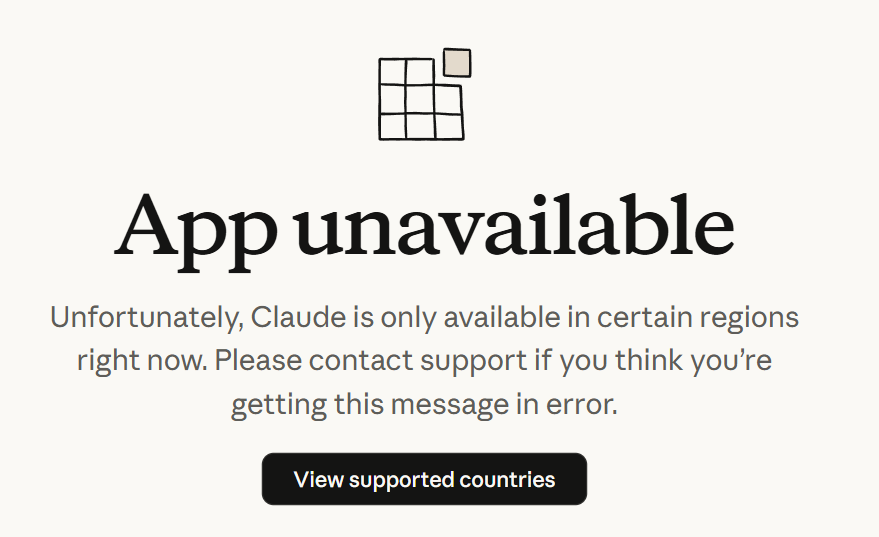

This is very troublesome. Many people consider using proxy services due to needs like cross-border e-commerce, digital immigration, and privacy protection, helping themselves bypass simple geographic restrictions to use related services.
But, is that the end?
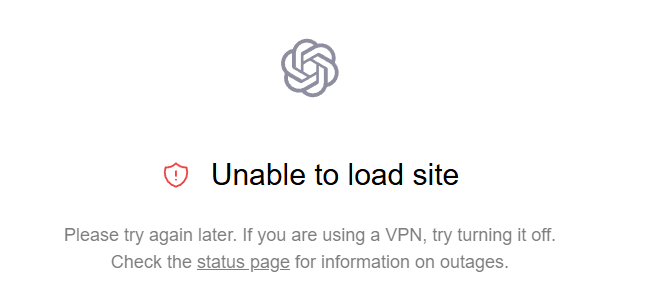
Certainly not. After using proxy services, many people still face the following problems:
ChatGPT detecting VPN
Netflix detecting Proxy
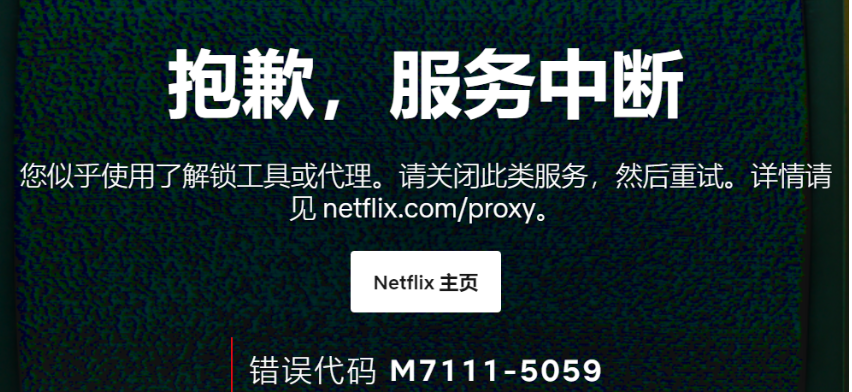
This is actually websites detecting from some behaviors that you are using a proxy instead of looking like a normal user, so they block you.
What I want to explain about proxy detection is standing from the website’s perspective to tell you how websites actually conduct proxy detection and how we should protect against it.
Of course, the specific detection methods of website owners are unknown to us since these vary depending on specific websites and they never disclose their detection strategies. Many detections are inter-related and estimated through algorithms. We can only start from the most common methods to teach basic detection principles and shielding methods.
Remember: Risk control looks at Consistency, not single indexes. A mismatch on one index might be fine, but multiple items contradicting is extremely dangerous.
1. IP Detection
The most basic and direct detection method.
1.1 IP Blacklist/Reputation Databases
The most commonly used method by the vast majority of websites, also the most convenient way for website owners, is directly checking whether the user’s IP is an abuse IP or datacenter/datacenter hosting IP. For the absolute majority of users, normal IP types should be residential (Fixed Line), commercial (ISP) or mobile, rather than Datacenter IPs. At the same time, whether there is abuse logs is also a direct judgment trigger. So selecting a high-quality IP directly is extremely important to reduce risk control.
Common commercial IP reputation databases used by merchants are MaxMind, IP2Location, ipinfo, and IPQS.
- MaxMind: Veteran location & fraud detection service provider. GeoIP database is almost the industry standard used by loads of websites by default.
- IP2Location: Primarily provides IP geolocation service. Proxy detection is relatively slow/late, often serving as a supplement to MaxMind.
- ipinfo: Common database for small and medium projects. Developer-friendly IP Info API providing ASN, Company, and Privacy detection data.
- IPQS: Focuses on fraud detection and risk scoring. Highly aggressive against proxies/VPNs/bots. Top choice for financial and e-commerce risk nodes.
MaxMind and IPQS are the “enemies” you’ll encounter most often—the former is everywhere, the latter is strict. If your IP is marked as “Data Center” or “High Risk” in these two databases, you’ll likely be flagged by various websites.
For individual users, you probably won’t see results from MaxMind’s DB since it is paid (running $300+ easily—they don’t care about individuals). IP2Location is most used for determining if it is residential. ipinfo has good reference value. IPQS allows individuals to query freely, but it has a high false positive rate; anything suspicious gets flagged. Note: ISP does not always mean residential; many ranges that “look like ISP” get flagged as datacenter/hosting/high abuse too.
Demonstrating the two most commonly used methods:
IP2Location checking IP address type
Open IP2Location, and you’ll see this page:
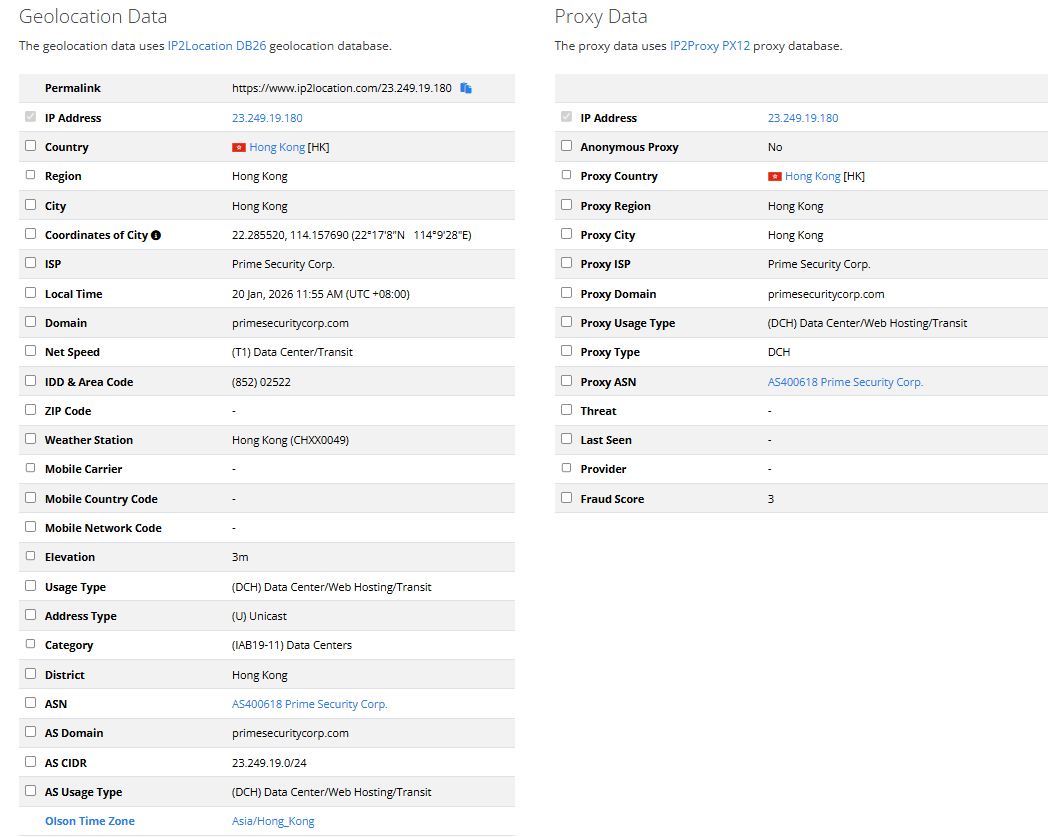
Left is basic info, right is proxy data. focus on Usage Type and Category on the left. In this image, it’s (DCH) Data Center/Web Hosting/Transit and (IAB19-11) Data Centers, which are explicitly a datacenter. On the right usually has no data (since IP2 is indeed obtuse and focuses little on proxy data; if it lists data, alarm bells should ring).
Residential IPs typically show:
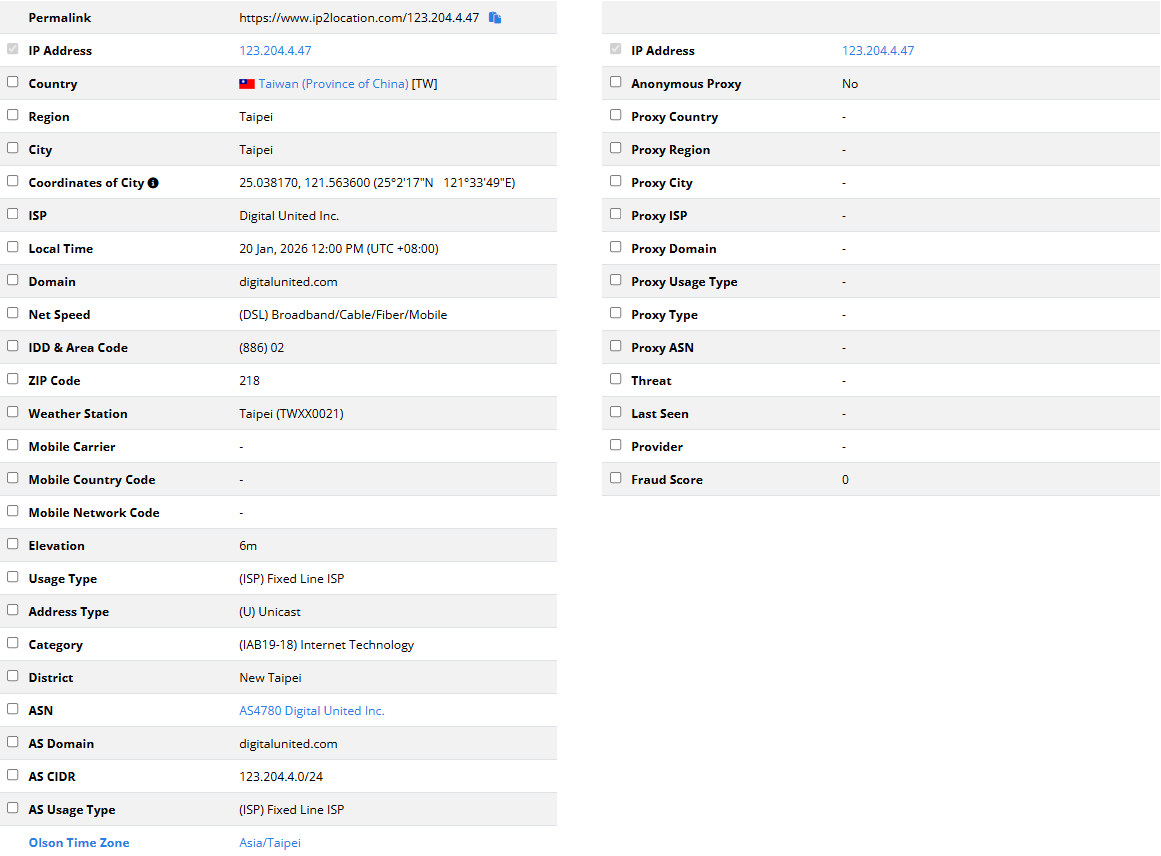
Explicit (ISP) Fixed Line ISP and (IAB19-18) Internet Technology, and below you can also see AS Usage Type as (ISP) Fixed Line ISP. If you are using 5G data users, you’ll see MOB type.
IPQS reviewing abuse conditions
Open IPQS to see loads of references:
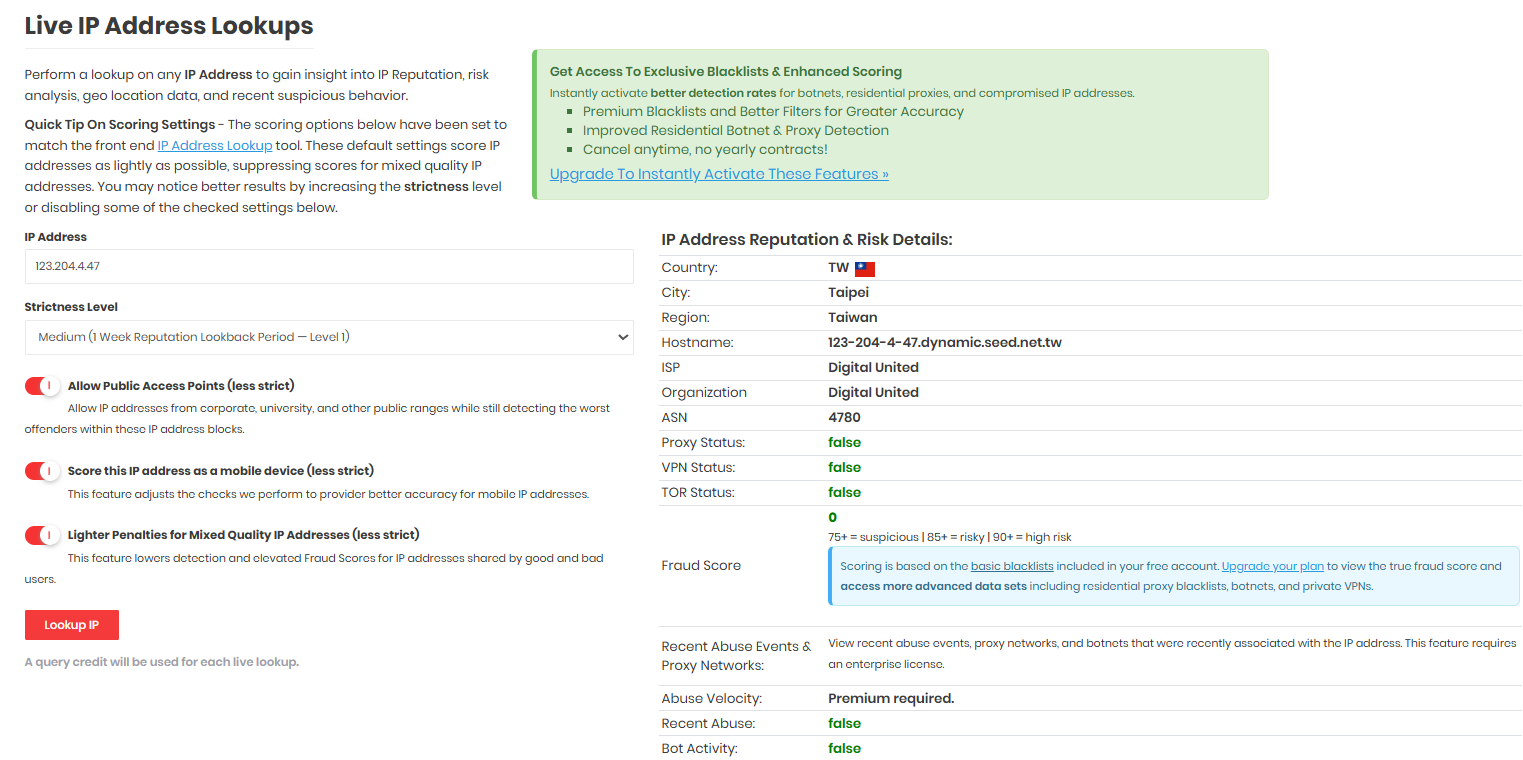
The strictness level on the left can just be default; right shows value distributions for standard residential setups. Datacenter setups look like this:

These two methods’ screening is very complete. One looks at IP type, one looks at abuse. If an IP passes both, other databases won’t fall short. Of course, underperforming here doesn’t mean unusable since you aren’t certain whether websites use these specific ones.
Others like Scamalytics/AbuseIPDB/Shodan/IPHub/DB-IP/IPRegistry are also good professional databases, not fully introduced.
Counterexample: Why do I not use Chinese domestic databases?
Firstly, no foreign websites use domestic databases. Their accuracy has no difference from your toilet paper. Moreover, its accuracy is shockingly inverse.
Find some seller selling Residential Dual ISP with test IP 38.34.14.1, let’s see domestic data:
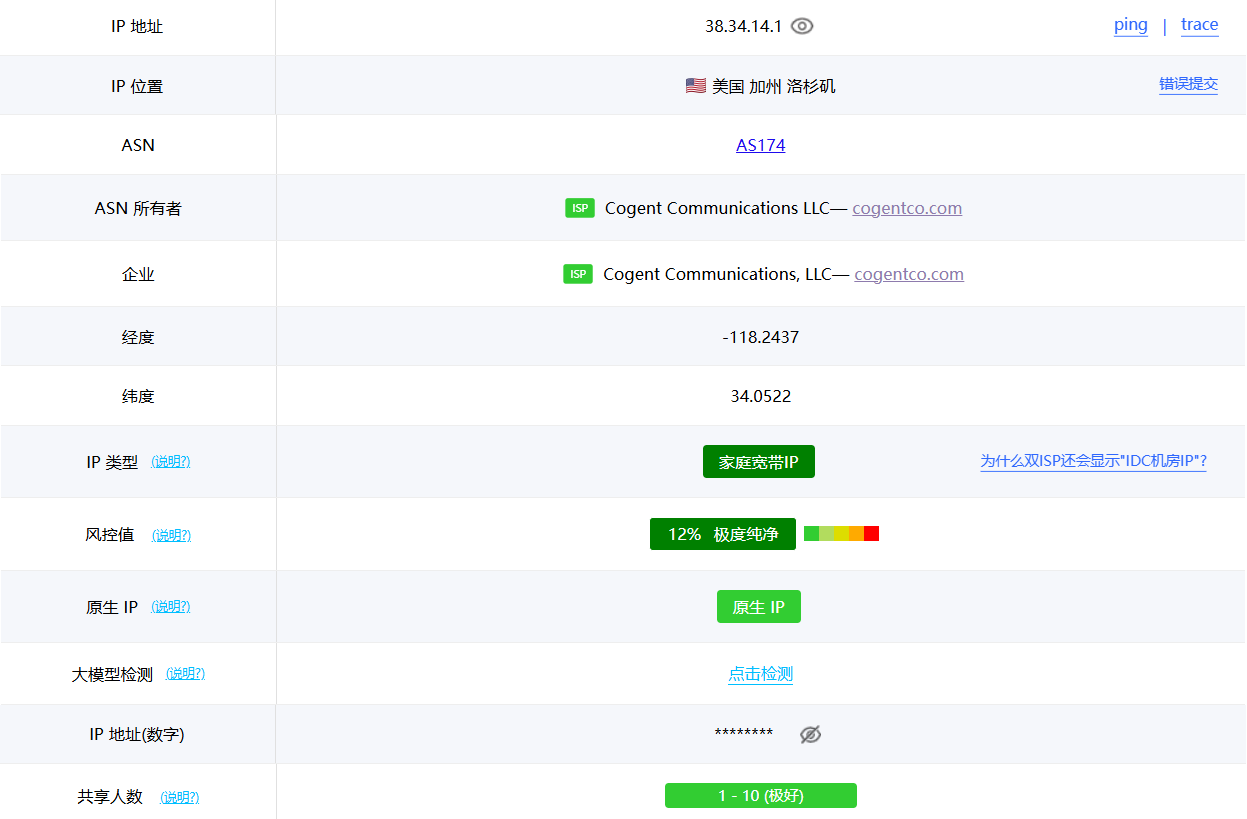
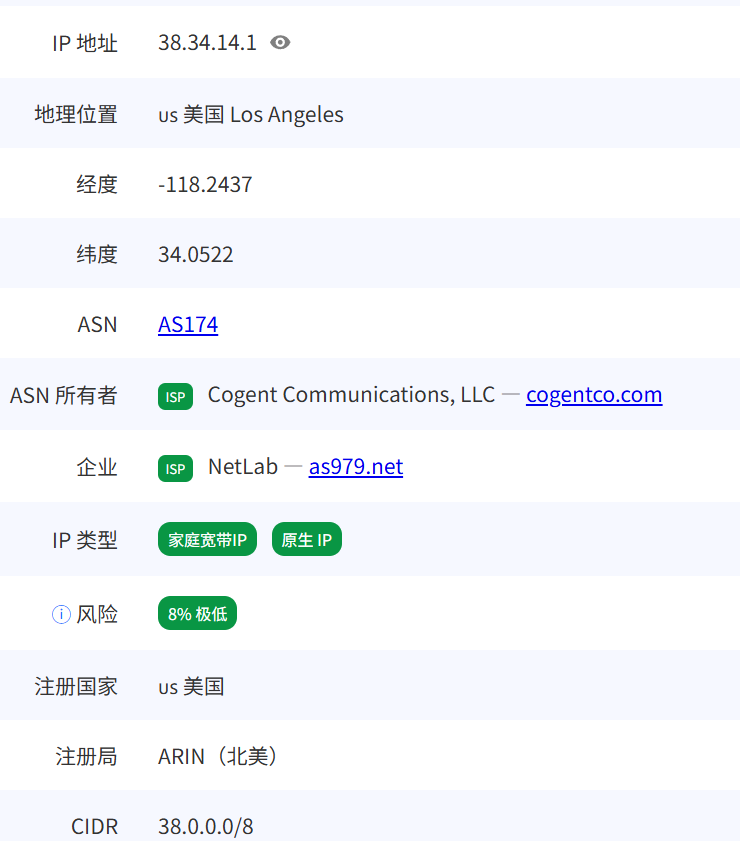
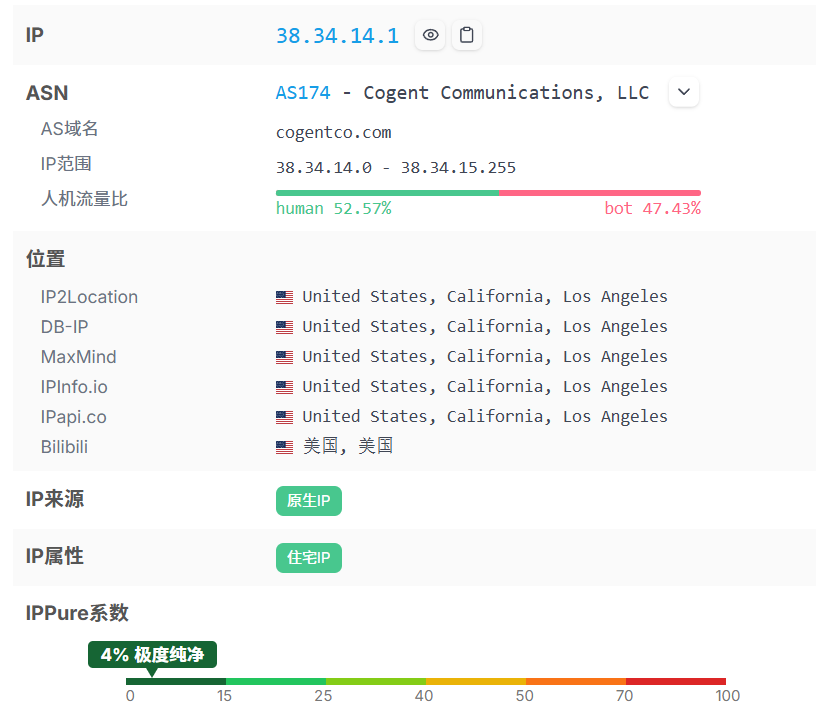
TikToker: Steady, this round is steady, cheap and clean.
Now search foreign databases:
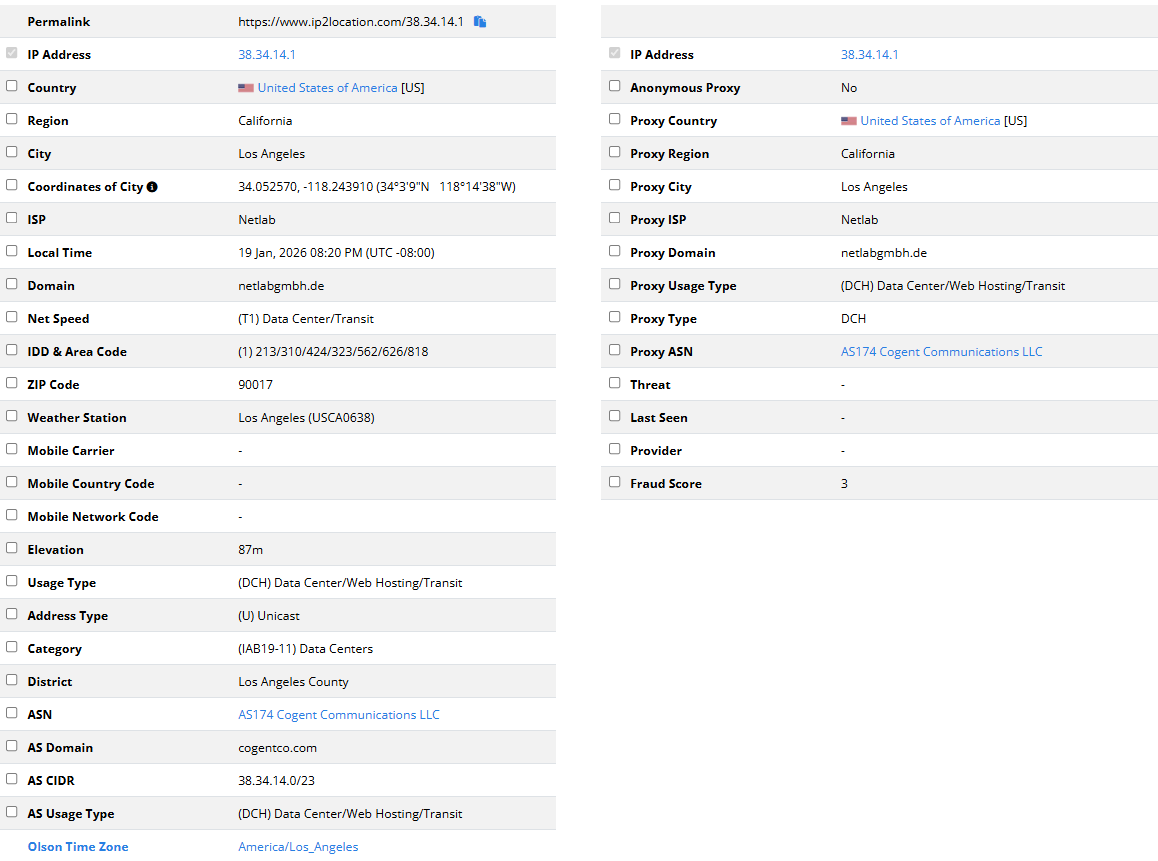
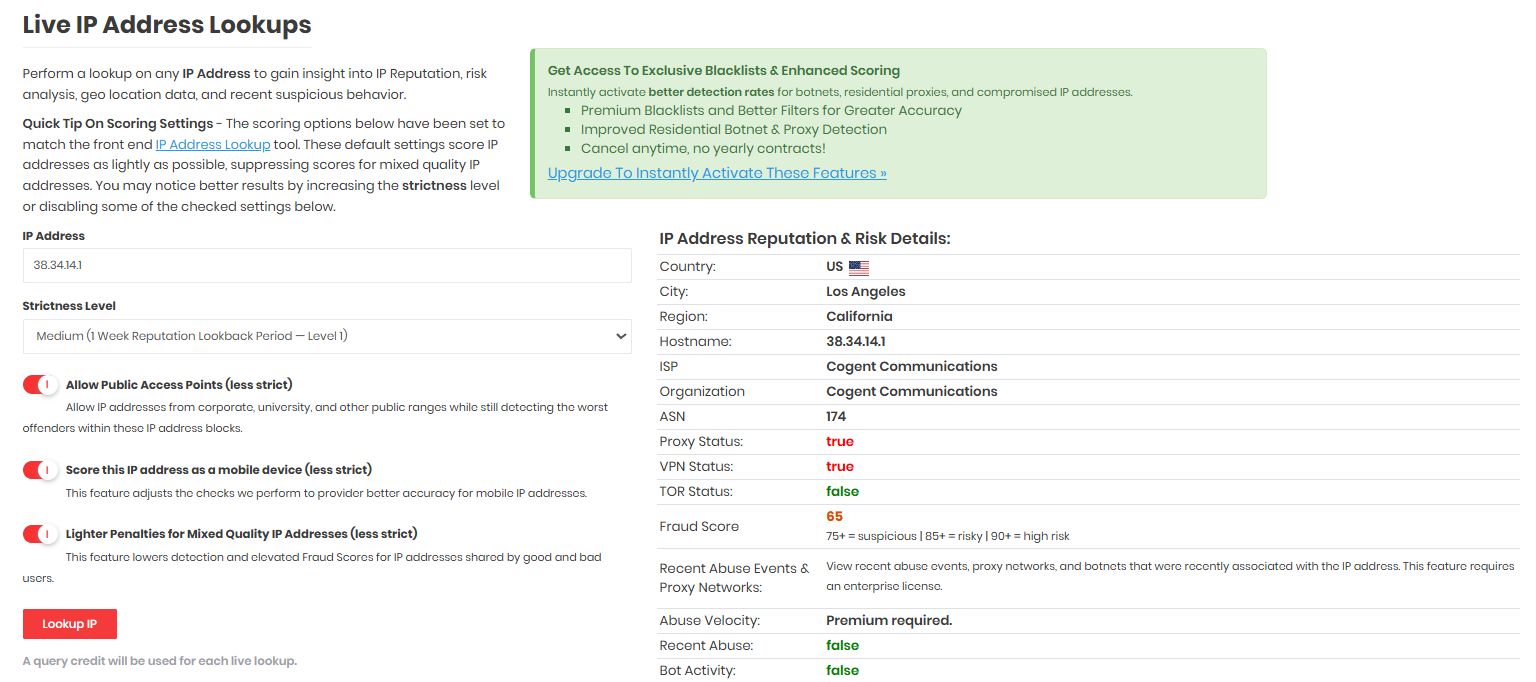
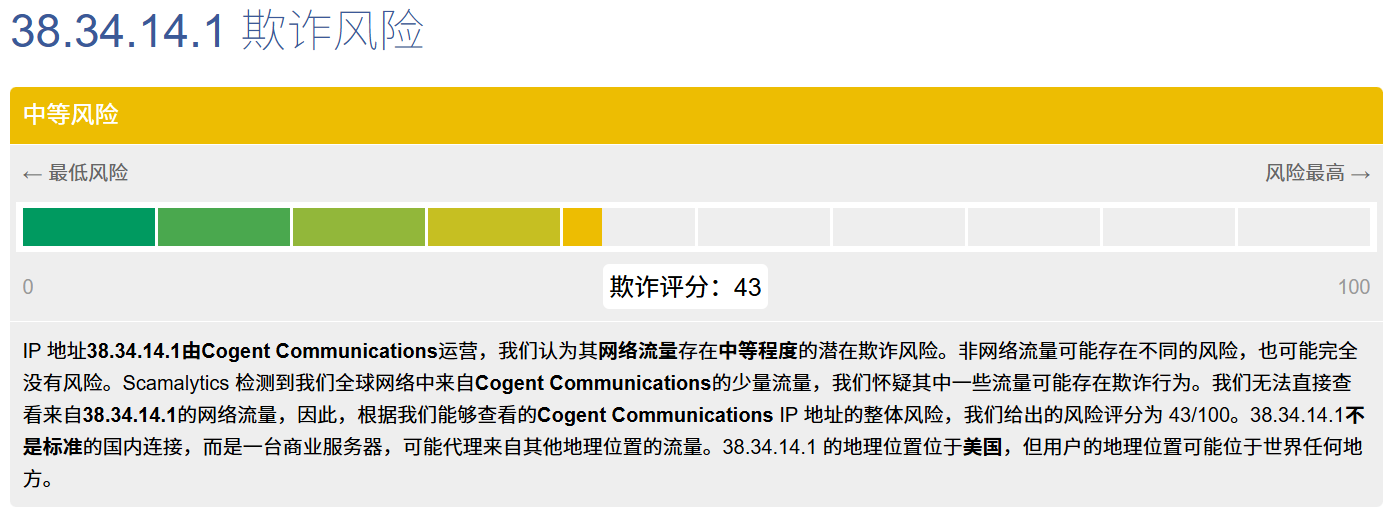
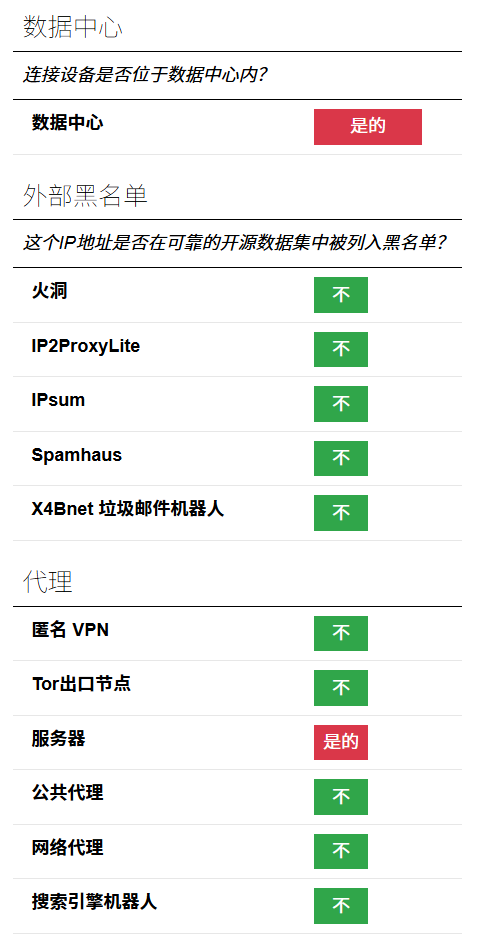
TikToker: Steady, found another one that’s about to be risk controlled.
For more about this, you can check VPS IP Quality Detection Guide for a deeper dive.
1.2 IP Geolocation Consistency
You thought choosing a perfect IP was enough? It has only just begun.
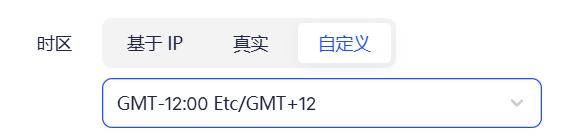
1. Browser Timezone vs IP Belonging Timezone
Principle: Websites can obtain your system timezone from the browser side. Simultaneously, the website queries geographic location via your IP address, getting the timezone it belongs to. Direct comparison yields if they match.
Contradictory Scenarios
| Your IP | IP Belonging Timezone | Your System Timezone | Result |
|---|---|---|---|
| USA | America/New_York (UTC-5) | Asia/Shanghai (UTC+8) | Contradiction, 13 hours difference |
| USA | America/Los_Angeles (UTC-8) | Asia/Shanghai (UTC+8) | Contradiction, 16 hours difference |
| Japan | Asia/Tokyo (UTC+9) | Asia/Shanghai (UTC+8) | Close but not fully matching (strange) |
Detection Methods:
You can check ipleak, browserleaks, or the toy I made Feature Detection Tool to check results.

Shielding Methods:
Extremely simple: Change to match your IP’s corresponding timezone on your operating system or use browser timezone changer plugins, or just use anti-detect browsers which set corresponding timezones directly upon IPs, which protect very well.
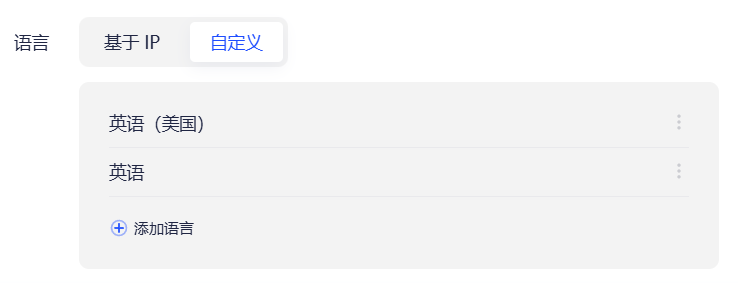
2. Browser Language vs IP Country
Principle: Browsers send your language preferences to websites to return appropriate language contents. E.g., if you are an American, you’d want English pages.
Contradictory Scenarios
| IP | Browser Language | Result |
|---|---|---|
| USA | zh-CN (Simplified Chinese) | American using Chinese, is this right? |
| Germany | zh-CN (Simplified Chinese) | German using Chinese, is this right? |
| Japan | ja-JP (Japanese) | ✅ |
| USA | en-US (US English) | ✅ |
Note: This detection has some fault tolerance because:
- Loaded overseas Chinese/students using Chinese browsers are not weird.
- Many set multi-languages.
So singular language mismatch won’t necessarily trigger block lists, but usually acts as a Weighted Signal.
Detection Methods:
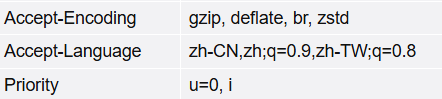
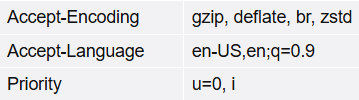
You can check browserleaks to check output results.
-
Unmasked
-
Masked
Shielding Methods:
Just modify browser preferred language, or easily configure language lists in anti-detect browsers.
3. System Regional Settings Contradiction
Principle: Besides timezone and language, there’s even more covert system-level info read via JavaScript, e.g., Date Formats (“zh-CN”), Numeric Formats (thousands separators), Currency preferences (US$/¥), Keyboard Layouts (Chinese users typically QWERTY + Chinese IME), System Fonts (Chinese systems have Songti, Yahei; US systems don’t), Default Search Engines (Chinese users may use Baidu/Quark), Clipboard languages, etc.
Contradictory Scenario
You use a US proxy, but:
- System font list contains “Yahei”, “Songti”.
- Date format is “January 20, 2025” in Chinese instead of “1/20/2025”.
- Keyboard layout detects Chinese input methods.
These details combined easily expose you as a Chinese user.
Shielding Methods: These are very covert and almost impossible to dodge unless you’re willing to truly use an English OS—trading convenience for stealth. If not, there will certainly be traces exposing your region info based on personal needs and convenience. It’s tough to dodge.
Safety or Convenience? That is the question.
2. WebRTC Leaks
The most common pitfall for proxy users
WebRTC leak is one of the most easily overlooked, yet most lethal privacy vulnerabilities for proxy users. Many configure a proxy with one click, and IP detection websites display everything is normal, wholly unaware that their real IP was exposed to the website via WebRTC long ago.
2.1 What is WebRTC
WebRTC (Web Real-Time Communication) is a set of browser-built-in real-time communication technologies, allowing webpages to directly make audio/video calls, screen sharing, and file transfers without installing any plugins. Services relied upon daily depend on it: Google Meet, Zoom web version, Discord voice, WeChat web video calls, etc.
Why does it expose the real IP?
WebRTC’s design goal is establishing Point-to-Point (P2P) connections. To make two users communicate directly (not having all data transferred via a server), the browser needs to know “where I am in the network”—namely your IP address.
The critical issue is: WebRTC acquiring IPs occurs in the network layer of the OS, not the browser’s proxy layer.
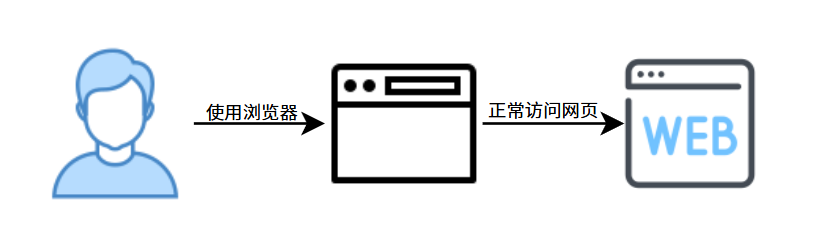
Normal users visiting webpage
Proxy users with improper configuration visiting webpage
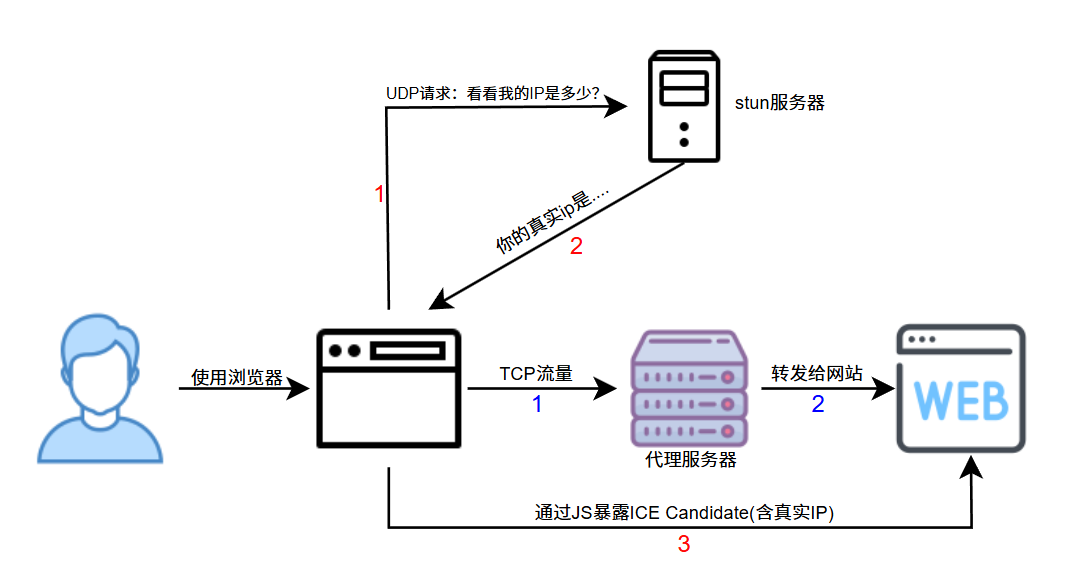
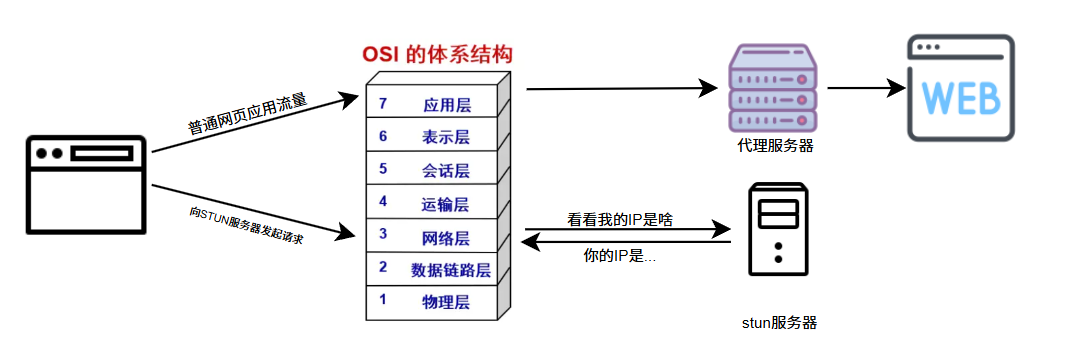
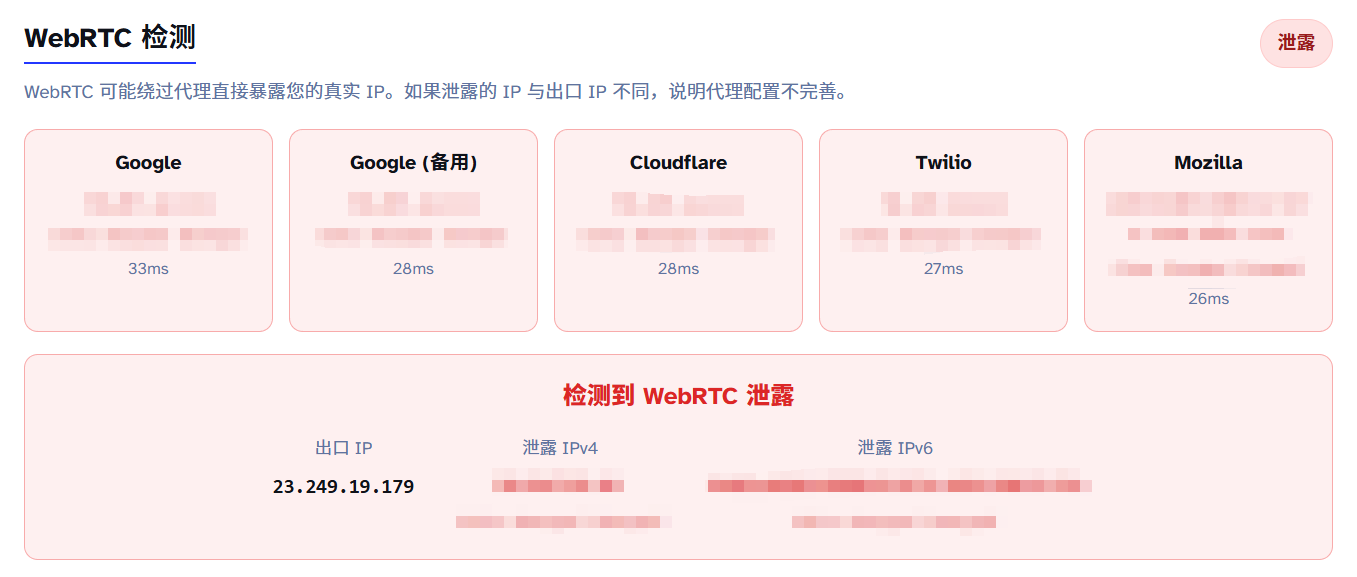
The red path is when WebRTC starts, the blue is normal webpage traffic (upper image). When your proxy config is improper, this red path situation occurs. This red path sends requests to STUN, bypassing your proxy entirely.
Browser WebRTC ICE collection triggers interacting with STUN queries (mostly UDP). Many proxy setups only proxy HTTP(S) or cover partial outbound paths, causing STUN UDP to connect directly.
At this point, the webpage actually obtains your real IP, and this step isn’t complex (a few lines of code initiate this detection). Loads of websites Turn this on; effectively, your real IP is fully visible.
2.2 STUN Server and ICE Candidate
What is a STUN Server
STUN (Session Traversal Utilities for NAT) server’s role is simple: Check what my IP is.
Most users are behind NAT (Network Address Translation), like home routers. Your computer might be 192.168.1.100 (internal IP), but the outside world sees the router’s public IP. STUN servers help you discover this public IP.
Common public STUN servers:
stun.l.google.com:19302(Google)stun.cloudflare.com:3478(Cloudflare)stun.services.mozilla.com:3478(Mozilla)
As shown above, browsers can initiate requests to public STUN servers, asking: “what is my ip?” STUN replies with the IP it sees.
ICE Candidate Collection Process
When webpages use WebRTC, the browser collects all possible connection methods, called ICE Candidates.
The collection process roughly follows:
- Collect local addresses:
192.168.1.100(internal IP) - Query STUN server
- Query TURN server if necessary
The problem is step 2: Browsers sending UDP requests to STUN servers don’t pass browser HTTP proxy settings, but are directly initiated at the transport layer via system socket, exposing your real IP.
2.3 Protection Recommendations
The traffic charts above already reveal how to prevent WebRTC detection:
1. Require WebRTC to strictly pass proxy traffic via plugins
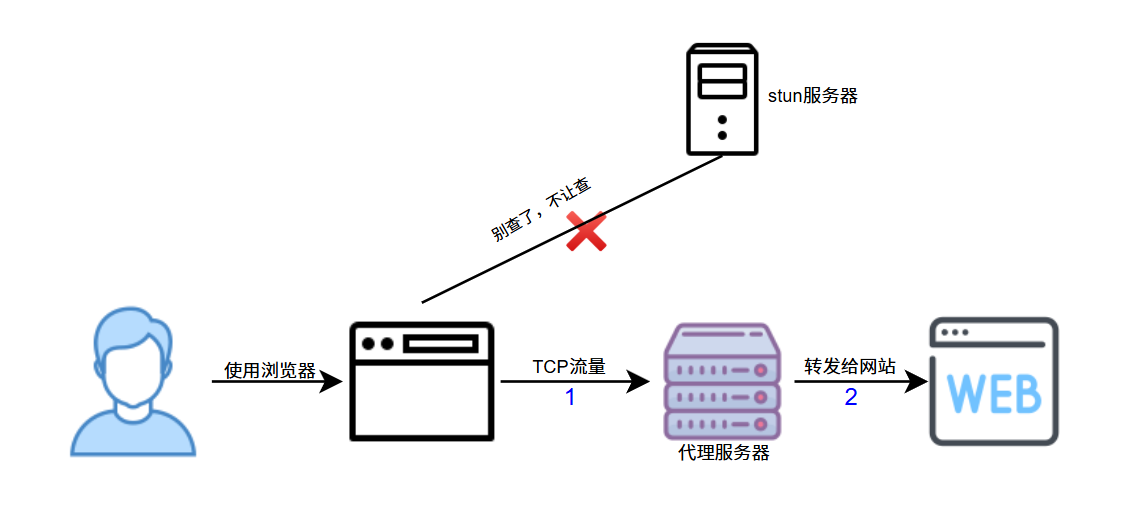
Download the google extension WebRTC Leak Prevent, choose Disable non-proxied UDP (force proxy). This forces all WebRTC traffic through the proxy, preventing real IP leakage.
Doing this has strict costs:
- May cause apps using WebRTC to act abnormally or suffer performance drops (various video calls/Meet/Zoom/Discord).
- Online games/cloud games lagging/errors.
- File transfer services lagging/errors.
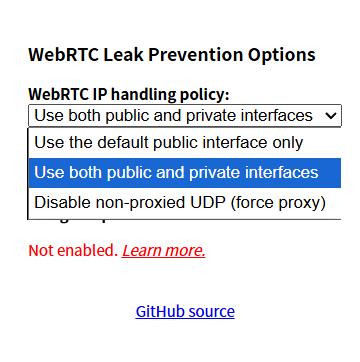
Effect after enabling:
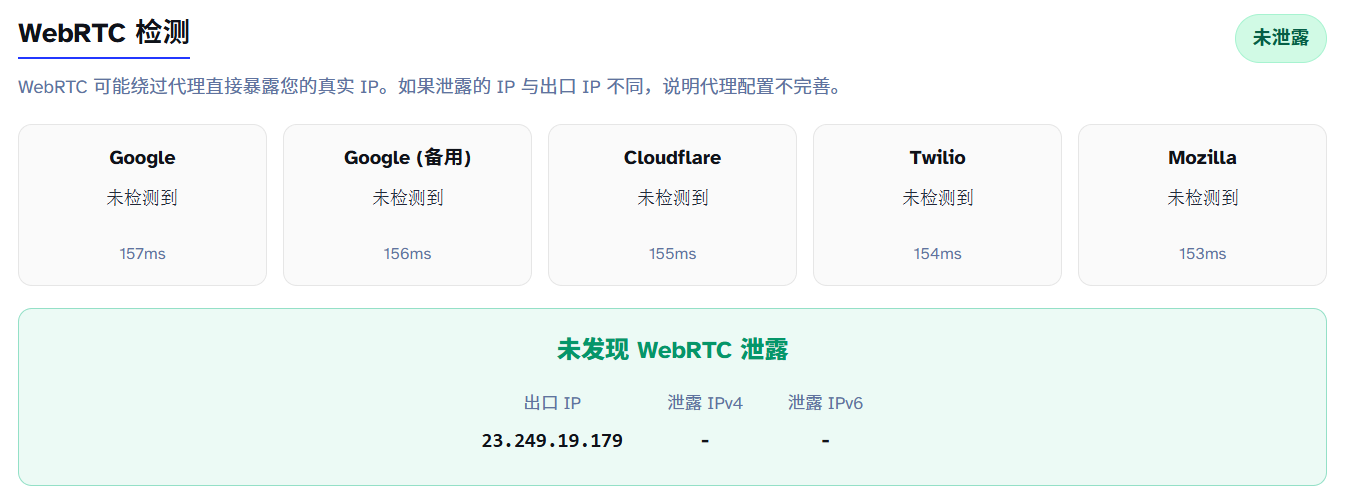
Wait, was WebRTC configured to pass through proxy? Is it because my dividing rule wasn’t configured well? I’ll just open global mode.
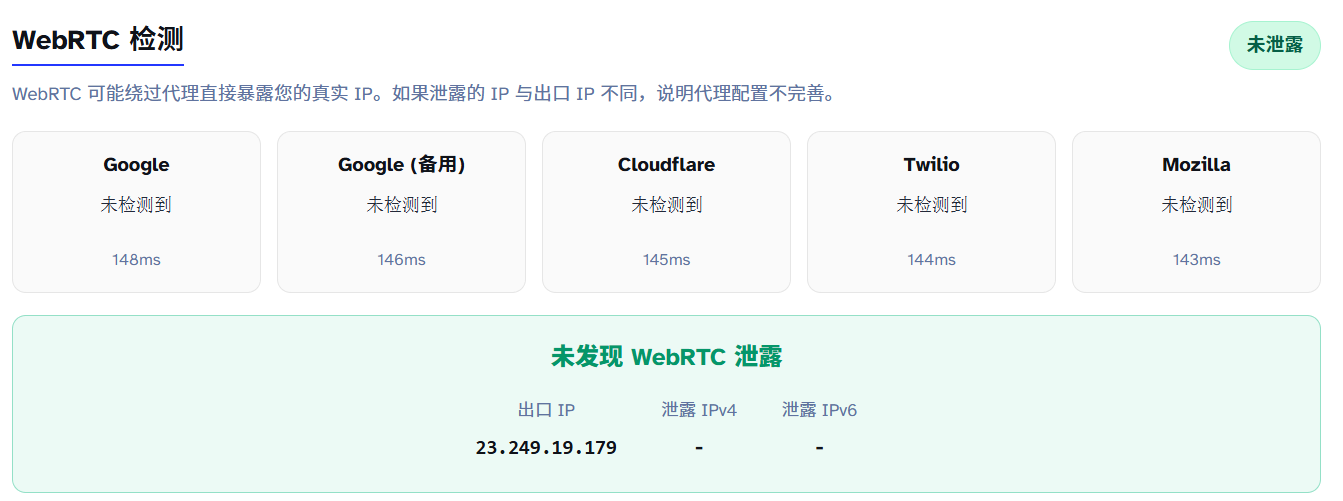
Why after enabling the plugin does WebRTC detect NO IPs?
As mentioned above, computers ask STUN servers for IPs by calling the network layer, but proxy softwares work at the application layer. No matter how you set dividing rules, you cannot control network layer matters, where computers directly call the network layer. Setting Disable non-proxied UDP essentially means: I’d rather let WebRTC not work than exposing my real address via direct UDP. Thus, the detection page shows “cannot fetch any WebRTC IP”. Real-time video is entirely unusable then. This method is absolute but sacrifices partial apps.
2. System Proxy all UDP/TCP traffic
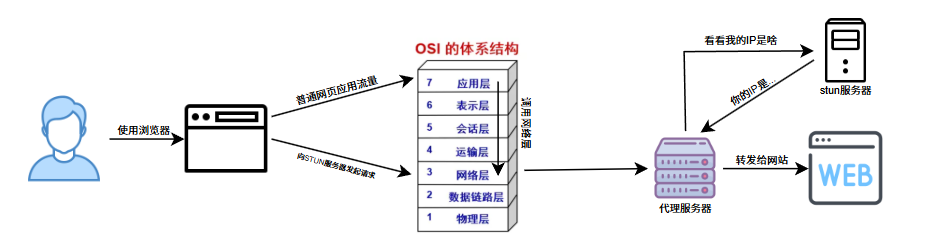
This scheme is simple and most commonly used: handle WebRTC correctly by letting the whole computer’s traffic pass through the proxy, namely our TUN Mode.
What is TUN Mode?
TUN is a virtual network device working at the network layer (Layer 3). When your proxy software enables TUN mode, it:
- Creates a virtual network card (e.g.,
utun0ortun0) - Intercepts all network traffic (including TCP and UDP)
- Redirects traffic to the proxy at the OS network stack layer
- System-wide proxy, all apps pass through smoothly (then divided according to rules)
Note, this requires:
- Administrator/Root permissions (so might prompt you when launching)
- May conflict with some VPNs
- Some anti-virus softwares intercept virtual network card creation
In a sentence: TUN is “system-wide interception”; it unifies system outbound traffic (TCP/UDP) into the same forwarding framework, making it hard for WebRTC UDP outbounds to bypass proxy paths and lowering leak probabilities.
This also prevents DNS leaks, which will be discussed later.
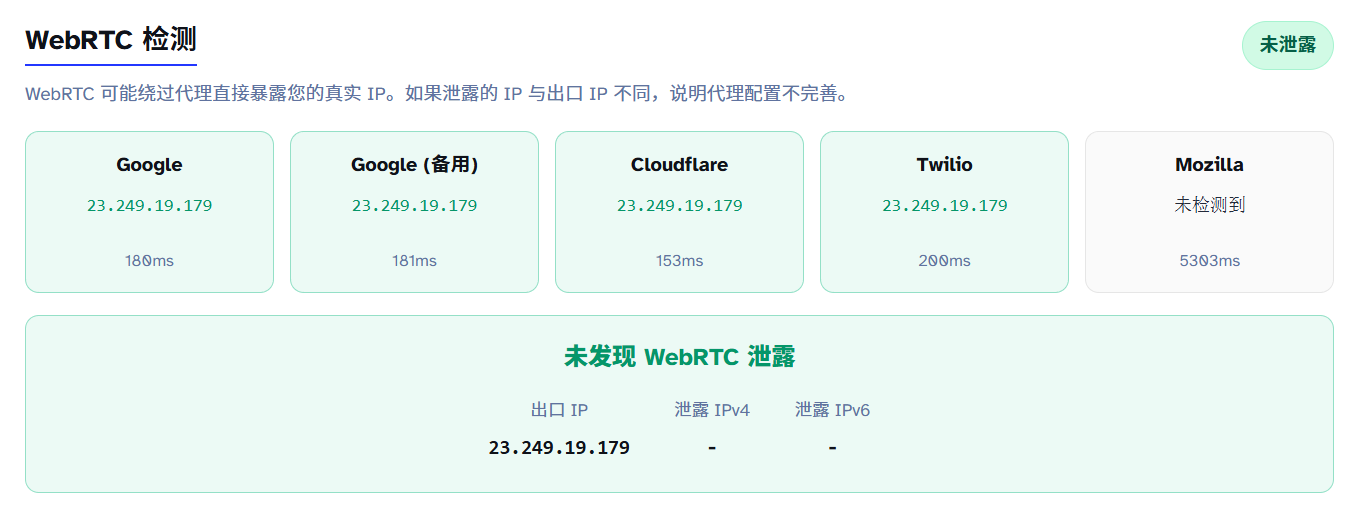
Effect after enabling:
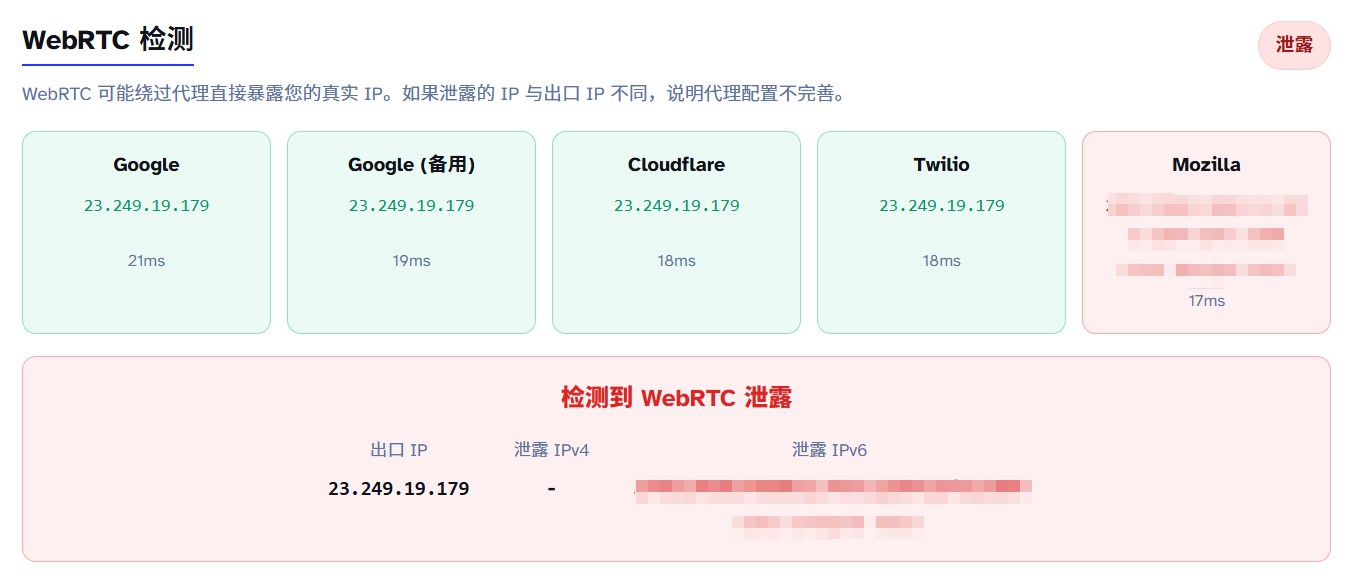
IPv4’s WebRTC leaks are thoroughly solved, but you’ll notice: why is IPv6 still leaking?
This is because many proxy softwares default only process IPv4 and don’t touch IPv6 routing tables. Many proxies don’t support IPv6 either. Critically: systems don’t query stun for IPv6 usually because IPv6 is written directly on the device network cards. It knows IPv6 just upon looking and sends directly.
Protection is simple: Enable setting to use the default network interface. This option restricts WebRTC from exposing candidate addresses from non-default interfaces/local addresses, lowering leak probabilities.
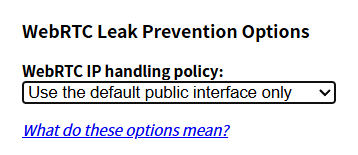
This scheme similarly lowers performance, inevitably affecting experience.
Is there a scheme with BOTH privacy and performance? No, because websites establishing optimal links with you require direct UDP connection. Any other schemes increase latency. Direct connection websites MUST know your IP. The two are irreconcilable.
Privacy and real-time nature usually require trade-offs: P2P/Direct UDP has optimal latency but easily exposes network info; relays/tunnels are more private, but increase latency. Best practices are “divided by usage”: apps needing real-time relax restrictions; daily browsing prioritizes privacy.
3. DNS Leaks
Covert but lethal fingerprints
DNS Leakage is an easily overlooked yet absolute lethal privacy vulnerability. Many think configuring proxies and passing IP detection allows all to go well, completely unaware their DNS queries are “informing”—exposing their ISP info, direct location, and browsing history.
This is generally not meant to guard against websites owners—they aren’t that bored usually. It prevents domestic DNS resolvers from knowing what sites you browse.
3.1 What is DNS Leakage
DNS (Domain Name System) acts as the internet’s “phonebook”. When entering 114514.homo into browser, computers translate the domain into an IP address (e.g., 114.51.4.191) to visit. This translation step is DNS Querying.
What is DNS Leakage?
DNS Leakage means: your browser traffic clearly passes through the proxy IP, but DNS query requests bypass the proxy, sending directly to your local ISP’s DNS resolver.
Normal visiting flow without proxy
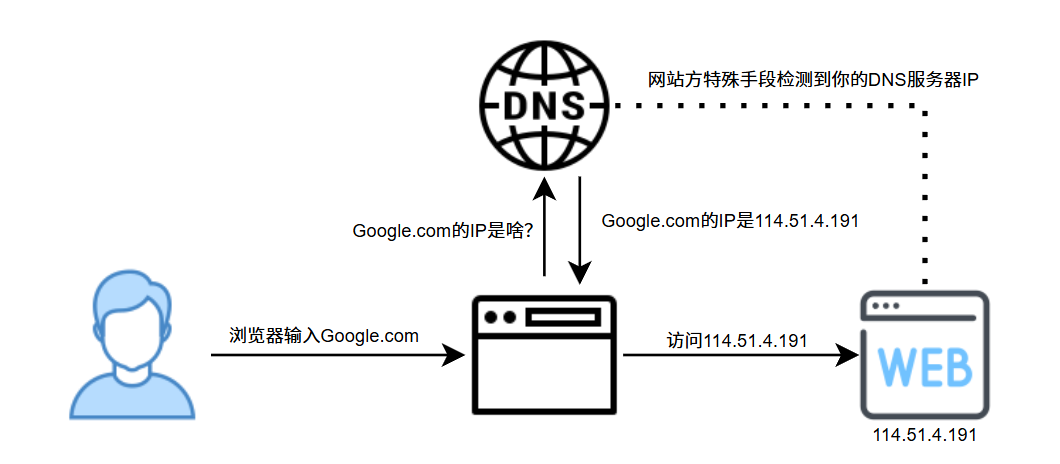
Requests to ISP DNS resolvers (e.g., China Telecom), resolver returns IPs, user visits website. Standard logic because you are indeed an ISP customer.
Setup WITH proxy BUT NO DNS Leakage
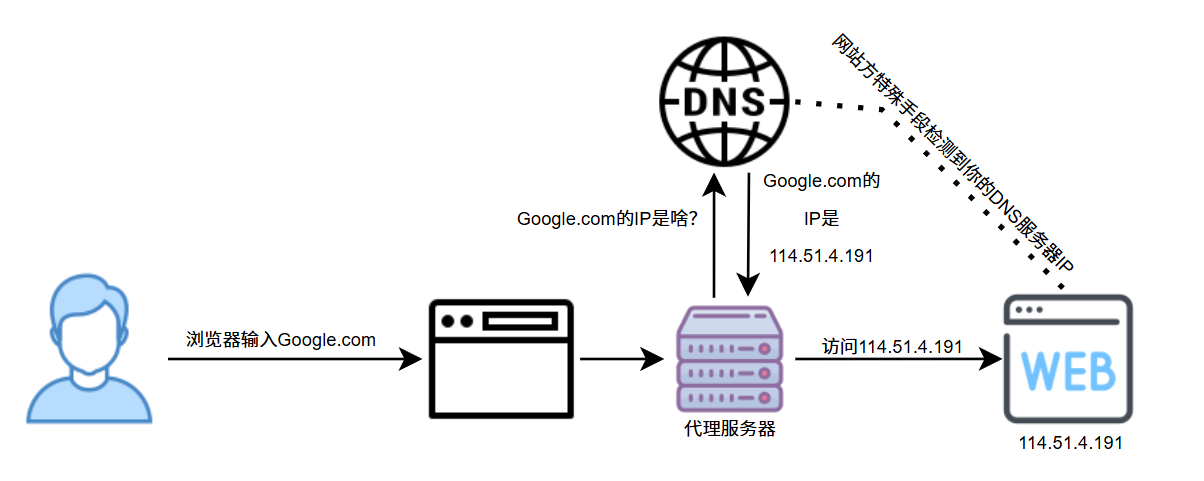
Setup WITH proxy BUT WITH DNS Leakage
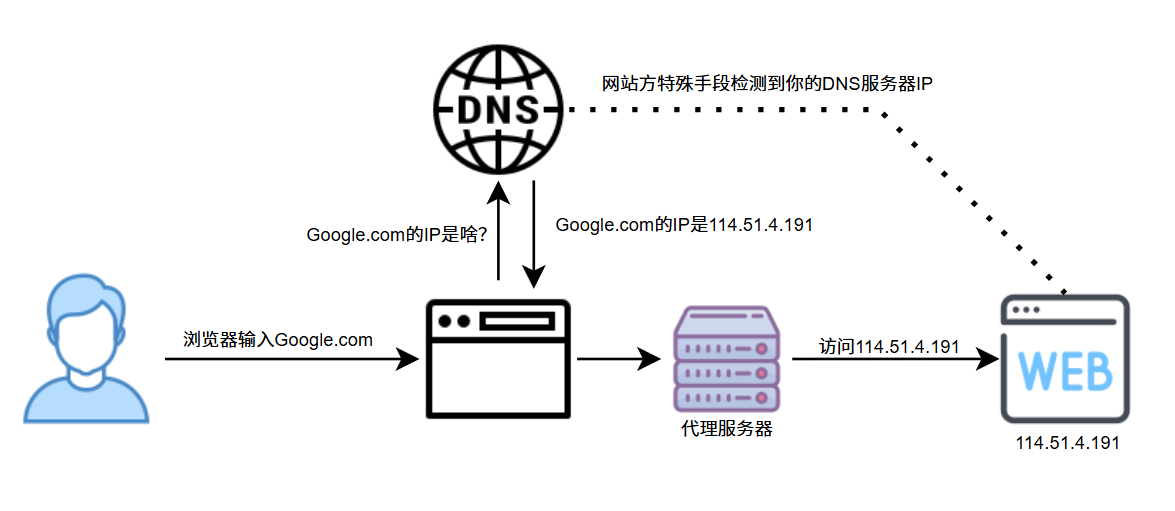
You are using US proxies, websites see your IP as US, BUT:
- Your DNS queries are still sent to domestic ISP resolvers.
- Websites can detect your DNS resolver IP using special means.
- DNS resolver location is China, output IP is US.
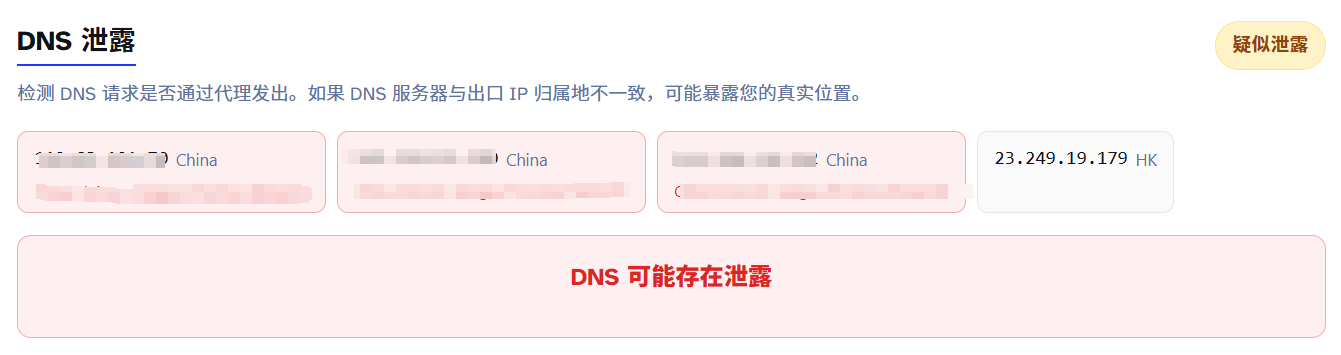
Contradiction! Websites think: You have a US IP, why do DNS requests originate from China Telecom resolvers? Instantly flagged as Proxy.
3.2 Detection Principle
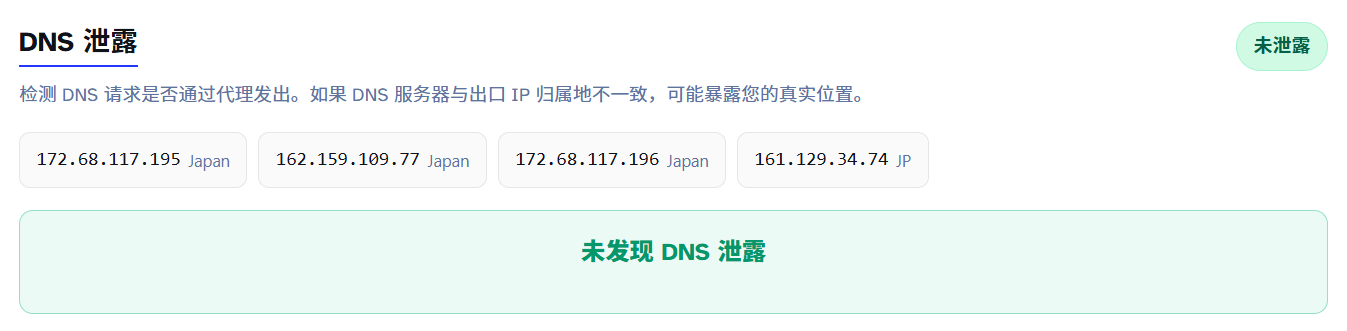
Open ipleak to verify if you have DNS leaks. If ANY domestic DNS server appears, leakage occurs.
DNS Leak detection core principle: Make your browser query a unique, random domain, to see WHICH DNS resolver asks for it.
EDNS Client Subnet (ECS)
Detections are primarily based on recursion resolvers witnessed by authoritative DNS; ECS further exposes client subnet info in some cases. Originally optimized for CDN performance but also used to detect DNS leaks.
Workflow:
- Website generates a unique random subdomain, e.g.,
dnstest1234567890.edns.ip-api.com. - Your browser visits this domain.
- Your DNS resolver queries
ip-api.com’s authoritative DNS resolver. - Authoritative DNS records: Who queries (your DNS resolver IP).
- Website fetches resolver IP/location info via API.
Keypoint: The queried domain is randomly generated, preventing caching and strictly triggering real DNS queries.
3.3 Why do DNS Leaks happen?
- Proxies configured improperly: Standard HTTP/Socks proxies default to Application-layer traffic only, not proxying DNS queries which occur at lower layers.
- OS DNS Caches: Windows/macOS/Linux have DNS caches. Even if configured, systems might use local resolver data cached previously.
- IPv6 DNS Leaks: Many proxies only process IPv4, and if your network supports IPv6, queries may leak directly over IPv6.
3.4 Protection Methods
- V2RayN: Configured automatically mostly without leakage risks, but default configs might load incomplete coverages.
- Clash Series: Select appropriate dividing rules and DNS override rules.
- Specifically see this DNS Leakage Chapter
Of course, some do violent TUN+Global proxy strategies for DNS leak preventions. Violence works, so long as you can endure mall troubles (domestic sites carding,微信 login IP as foreign, etc.).
4. TCP/IP Stack Fingerprinting
OS-level “Identity Card”
4.1 What is TCP/IP Fingerprinting
TCP/IP fingerprinting is a technique to identify operating systems by analyzing protocol stack characteristics in network packets. Just like everyone’s fingerprint is unique, different operating systems leave unique “fingerprints” in packet headers when implementing TCP/IP.
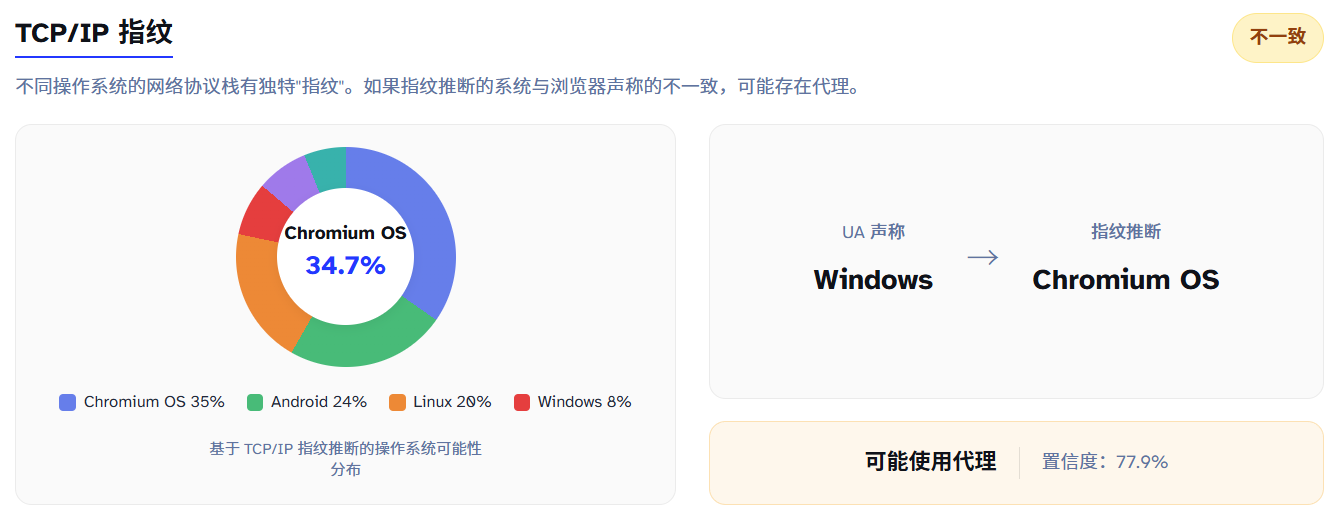
Inconsistency ≠ proxy strictly, just a risk signal (middle equips/DB false positives might trigger inconsistency). Note: ChromeOS/Android are highly similar to Linux kernel features; estimations might cause confusions.
Core Principle:
Different operating systems set different default values in packet headers when handling connections, including:
- TTL (Time To Live): Windows usually 128, Linux/macOS usually 64.
- Window Size: Varies across initials setups.
- TCP Option Fields: MSS, SACK, timestamps order and values.
- DF Flag: Don’t Fragment settings.
- ID Field: Incremental modes differ.
These minor differences don’t affect function in normal environments but act as OS identification triggers.
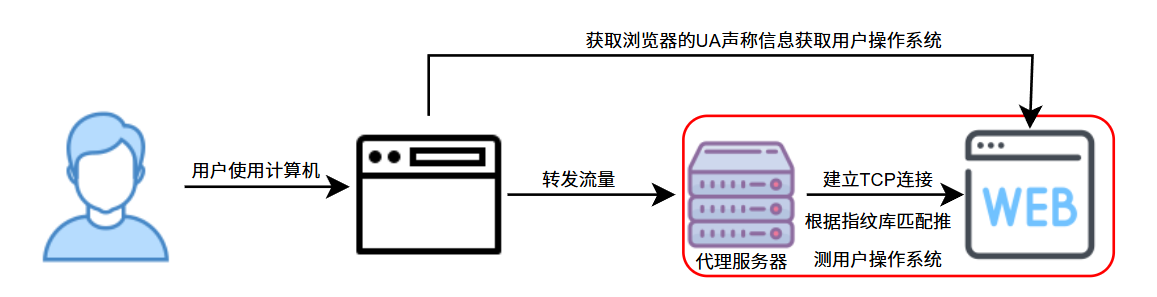
When using proxies, browser-supported OS (via User-Agent) might claim Windows 10, but the computer actually sending nodes is the proxy server’s Linux system. This inconsistency exposes proxy existence.
4.2 Detection Logic
Website owners fetch two details:
Info 1: UA Claim (Controllable)
UA claims from browsers can be set by users freely (e.g., via anti-detect browsers).
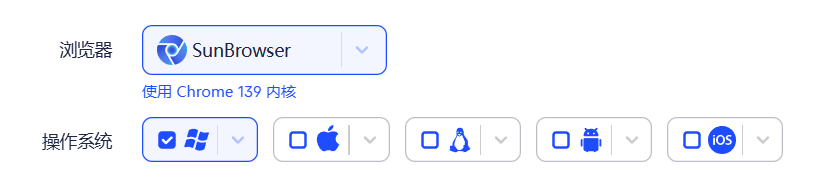
If set to MacOS, entering detection yields:
|
|
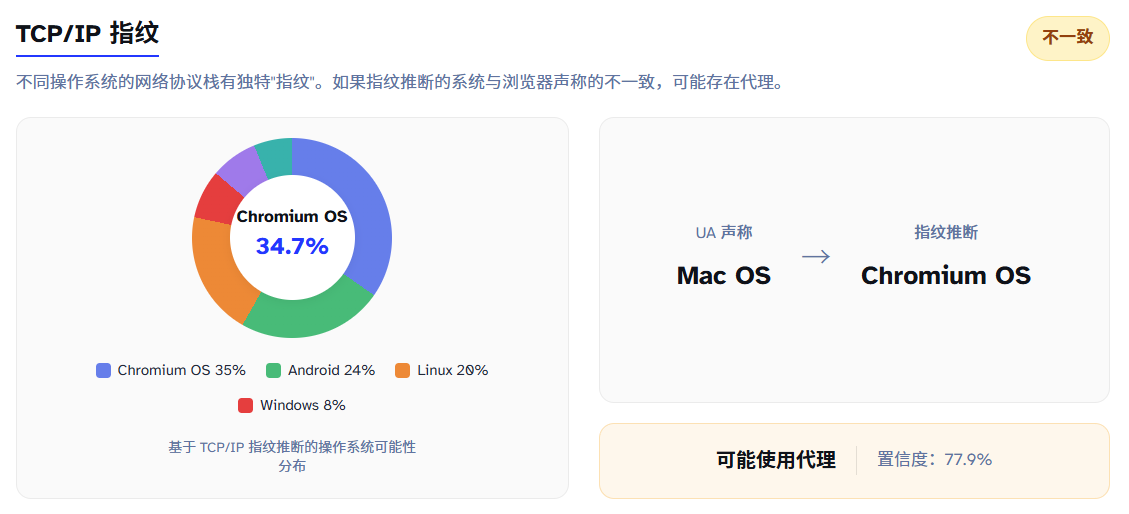
UA is told by your browser to websites, fully customizable to anything you like.
Info 2: Fingerprint Estimate (Hard to mask)
Analyzes TCP packets estimating systems, only linked to your output node machine.
- Kernel-level leakage.
- Irrelevant to user client configs.
- Theoretically variables on output computers can be adjusted, but require:
- Modifying kernel params (needs root).
- Professional network knowledge.
- Inappropriate parameters might crash connections.
Once fetched, direct comparison discloses proxy buffers if they differ.
4.3 Protection Guidelines
No protection needed. Not because OS fingerprinting is imprecise, but because costs are too high—outside daily shielding strategies. Although p0f/Nmap have high accuracy, web risk control scenarios rarely consume fully raw packet access permissions to strictly enforce it.
In fact, adjusting anti-detect browser systems to match outputs solves it securely (resembles ostrich burying head).
Consider as a technical expansion, practical threat is minor; focus much more on WebRTC Leakage and Timezone matching.
5. RTT Latency Analysis
Inferring proxies via time deltas—a “theoretically viable, low cost, but noisy, non-mainstream” logic.
RTT (Round-Trip Time) analysis is a covert yet effective proxy detection method. Core logic: Using a proxy adds detour loops, inevitably increasing latency.
5.1 Principle
Basically summarized in one chart:
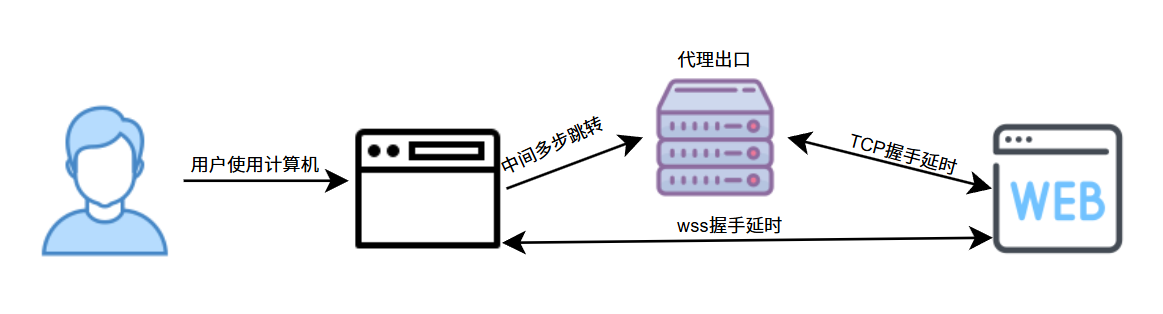
TCP RTT (Server view): Latency measured facing socket peer server/gateways: “Whoever connection node is, that’s who gets measured.”
WS RTT (Browser view): Latency measured via WebSocket ping/pongs of browser clients, containing paths up to actual end points.
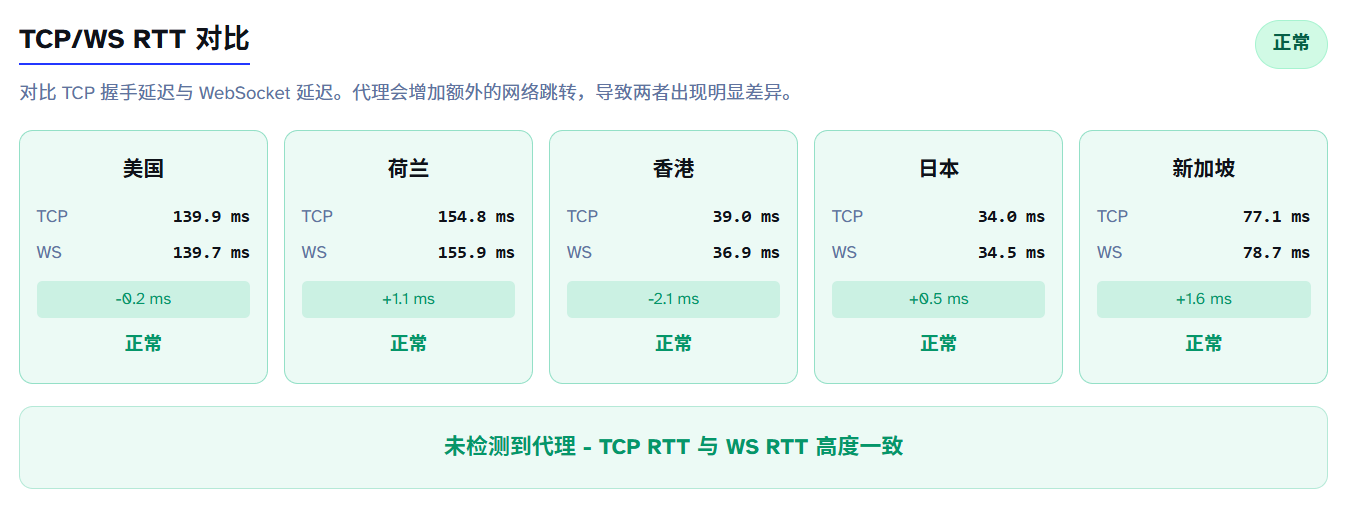
A gap must exist because browser issuing to proxy nodes takes time. Deltas exceeding thresholds trigger proxy tags. Non-proxy setups behave like this:
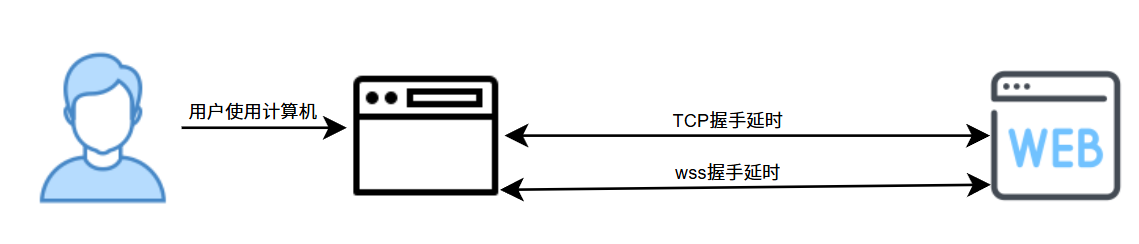
Fluctuations around 10ms usually.
5.2 Why it works
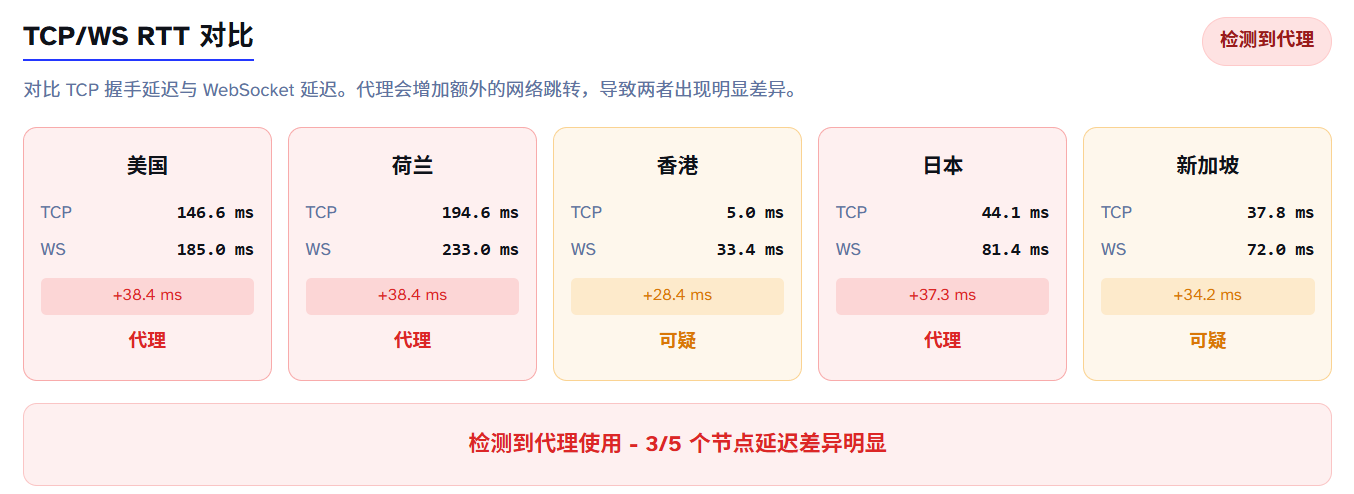
TCP latency cannot be altered by you because websites measure absolute node latencies, which holds zero relations to client settings. Wss handshakes could be spoofed with JS setups to match TCP, but: how do you know TCP latency in real time when websites don’t disclose it to client nodes?
Simple but absolute method, one-tap disablement.
5.3 Shielding Difficulties
Shortening delay to ~10ms dodges it within margin of error limits. E.g., Shenzhen -> HK -> Web. Shenzhen to HK takes <5ms. Deltas would be untraceable then. Above chart shows 30-40ms differences because my node takes that amount. Japanese nodes look like this, TCP latency ~0ms:
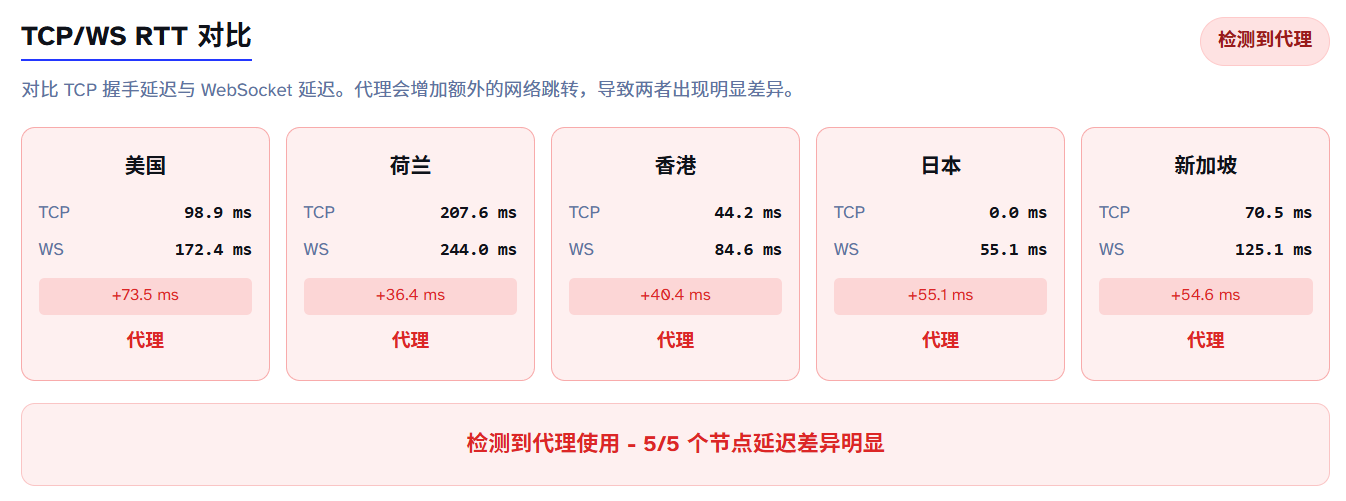
Other scenarios are nearly impossible to dodge.
Good news: Few websites load this method in production; highly theoretical. Edge logs/WAF generally absorb it first instead of application nodes directly.
Bad news: Code lines are minimal for 实装 enablement.
6. Browser Fingerprinting
Browsers act like ID cards, exposing features upon every access.
6.1 Common Fingerprint Dimensions
Combinatory fingerprints tracking devices across unlogged sessions.
Explore using BrowserLeaks:
- Canvas Fingerprinting: Renders canvas drawings, hashes pixels. Diff systems/GPUs/Drivers yield minor deltas used to ID environments. Mismatching Claims (e.g., iPhone rendering like desktop) flags risk values.
- WebGL Fingerprint: Renders 3D, reveals graphics setup identifiers. Claiming iPhone 13Pro while WebGL returns NVIDIA GTX 1060 flags instant contradiction.
- Font Fingerprint: Infers systems by width renders of common sets. US IPs loading Songti/Yahei flag inconsistencies.
- Resolution & Concurrency: 1170×2532 vs 1920×1080 claiming discrepancies.
- Audio Context Fingerprint: Audio calculations hashing subtle drivers diffs.
Risk systems look at self-consistency, not single indexes.
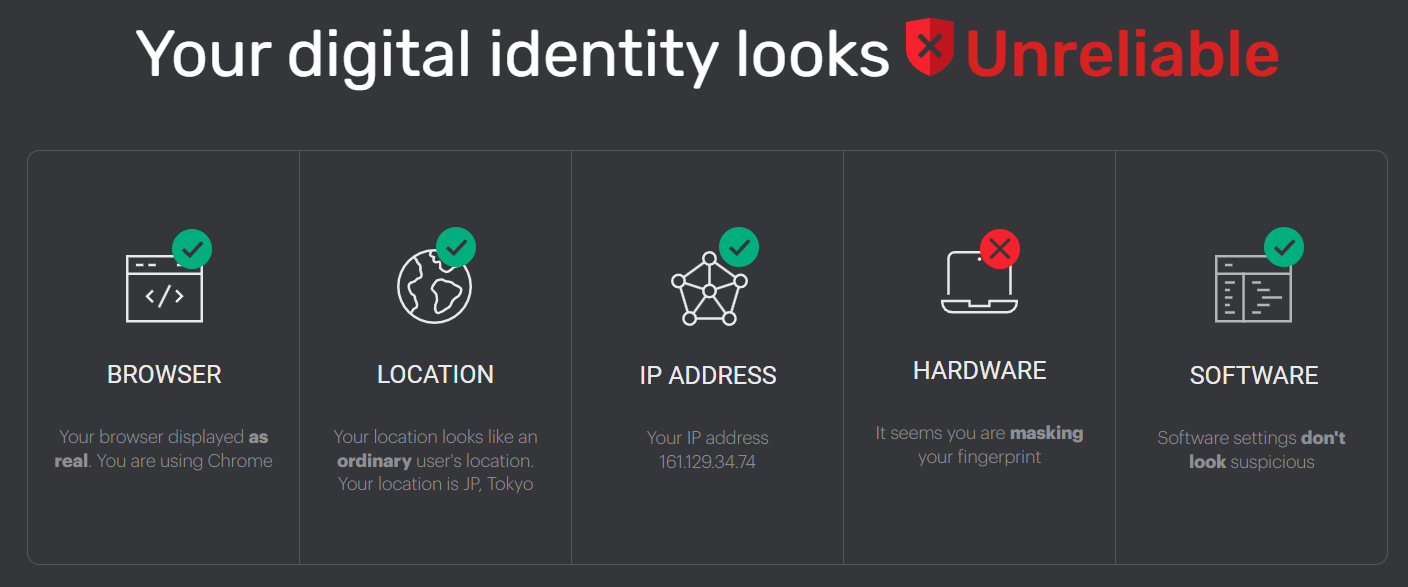
Check consistency scores on iphey and pixelscan.
6.2 Automation/Headless Browser Detection
Puppeteer/Selenium frameworks have obvious flags. Check bot features on sannysoft.
navigator.webdriverProperty:1 2 3 4// Normal browser navigator.webdriver === undefined // Selenium/Puppeteer default navigator.webdriver === true // direct bot flag- Headless triggers: Window renders, fonts, permissions behaviors.
- Events: Mouse tracks, scroll rithyms, inputs.
- Extension counts being strictly zero flags incognito anomalies.
7. Conclusion: The Cat-and-Mouse Game of Proxy Detection
Is there a perfect solution? The answer is simple and cruel: No.
Proxy detection is inherently an asymmetric war:
- Websites have infinite server resources, professional risk teams, and sea-like behavior logs.
- You only have a computer and scattered tech articles.
Remember three principles:
- Risk control looks for consistency, not perfection: You don’t need to be flawless, just reduce internal contradictions.
- Understand your threat model: E-commerce multi-accounts needs fully isolated envs; Privacy needs strict DNS/WebRTC prevention; pure AI usage needs IP metrics + Timezone metrics.
- Technology is a tool, not an end: Absolute stealth isn’t the target; finding balance across privacy, convenience, and costs is.
This is an endingless war. You might not change anything, but at least, you know what happens when you are risk controlled.
Knowing the truth is the first step up.
References: